Transmission Ranges
The indicator in the instrument cluster shows the position of the shift lever when the ENGINE START/STOP button is in the ON position.
P (Park)
Always come to a complete stop before shifting into P (Park). This position locks the transmission and prevents the drive wheels from rotating.
Shifting into P (Park) while the vehicle is moving will lock the drive wheels, causing you to lose control of the vehicle.
R (Reverse)
Use this position to drive the vehicle in reverse.
CAUTION - Shifting
Always come to a complete stop before shifting into or out of R (Reverse). You may damage the transmission if you shift into R (Reverse) while the vehicle is moving, except when "Rocking the Vehicle" is described in this chapter.
N (Neutral)
The wheels and transmission are not engaged. The vehicle will roll freely even on the slightest slope unless the parking brake or service brakes are applied.
- Parking in N (Neutral)
Follow the instructions below when parking and you want the vehicle to be able to move when pushed.
1. After stopping the vehicle, press the brake pedal and shift the shift lever to [P] with the ENGINE START/STOP button in [ON] or with the engine running.
2. If the parking brake is applied, release the parking brake.
- For vehicles equipped with EPB (Electronic Parking Brake), press the brake pedal with the ENGINE START/STOP button in [ON] or with the engine running to release the parking brake. If the [AUTO HOLD] function is used while driving (if the [AUTO HOLD] indicator is illuminated in the cluster), press the [AUTO HOLD] switch and the [AUTO HOLD] function will be turned off.
3. While pressing the brake pedal, place the ENGINE START/STOP button in the OFF position.
- For vehicles equipped with a smart key, the ENGINE START/STOP button can only be turned off when the shift lever is in [P].
4. Move the shift lever to [N] (Neutral) while pressing the brake pedal and insert a tool (such as a flat-blade screwdriver) into the access hole of the [SHIFT LOCK RELEASE] at the same time. The vehicle will then be able to move when an external force is applied.
WARNING! Parking in Neutral
- Except when parking in neutral, always park the vehicle in [P] (Park) for safety and apply the parking brake.
- Before parking in [N] (Neutral), make sure the parking ground is flat and level. Do not park in [N] on any slope or gradient. If the vehicle is parked in [N] and the driver leaves, the vehicle may move and cause serious damage or injury.
✽ NOTICE
- When the ENGINE START/STOP button is in the OFF position, the EPB (Electronic Parking Brake) cannot be released.
- For vehicles equipped with EPB (Electronic Parking Brake) that use the [AUTO HOLD] function: if the ENGINE START/STOP button is turned OFF while driving, the EPB will be applied automatically. Therefore, [AUTO HOLD] must be turned off before the ENGINE START/STOP button is turned OFF.
D (Drive)
This is the normal forward driving position. The transmission will automatically shift through 8 forward gears in sequence to provide the best fuel economy and performance.
For additional power when passing another vehicle or climbing hills, fully depress the accelerator pedal. At this time, the transmission will automatically downshift to the next lower gear.
WARNING - Starter
If the engine stalls while the vehicle is moving, do not attempt to move the shift lever to the P (Park) position. If road and traffic conditions permit, move the shift lever to the N (Neutral) position while the vehicle is still moving, and press the ENGINE START/STOP button to attempt to restart the engine.
Manual Mode
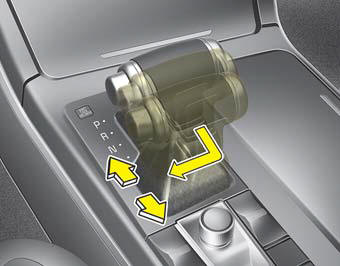
Whether the vehicle is stationary or moving, select manual mode by pushing the shift lever from the D (Drive) position into the manual shift gate. To return to D (Drive) range, move the shift lever back into the main shift gate.
In manual mode, moving the shift lever forward and backward allows you to shift gears quickly. Unlike a manual transmission, manual mode allows you to shift gears without depressing the clutch pedal.
Up (+): Push the lever forward once to shift up one gear.
Down (-): Pull the lever back once to shift down one gear.
- In manual mode, the driver should upshift according to driving conditions, taking care to keep engine speed below the red zone.
- In manual mode, only the 8 forward gears can be selected. To reverse or park the vehicle, move the shift lever to the R (Reverse) or P (Park) position as required.
- In manual mode, the transmission downshifts automatically when the vehicle decelerates. When the vehicle stops, 1st gear is automatically selected.
- In manual mode, when engine speed approaches the red zone, the transmission automatically upshifts to the next higher gear.
- To maintain proper driving performance and safety, the system may not perform some gear shifts when the shift lever is operated.
- When driving on a slippery road, push the shift lever forward to the + (Up) position. This causes the transmission to shift to 2nd gear, which is better for smooth driving on slippery roads. Push the shift lever toward - (Down) to shift back to 1st gear.
Test yourself
A quick Kia Cadenza VG Owner's Manual quiz: every answer comes with an explanation and a link to the manual page.