Brake System
Brakes
This Mazda vehicle is equipped with brake boosters that adjust automatically during normal use.
If the brake booster is not working, you can still stop by pressing the brake pedal with greater force.
However, the stopping distance will be longer than normal.
Do not drive with the engine stalled or switched off. Stop in a safe place:
Driving with the engine stalled or switched off is dangerous. Braking will require more effort, and brake assist may be depleted if the pedal is pumped. This will result in a much longer stopping distance or even an accident.
Shift to a lower gear when driving down a steep slope:
Driving with your foot continuously on the brake pedal, or applying the brakes continuously over long distances, is dangerous. This will overheat the brakes, resulting in much longer stopping distances or even a complete loss of braking capability. This may cause you to lose control of the vehicle and cause a serious accident. Avoid applying the brakes continuously.
Dry out wet brakes by driving slowly, releasing the accelerator pedal and lightly applying the brakes repeatedly until braking returns to normal:
Driving with wet brakes is dangerous. A longer stopping distance or the vehicle pulling to one side when braking may cause a serious accident. Lightly applying the brakes will show whether they have been affected by water.
WARNING
Do not drive with your foot resting on the clutch or brake pedal, and do not keep the clutch pedal partially depressed unnecessarily. Otherwise, the following may occur:
- The brakes and clutch will wear out more quickly.
- The brakes may overheat and adversely affect braking performance.
Always press the brake pedal with your right foot.
Using the left foot unusually on the brakes may increase your reaction time in an emergency and result in insufficient brake operation.
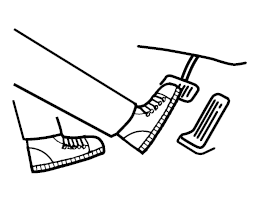
- Wear appropriate driving shoes to prevent your shoe from touching the brake pedal when you press the accelerator pedal.
Parking brake
WARNING
Driving with the parking brake applied causes excessive wear of the brake pads.
NOTE
When parking in snow, refer to Winter Driving (page 3-52) for information on using the parking brake.
Applying the Parking Brake
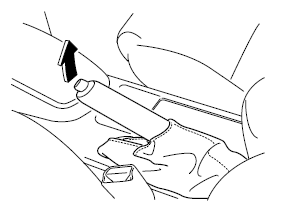
Press the brake pedal and firmly pull the parking brake lever up to secure the vehicle.
To Release the Parking Brake
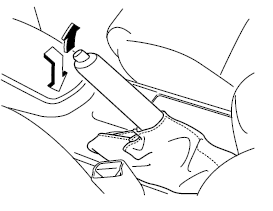
Press the brake pedal, then pull the parking brake lever up and press the release button. While holding the button, lower the parking brake lever fully until it is in the released position.
Display Indication
For vehicles equipped with a Type A instrument panel, check the vehicle condition or have the vehicle inspected by an authorized Mazda dealer as indicated.
Displays
A malfunction in the system or operating conditions is indicated by a warning.
Refer to Indicator and Warning Lights on page 4-24.
Brake Pad Wear Indicator
As disc brake pads wear down, the wear indicators contact the discs. This produces a squealing noise to warn that the pads need to be replaced.
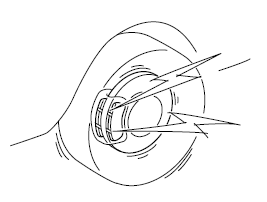
When this noise is heard, contact an authorized Mazda dealer as soon as possible.
WARNING
Do not drive with worn brake pads:
Driving with worn brake pads is dangerous. The brakes may fail and cause a serious accident. As soon as a squealing noise is heard, contact an authorized Mazda dealer.
Brake Assist
In emergency braking situations, when the brake pedal must be pressed with great force, the brake assist system improves braking performance.
When the brake pedal is pressed hard or quickly, the brakes are applied very strongly.
NOTE
- When the brake pedal is pressed hard or quickly at higher speeds, the pedal will feel softer but the brakes are applied very strongly. This is a normal effect of brake assist operation and does not indicate a malfunction.
- When the brake pedal is pressed hard or pressed more quickly, a motor/pump operating noise may be heard. This is a normal effect of brake assist and does not indicate a malfunction.
- The brake assist system does not replace the vehicle's primary braking function.
Test yourself
A quick Mazda 6 quiz: every answer comes with an explanation and a link to the manual page.