Smart City Brake Support (SCBS)
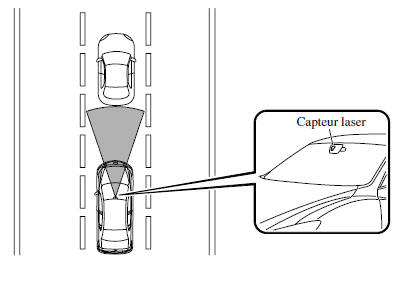
- Smart City Brake Support (SCBS) is a system designed to reduce damage in the event of a collision. It applies the brakes (SCBS braking) when the system's laser sensor detects a vehicle ahead while you are driving at a speed of approximately 4 to 30 km/h, and the system determines that a collision with the vehicle ahead is unavoidable. A collision may also be avoided if the relative speed between your vehicle and the vehicle ahead is less than approximately 15 km/h.
Furthermore, when the driver depresses the brake pedal while the system is operating in the range of approximately 4 to 30 km/h, the brakes are applied firmly and quickly to assist. (Brake assist (SCBS brake assist))
- For vehicles equipped with a Type A instrument panel, check the vehicle condition or have the vehicle inspected by an authorized Mazda dealer as indicated.
- A malfunction in the system or operating conditions is indicated by a warning.
Refer to Indicator and Warning Lights on page 4-24.
WARNING
Do not rely entirely on the Smart City Brake Support (SCBS) system:
- The Smart City Brake Support (SCBS) system is only designed to reduce damage in the event of a collision. Relying too much on the system may result in the accelerator pedal or brake pedal being depressed by mistake, which may cause an accident.
- Smart City Brake Support (SCBS) is a system that activates in response to a vehicle ahead of you. It does not apply to two-wheeled vehicles or pedestrians.
- The laser sensor of the Smart City Brake Support (SCBS) system is installed near the interior rearview mirror. Observe the following precautions to ensure proper operation of the Smart City Brake Support (SCBS) system.
- Do not attach stickers to the windshield surface near the laser sensor (even transparent stickers). Otherwise, the laser sensor may be unable to detect vehicles or obstacles ahead of you, which may result in an accident.
- Do not disassemble the laser sensor.
- If cracks or damage caused by gravel or debris are visible near the laser sensor, stop using the Smart City Brake Support (SCBS) system immediately and have your vehicle inspected by an authorized Mazda dealer. If you continue to drive the vehicle with cracks or scratches on the windshield near the laser sensor, the system may operate unnecessarily and cause an unexpected accident. Refer to "Deactivating the Smart City Brake Support (SCBS) System" on page 4-98.
- To replace the windshield wiper blades or the windshield, contact an authorized Mazda dealer.
Do not modify the suspension:
- If the height or tilt of the vehicle is changed, the system will not be able to correctly detect vehicles or obstacles ahead of you, which will cause a malfunction or incorrect operation of the Smart City Brake Support (SCBS) system and may result in a serious accident.
Deactivate the Smart City Brake Support (SCBS) system when the vehicle is towed on a flatbed trailer:
- Deactivate the Smart City Brake Support (SCBS) system to prevent incorrect operation when the vehicle is transported on a car carrier trailer. Refer to "Turning Off the Smart City Brake Support (SCBS) System" on page 4-98.
WARNING
- When driving on tracks in areas with grass or fodder, it is recommended to deactivate the Smart City Brake Support (SCBS) system.
- Always use tires that are of the specified size and the same manufacturer, brand and tread pattern design on all wheels. Also, do not use tires with significantly different wear patterns on the same vehicle. Do not use tires with significantly different wear patterns on the same vehicle, as the Smart City Brake Support (SCBS) system may not operate normally.
- The laser sensor includes a function that detects a dirty windshield and notifies the driver; however, depending on conditions, it may not detect plastic shopping bags, ice or snow on the windshield. In such cases, the system cannot accurately determine the presence of a vehicle or obstacle ahead of you and may not operate normally. Always drive carefully and pay attention to the road ahead.
NOTE
The Smart City Brake Support (SCBS) system will operate under the following conditions.
- The engine is running.
- The instrument cluster display does not indicate that the system needs inspection or should not be used.
- The vehicle speed is approximately 4 to 30 km/h.
- The Smart City Brake Support (SCBS) system is not turned off.
- The Dynamic Stability Control (DSC) system is not turned off using the DSC OFF switch.
- DSC is operating normally.
- The driver is not performing deliberate driving operations (accelerator pedal, steering wheel and braking).
Smart City Brake Support (SCBS) detects a vehicle ahead by emitting a near-infrared laser beam and receiving the beam reflected by that vehicle's reflector, and then uses it to make measurements. Therefore, Smart City Brake Support (SCBS) may not operate under the following conditions:
- The reflection of the laser beam is weak due to the shape of the vehicle ahead of you.
- The vehicle ahead of you is very dirty.
- In adverse weather conditions such as rain, fog or snow.
- The washer is used or the windshield wipers are not used when it is raining.
- The windshield is dirty.
- The steering wheel is turned fully to the left or right, or the vehicle accelerates rapidly and approaches the vehicle ahead of you.
- Trucks equipped with low loading platforms, vehicles moving very slowly, and vehicles with a high profile.
- Vehicles with unusual shapes, such as a car carrier.
Under the following conditions, the Smart City Brake Support (SCBS) system may not operate normally.
- Heavy luggage is loaded in the luggage compartment or on the rear seat.
- When partial contact with a vehicle or obstacle ahead of you is possible.
- When driving on continuously winding roads, when entering or exiting curves, or when driving in unstable conditions due to an accident or breakdown in a driving lane.
- Long luggage or cargo is loaded on the roof rails and covers the laser sensor.
- Exhaust gas from the vehicle ahead of you, sand, snow and water vapor rising from manholes and grates, and water splashed into the air.
In the following cases, if the laser sensor determines that there is a vehicle ahead of you, the Smart City Brake Support (SCBS) system may operate.
- There are objects on the road when approaching a curve.
- A vehicle is overtaking in the oncoming lane in a curve.
- There are metal objects, bumps or protruding objects on the road.
- When passing through a toll gate.
- When passing under a vinyl curtain or flag.
- Plastic objects such as traffic cones.
- There are two-wheeled vehicles, pedestrians, animals or trees.
If the vehicle is driven with some of the tires significantly worn, the system may not operate properly. If the tires are restored to a normal condition and the master warning light remains on, have your vehicle inspected by an authorized Mazda dealer.
Handling the Laser Sensor
The laser sensor of the Smart City Brake Support (SCBS) system is installed at the top of the windshield near the rearview mirror.
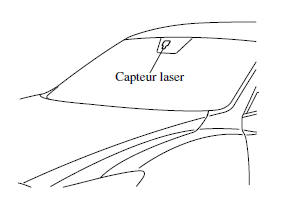
Always keep the windshield surface around the laser sensor clean to ensure proper operation of the Smart City Brake Support (SCBS) system.
WARNING
As the laser can potentially damage the eyes, always observe the following warnings:
- Never remove the sensor.
- A removed sensor does not meet the requirements of a Class 1M laser under IEC 60825-1 specification, and eye safety therefore cannot be ensured.
- Do not look directly into the sensor with magnifying optical instruments such as magnifying glasses, microscopes or objective lenses at a distance of 100 mm (3.94 in.) from the sensor.
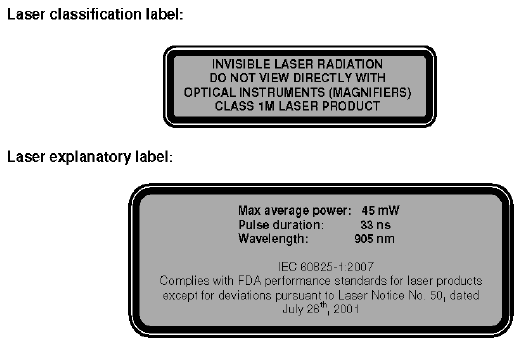
Laser Sensor Radiation Data
Maximum average power: 45 mW
Pulse duration: 33 ns
Wavelength: 905 N·m
Divergence angle (horizontal x vertical): 28 degrees × 12 degrees
Deactivating the Smart City Brake Support (SCBS) System
The Smart City Brake Support (SCBS) system can be temporarily turned off. Refer to Trip Computer and INFO Switch on page 4-20.
The system becomes operational again when the engine is restarted.
Test yourself
A quick Mazda 6 quiz: every answer comes with an explanation and a link to the manual page.