Steptronic transmission
The Steptronic transmission in the BMW 5 Series G30 combines the convenience of an automatic transmission with the advantages of manual shifting. This section explains in detail all selector lever positions, switching between automatic and manual mode, and the sport programs. Shift paddles on the steering wheel allow the driver to adapt the driving style dynamically and to the situation. The chapter is supplemented by information on the transmission lock, Launch Control for maximum acceleration, and safety-related requirements for gear changes. Functional limits and special features such as kickdown and automatic downshifting are also covered. With numerous illustrations and clearly structured explanations, this section is intended for all those who want to make full use of the potential of their BMW 5 Series (7th generation), whether in everyday driving or in sporty driving.
Principle
The Steptronic transmission combines the functions of an automatic transmission with the option of shifting manually when required.
Safety information
WARNING An unsecured vehicle can move off on its own and roll away.
There is a risk of accident. Before leaving the vehicle, secure it against rolling away.
To make sure the vehicle is secured against rolling away, observe the following:
- Apply the parking brake.
- On inclines or downhill, turn the front wheels towards the curb.
- On inclines or downhill, additionally secure the vehicle, e.g. with a wheel chock.
Manual Mode M/S
Principle
In manual mode, gears can be changed manually.
Activating Manual Mode
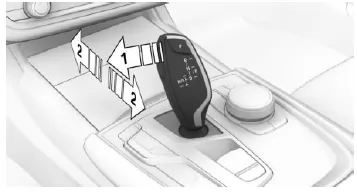
Press the selector lever to the left out of selector lever position D, arrow 1. Then push the selector lever forward or pull it backward, arrows 2.
Manual mode is active and the gear is changed.
The engaged gear is shown in the instrument cluster, e.g. M1.
Shifting
Downshifting: Push the selector lever forward.
Upshifting: Push the selector lever backward.
In certain situations the transmission continues to shift automatically, e.g. when engine speed limits are reached.
Steptronic Sport Transmission: Avoiding Automatic Upshifts in Manual Mode M/S
When driving mode SPORT is selected, the Steptronic Sport transmission does not shift up automatically in manual mode M/S when certain engine speed limits are reached.
In addition, no downshift occurs during kickdown.
Exiting Manual Mode
Push the selector lever to the right.
D is shown in the instrument cluster.
Selector Lever Positions
D Drive
Selector lever position for normal driving.
All forward gears are shifted automatically.
R Reverse
Engage selector lever position R only when the vehicle is stationary.
N Neutral
In selector lever position N, the vehicle can be pushed or can roll without engine power, e.g. in car washes.
P Park
Selector lever position e.g. for parking the vehicle. In selector lever position P, the drive wheels are locked by the transmission.
Engage selector lever position P only when the vehicle is stationary.
Selector lever position P is engaged automatically in the following situations:
- After switching off drive readiness when selector lever position R or D is engaged.
- When, with selector lever position D or R engaged, the vehicle is stationary, the driver's seat belt is unfastened, the driver's door is opened and the brake is not applied.
Engaging Selector Lever Positions
General
Apply the brake until the vehicle moves off, otherwise the vehicle will move when a drive position is engaged.
Prerequisites for operation
A change from selector lever position P to another selector lever position is only possible with drive readiness switched on and the brake applied.
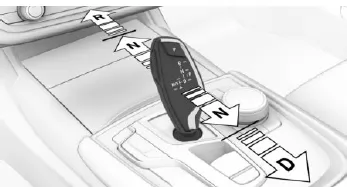
Engaging Selector Lever Positions D, N, R
A selector lever lock prevents the following incorrect operations:
- Accidentally shifting into selector lever position R.
- Accidentally changing from selector lever position P to another selector lever position.
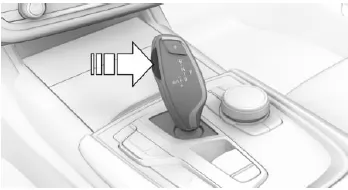
- To release the selector lever lock, press and hold the button.
- With the driver's seat belt fastened, tap the selector lever in the desired direction, if necessary.
Engage selector lever position P
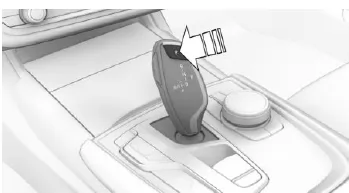
Press the P button.
Kick-down
Kick-down provides maximum acceleration.
Press the accelerator pedal past the resistance point to full throttle.
Sport program M/S
Principle
The Sport program has shift points and shift times designed for a sportier driving character. For example, the transmission shifts later and the shift times are shorter.
The transmission upshifts later and the shift times are shorter.
Activating the Sport program
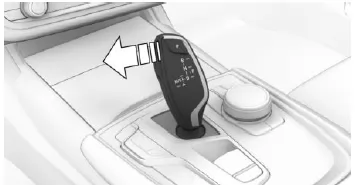
Push the selector lever from position D to the left.
The instrument cluster shows the engaged gear, e.g. S1.
The transmission Sport program is activated.
Ending the Sport program
Push the selector lever to the right.
D is shown in the instrument cluster.
Shift paddles
Principle
The shift paddles on the steering wheel allow quick gear changes without taking your hands off the steering wheel.
General
Shifting
A gear change is only carried out at a suitable engine speed and vehicle speed.
Switching to manual mode
In selector lever position S, actuating a shift paddle switches permanently to manual mode.
In selector lever position D, actuating a shift paddle switches to manual mode temporarily.
Switching back to automatic mode
In selector lever position D, the transmission switches back to automatic mode if, in manual mode, you drive moderately for a certain period, do not accelerate and do not shift using the shift paddles.
Switching back to automatic mode is possible as follows:
- Pull the right shift paddle and hold it.
- In addition to briefly pulling the right shift paddle, briefly pull the left shift paddle.
Steptronic Sport transmission
Depending on the transmission version, you can downshift to the lowest possible gear by fully depressing the accelerator pedal (kick-down) and pulling the left shift paddle at the same time. This is not possible when switching briefly to manual mode from selector lever position D using the shift paddles.
Shifting
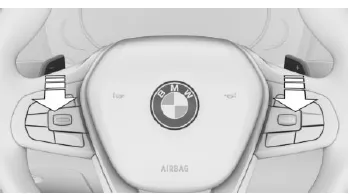
- Upshift: briefly pull the right shift paddle.
- Downshift: briefly pull the left shift paddle.
- Pulling the left shift paddle and holding it downshifts to the lowest possible gear.
The instrument cluster briefly shows the selected gear, then shows the current gear again.
Displays in the instrument cluster
 The selector lever position is shown, e.g. P.
Electronically releasing the transmission lock
General
Electronically release the transmission lock to move the vehicle out of a danger zone.
Release is possible if the starter motor can crank the engine.
Before releasing the transmission lock, apply the parking brake to prevent the vehicle from rolling away.
Engage selector lever position N
- Press the brake pedal and keep it pressed.
- Press the Start/Stop button. The starter motor must be audibly engaging. Keep the Start/Stop button pressed.
- With your free hand, press the button on the selector lever, arrow 1, and push and hold the selector lever toward position N, arrow N, until selector lever position N is shown in the instrument cluster.
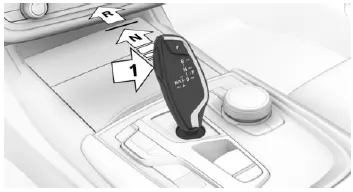
- Release the Start/Stop button and the selector lever.
- Release the brake pedal as soon as the starter motor stops.
- Move the vehicle out of the danger zone, then secure it against rolling away.
For more information, see chapter Towing and Lifting.
Launch Control
Principle
In dry ambient conditions, Launch Control enables optimized acceleration on high-grip road surfaces.
General
Using Launch Control causes premature component wear, as this function places a very high load on the vehicle.
Do not use Launch Control during the break-in period.
When starting off with Launch Control, do not turn the steering wheel.
Prerequisites for operation
Launch Control is available when the engine is at operating temperature, i.e. after uninterrupted driving of at least 10 km.
Starting off with Launch Control
- Switch on ready mode.
 Press the button.
The instrument cluster shows TRACTION and the DSC OFF indicator lamp illuminates.
Using it again during the same trip
After using Launch Control, the transmission must cool down for approx. 5 minutes before Launch Control can be used again.
When used again, Launch Control adapts to the ambient conditions.
After using Launch Control
To support driving stability, reactivate Dynamic Stability Control DSC as soon as possible.
System limitations
An experienced driver may achieve better acceleration values in DSC OFF mode.
The Steptronic transmission of the BMW 5 Series G30/G31 offers a perfect combination of comfort and sporty dynamics. Whether in automatic mode or manual shifting via the selector lever or shift paddles, the system adapts optimally to every driving situation.
Special features such as the Sport program or Launch Control provide an exceptional driving experience. This keeps the BMW 5 Series G30/G31 a benchmark for modern transmission technology in the premium segment.
FAQQuestion 1: When is park position P engaged automatically?
Answer: After the engine is switched off, or when the vehicle is stationary, the driver's seat belt is unfastened and the door is opened.
Question 2: Is manual mode also possible with shift paddles?
Answer: Yes, the shift paddles allow quick shifting directly at the steering wheel.
Test yourself
A quick BMW 5 quiz: every answer comes with an explanation and a link to the manual page.