Instrument panel and controls
Control buttons
In this manual: Instrument panel and controls
~1min read
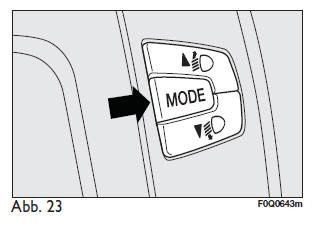
 Control buttons Fig. 23
To scroll up through the menu screens and the relevant options, and to increase the displayed value.
MODE: short press to access the menu and/or move to the next screen or to confirm the desired selection.
Long press to return to the standard screen.
 To scroll down through the menu screens and the relevant options, and to decrease the displayed value.
Note on the
buttonsand activate
the various functions according to the following situations:
- within the menu they allow scrolling up or down;
- during setting procedures they allow increasing or decreasing the value.
Note: when a front door is opened, the display is activated and shows the time and the distance travelled in kilometers or miles for a few seconds.
Test yourself
A quick Fiat Bravo quiz: every answer comes with an explanation and a link to the manual page.
Was this page helpful?