Vehicle Stability Assist (VSA)
The Vehicle Stability Assist (VSA) system helps maintain directional stability by correcting oversteer or understeer. In addition, this system helps the wheels maintain traction when accelerating on slippery or loose surfaces. The system operates by individually controlling the brakes at each wheel and by limiting engine output.
When the VSA system is activated, you may notice that the engine responds differently to accelerator pedal input. You may also hear noise from the VSA hydraulic components. The VSA indicator blinks while the VSA system is operating.
The VSA system cannot maintain directional stability of the vehicle under all driving conditions and does not provide full control of the vehicle's braking system. Therefore, the driver is still responsible for selecting a safe speed when driving through curves and for overall safety.

Vehicle Stability Assist (VSA) Activation Indicator
The indicator blinks when the Vehicle Stability Assist system is activated.

VSA System Malfunction Indicator
If there is a malfunction in the VSA system, the indicator comes on and stays lit. At the same time, the VSA indicator also comes on.
If the VSA malfunction indicator comes on while driving, stop the vehicle in a safe place and turn off the engine. Reset the system by restarting the engine.
If the VSA indicator does not go off after the engine is started or comes on again while driving, have the vehicle inspected by an authorized dealer service center to check the VSA system.
When the VSA malfunction indicator comes on, the following symbol is displayed on the multi-information display: This may be accompanied by the message "CHECK SYSTEM."
If the VSA system is not operating, the vehicle retains its braking performance and steering control; however, the additional functions of the traction control system and the vehicle stability control system will not operate.
VSA SYSTEM SWITCH
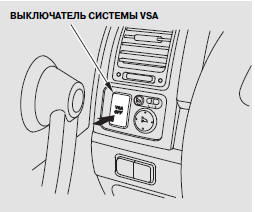
The switch is located under the driver's side vent grille. To turn the VSA system off or on, press and hold the switch until you hear a beep.
The VSA OFF indicator lit indicates that the Vehicle Stability Assist system is turned off. Press the switch again and hold it to turn the system on.
The VSA system turns on each time the engine is started, even if it was turned off by the driver previously.
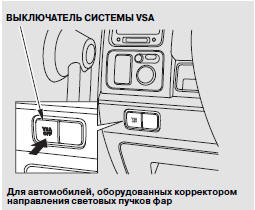
In certain adverse conditions, such as when the vehicle is stuck in mud or snow, temporarily turning off the VSA system may help free the vehicle. When the VSA system is turned off, the traction control system is also turned off. Turn off the system only if attempts to free the vehicle with the VSA system on have been unsuccessful.
Once the vehicle is freed, turn the VSA system back on immediately. It is not recommended to drive with the traction control system and the VSA system turned off.
Effect of Tire Size on VSA Operation
Installing wheels and tires of a different type or size may cause the Vehicle Stability Assist system to malfunction. When replacing tires, make sure they are the same type and size as the original tires.
When replacing summer tires with winter tires, also make sure they are the same size as the original tires supplied with the vehicle.
When driving the vehicle in winter conditions, observe the same precautions you would take when driving a vehicle not equipped with the Vehicle Stability Assist system.
Test yourself
A quick Honda CR-V quiz: every answer comes with an explanation and a link to the manual page.