When replacing the ECM on a vehicle equipped with an immobilizer, perform the procedure below. [When installing a used ECM] 1) Perform the "ECM Neutral Mode" procedure using GDS. (Refer to Body Electrical System - "Immobilizer System") 2) After completing "ECM Neutral Mode", perform the "Key Learning" procedure using GDS. (Refer to Body Electrical System - "Immobilizer System") [When installing a new ECM] Perform the "Key Learning" procedure using GDS. (Refer to Body Electrical System - "Immobilizer System")
When replacing the ECM on a vehicle equipped with a Smart Key System (push button start), perform the procedure below. [When installing a used ECM] 1) Perform the "ECM Neutral Mode" procedure using GDS. (Refer to Body Electrical System - "Smart Key System") 2) After completing "ECM Neutral Mode", insert the key (or press the start button) and turn it to IGN ON and OFF. The ECM then automatically receives the smart key information. [When installing a new ECM] Insert the key (or press the start button) and turn it to IGN ON and OFF. The ECM then automatically stores the smart key information.
Turn the ignition switch OFF and disconnect the negative (-) battery cable.
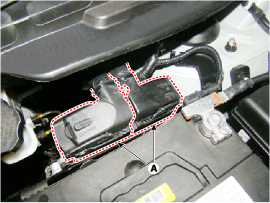
Disconnect the ECM connector (A).
Remove the battery. (Refer to Engine Electrical System - "Battery")
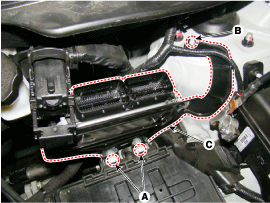
Remove the mounting bolts (A) and nut (B), then remove the ECM bracket assembly (C).
Remove the mounting nuts (A) and separate the ECM (B) from the ECM bracket assembly.
Installation
When replacing the ECM on a vehicle equipped with an immobilizer, perform the following procedure. [When installing a used ECM] 1) Perform the "ECM Neutral Mode" procedure using GDS. (Refer to Body Electrical System - "Immobilizer System") 2) After completing "ECM Neutral Mode", perform the "Key Learning" procedure using GDS. (Refer to Body Electrical System - "Immobilizer System") [When installing a new ECM] Perform the "Key Learning" procedure using GDS. (Refer to Body Electrical System - "Immobilizer System")
When replacing the ECM on a vehicle equipped with a Smart Key system (push button start), perform the following procedure. [When installing a used ECM] 1) Perform the "ECM Neutral Mode" procedure using GDS. (Refer to Body Electrical System - "Smart Key Diagnosis"). 2) After completing "ECM Neutral Mode", insert the key (or press the start button) and turn it to the IGN ON and OFF positions. The ECM then automatically receives the smart key information. [When installing a new ECM] Insert the key (or press the start button) and turn it to IGN ON and OFF. The ECM then automatically stores the smart key information.
Install in the reverse order of removal. ECM mounting nut: 9.8 ~ 11.8 N·m ECM bracket mounting bolt/nut: 7.8 ~ 11.8 N·m
ECM Inspection Procedure
GROUND CIRCUIT CHECK: Measure the resistance between the ECM ground and chassis ground. If out of specification, repair it.
Specification: Below 1x
CONNECTOR CHECK: Disconnect the ECM connector and visually check the ground terminals on the ECM side and the harness side for bent pins or poor contact pressure. If a problem is found, repair it.
If no problem is found in steps 1 and 2, the ECM itself may be faulty. If so, before replacing the ECM, make sure there are no DTCs, then recheck the vehicle. If DTCs were found, check them first before replacing the ECM.
ECM DOUBLE CHECK: Install the original ECM (suspected faulty) into a known good vehicle and check the vehicle. If the problem recurs, replace the original ECM with a new one. If the problem does not occur, it is an intermittent problem.
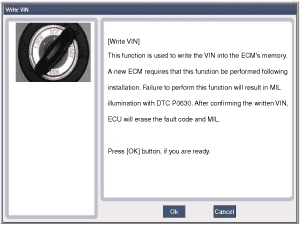
VIN Programming Procedure. The VIN (Vehicle Identification Number) is a number that contains vehicle information (manufacturer, vehicle type, vehicle line/series, body type, engine type, transmission type, model year, plant location, etc.). For details, refer to the "GI" group in this SERVICE MANUAL. When replacing the ECM, the VIN must be programmed into the ECM. If no VIN is stored in the ECM memory, DTC P0630 is displayed.
The programmed VIN cannot be changed. When writing the VIN, carefully confirm the VIN.
Select the "VIN Write" function in "Vehicle Software Management."
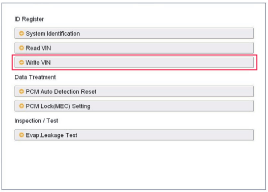
Select "Write VIN" in "Identification Registration."
Enter the VIN.
Before entering the VIN, verify the VIN again, because a programmed VIN cannot be changed.
Turn the ignition OFF, then turn it back ON.
?
Test yourself
A quick Hyundai Tucson LM quiz: every answer comes with an explanation and a link to the manual page.