Personalized Profile and Vehicle Settings
You can set the registered Digital Key profiles for Driver 1 and Driver 2. When you use the Digital Card Key or Hyundai Digital Key app, the vehicle can be set to a user-defined personalized profile (includes items such as driver seat and sound settings).
Linking/Unlinking a Profile
Profile Link
1. Select Settings > User Profile > Profile Settings > Link Digital Key (Smartphone) from the infotainment system settings menu.
2. Unlock your smartphone and place it on the vehicle authentication panel (wireless charging pad).
3. Select Link to connect the registered Digital Key phone and the user profile.
Unlink Profile
Select Digital Key Information from the infotainment system settings menu to unlink the profile.
Information
If you connect Driver 1 and Driver 2 with one smartphone, the Digital Key (smartphone key) always uses the profile settings for Driver 1. If you disconnect Driver 1, the Driver 2 profile settings are used.
Precautions When Using Profile Link and Unlink
Keep in mind:
- Profile Link can be used with the Digital Key. (Infotainment System: Settings > Vehicle > Digital Key > Enable Digital Key)
- Profile Link information is retained even when the Digital Key function is disabled.
- Only a smartphone with the Hyundai Digital Key App can be linked to your profile, not a key card.
- Profile Link works only when the smartphone and Digital Key are registered to the vehicle.
- Do not remove the smartphone from the vehicle authentication pad (wireless charging pad) while the profile is linked.
Driver Profile Operation
The profile linked to the Digital Key locks or unlocks the doors when:
- The smartphone touches the driver's door handle.
- The Hyundai Digital Key App is used on the smartphone linked to the profile.
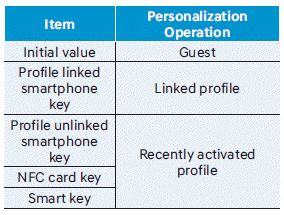
Vehicle Personalization Using the Digital Key
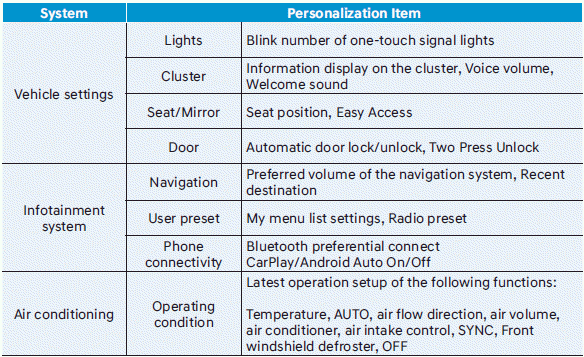
For more information, refer to the infotainment system manual.
Information
Do not leave the Digital Key (smartphone key or key card) in the vehicle after locking or unlocking the doors or starting the engine. The doors can be locked using the switches on the driver's or passenger's door. Always take your Digital Key (smartphone key or key card) with you when exiting the vehicle.
Test yourself
A quick Hyundai Tucson LM quiz: every answer comes with an explanation and a link to the manual page.