Automatic control. Manual control. Temperature control buttons. Dual temperature control selection (DUAL)
The fully automatic climate control system in the Kia Opirus precisely regulates temperature, air distribution and humidity. It dynamically adapts to interior conditions, ideal for constant comfortable temperatures. For individual needs, manual control is also available, supplemented by DUAL mode for separate regulation of both sides. Temperature display in Celsius or Fahrenheit and reset options round off the system.
Automatic Control
The automatic climate control system is operated simply by selecting a temperature.
The fully automatic temperature control (FATC) system automatically controls the heating and cooling system as follows.
1. Press the AUTO button. The indicator light then illuminates, and the ventilation modes, blower speeds, fresh air/recirculation and air conditioning are controlled automatically by selecting the temperature.
2. Press the TEMP switch buttons to select the desired temperature.
If the lowest temperature (17°C) (Lo) is selected, the air conditioning remains switched on permanently.
3. To turn off the automatic function, press any button except TEMP and Air Quality (AQS). Pressing the MODE, A/C, Defrost, Air Intake Control or Blower Speed buttons switches the selected function to manual control. The other functions remain under automatic control.
When automatic control is selected, the air conditioning may switch on regardless of the selected temperature (even at higher temperatures) to reduce the humidity inside the vehicle.
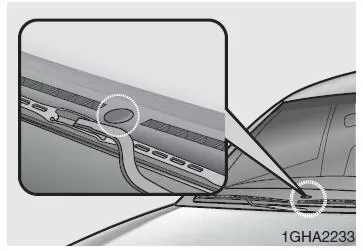
NOTE
Never place objects on the sensor at the top of the dashboard, as this could interfere with the automatic control of the heating and air conditioning system.
Manual Control
The heating and air conditioning system can also be controlled manually by pressing the desired function buttons, except the AUTO button. In this case, the system operation follows the sequence in which the buttons were selected.
If any button is pressed during AUTO control, the functions of the buttons that were not selected remain under automatic control.
Press the AUTO button to return to fully automatic system control.
When the system is switched on, the functions of the buttons that were not selected are set to the modes used last time. If the battery was discharged or disconnected, the last settings were erased and initialized. In this case, set all function buttons to the desired modes.
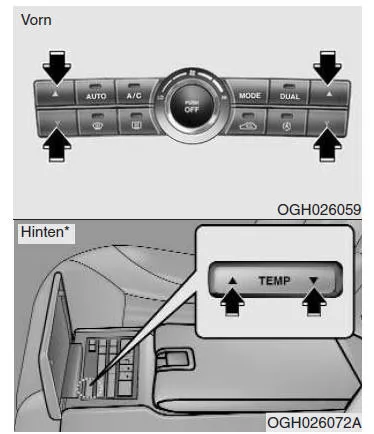
Temperature Control Buttons
Press the upper buttons to raise the temperature up to the maximum of 32°C. The temperature display increases by 0.5°C with each press.
Press the lower buttons to lower the temperature down to the minimum of 17°C. The temperature display decreases by 0.5°C with each press. When the lowest temperature (17°C) is selected, the air conditioning remains switched on continuously.
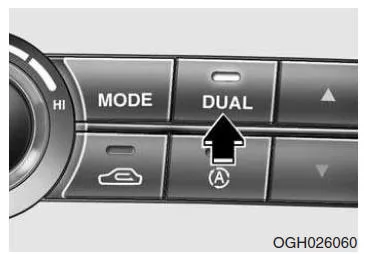
Dual Temperature Control Selection (DUAL)
Selecting Separate Left/Right Temperature Control
1. Press the DUAL button to select separate temperature control for the driver and passenger sides (the switch indicator light then illuminates).
When you operate the right temperature selection buttons, DUAL mode is switched on automatically.
2. Press the left temperature selection buttons to set the temperature for the driver side, and press the right temperature selection buttons to set the temperature for the passenger side.
Setting the Same Temperature on Left and Right
1. Press the DUAL button again, or DUAL mode is deactivated when you select the highest (HI) or lowest (Lo) temperature (the switch indicator light then goes off). The passenger side temperature is matched to the driver side temperature.
2. In this mode, if you operate the left temperature selection buttons, the passenger side temperature is set to the same value.
Temperature Display in Celsius or Fahrenheit
If the vehicle battery is discharged or disconnected, the system performs a reset. The temperature is then automatically displayed in Celsius.
This is an automatic process.
To switch the temperature display to Fahrenheit, proceed as follows.
Press and hold the MODE button, and at the same time press the DUAL button for 3 seconds or longer. The display then changes from Celsius to Fahrenheit. The display can be changed from Fahrenheit back to Celsius in the same way.
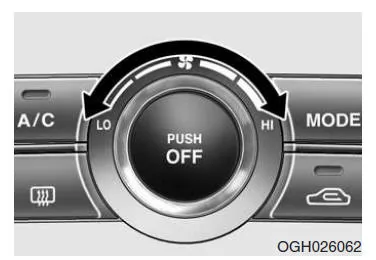
The air conditioning system of the Kia Opirus 2003–2011 offers flexible control through automatic and manual operating modes. The DUAL system allows individual temperature settings for the driver and front passenger, increasing comfort.
Simple operation and precise control ensure an optimal interior climate. This keeps the Kia Opirus comfortable even on long journeys.
FAQHow can the temperature display in the Kia Opirus 2003–2011 be switched between Celsius and Fahrenheit?
By pressing and holding the MODE and DUAL buttons together for about 3 seconds.
When does the air conditioning switch on automatically in AUTO mode?
When a low temperature is selected, to reduce humidity.
Test yourself
A quick Kia Opirus quiz: every answer comes with an explanation and a link to the manual page.