Electronic key
The electronic key of the Kia Opirus provides modern locking technology at the push of a button. Its convenient operation allows you to unlock the doors, access the tailgate and start the engine without direct contact, provided the key is within range. This chapter also provides useful tips on protecting the battery, avoiding signal interference and reactivation. Practical for everyday use and travel, and always designed with the highest level of safety in mind.
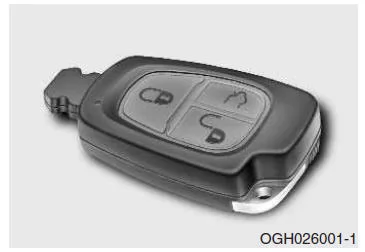
The electronic key allows you to lock and unlock the doors and start the engine without inserting the key into the respective lock.
The functions of the buttons on the electronic key correspond to those of the central locking remote control. See page 3-5.
Functions
The electronic key allows you to lock and unlock the doors, unlock the tailgate and start the engine.
Unlocking the doors
All doors are initially locked.
If you carry the electronic key with you and touch the door handle of the driver's or front passenger's door, all doors will be unlocked automatically within 0.5 seconds.
Note that persons who do not have a key can also open the doors if the electronic key is within a radius of 0.7 to 1 m of the front door handles.
Locking the doors
When all doors are closed and you press the lock button on the outside door handle of one of the front doors, all doors will be locked. The lock button only works reliably if the electronic key is within a radius of 0.7 to 1 m of the front door handles. If you then touch one of the front door handles, the doors will unlock again. To check whether the doors are properly locked, check the position of the door lock switch (inside the door) or pull the handle of a rear door.
Opening the tailgate
If the electronic key is within a radius of 0.7 to 1 m of the tailgate handle and you press the handle, the tailgate will unlock and open automatically.
NOTE
If the electronic key is in the luggage compartment near electronic components, the tailgate may not be able to be opened after it has been closed.
Therefore, do not leave the key in the luggage compartment; always carry it with you.
Starting the engine
You can also start the engine without inserting the electronic key into the ignition switch. For more information on starting the engine with the electronic key, refer to Chapter 4 of this manual.
Deactivating an electronic key
If you use two electronic keys and lock the doors from outside with one key (A), the second key (B) will be deactivated if all of the following conditions are met:
- the ignition switch is in the LOCK position
- the electronic key has been removed from the ignition switch
- the second electronic key (B) is inside the vehicle.
In this case, an audible alarm sounds for approx. 6 seconds. Key B can still be used to start the engine when it is inserted into the ignition switch. It is also still possible to unlock the doors using the corresponding button on the electronic key.
To reactivate key B, unlock the doors with key A or press the corresponding button on key B.
Please observe the following notes on using the electronic keys:
- The vehicle doors are only unlocked and locked automatically when all doors are closed.
- The doors are automatically unlocked approx. 0.5 seconds after you touch the door handle.
Therefore, wait briefly before pulling a door handle to open the door.
- When an electronic key is detected, touching a front door handle or pressing the door handle (e.g. in a car wash) may unintentionally unlock the doors.
- Keep the keys with you when you leave the vehicle.
NOTE
- If you lose your electronic key, you will no longer be able to start the engine. Have the vehicle towed and contact an authorized KIA dealer.
- A maximum of 2 keys can be registered for one vehicle. If you lose a key, go immediately to an authorized KIA dealer with your vehicle and the second electronic key so that the dealer can deactivate the lost key and protect the vehicle against theft.
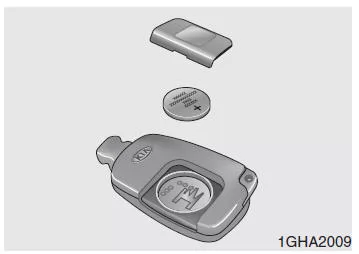
Replacing the battery
To ensure proper function of the electronic key, KIA recommends replacing the battery in the key every 2 years.
If the indicator light in the key only glows weakly or the key no longer works reliably, you can replace the battery as described below.
If you have questions about using the key or replacing the battery, contact an authorized KIA dealer.
NOTE
To avoid damaging the electronic keys, do not expose them to moisture or strong electrostatic charges. If you have questions about using the key or replacing the battery, contact an authorized KIA dealer.
- Pry off the cover on the back of the key.
- Remove the battery and insert a new battery.
- Refit the cover on the back of the key.
- Using an incorrect battery may cause the electronic key to malfunction. Make sure that only the specified battery is used.
- To avoid damaging the electronic keys, do not drop them and do not expose them to moisture or strong electrostatic charges.
- If you suspect that your keys have been damaged or are no longer working properly, contact an authorized KIA dealer.
The electronic key of the Kia Opirus 2003–2011 greatly simplifies vehicle handling and offers additional security features. Keyless entry and starting provide not only more convenience but also protection against unauthorized access.
Particularly convenient is the automatic detection of the key when it is in the immediate vicinity of the vehicle, which makes getting in and out easier. The ability to open the trunk without manual unlocking also highlights the well-thought-out equipment of the Kia Opirus 2003–2011.
FAQWhat are the benefits of the electronic key of the Kia Opirus 2003–2011?
It allows keyless entry and starting, thereby increasing comfort and security in everyday use.
How often should the battery of the electronic key be replaced?
KIA recommends replacing the battery every two years to ensure reliable operation.
Test yourself
A quick Kia Opirus quiz: every answer comes with an explanation and a link to the manual page.