Windows
The power windows of the Kia Opirus (2003–2011) combine convenience with safety. Each switch is positioned to allow easy operation from every seat. In addition, the safety logic protects against pinching during automatic closing, which is a real advantage in everyday use. Precise window control also helps maintain a comfortable interior climate on longer journeys. The integrated sunshades provide protection from direct sunlight. This well-thought-out window system makes the Opirus the ideal choice for drivers who value technology and safety.
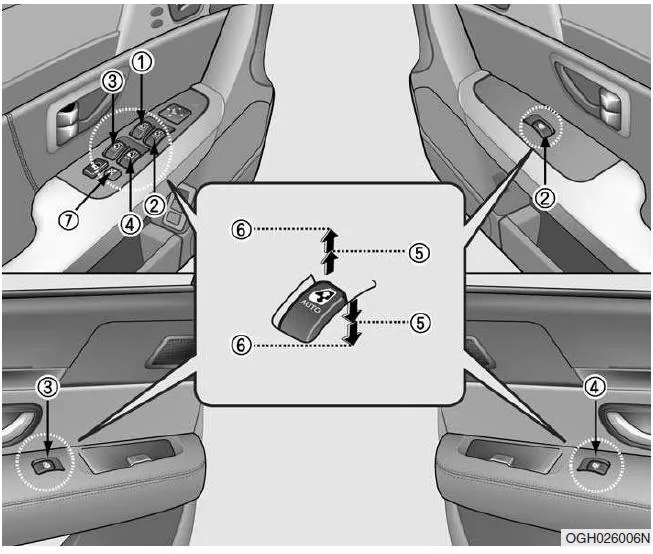
- Window Switch - Driver's Door
- Window Switch - Front Passenger Door
- Window Switch - Rear Left Door
- Window Switch - Rear Right Door
- Opening and Closing Windows
- Power Window One-Touch Function - Driver's Door
- Power Window Lockout Switch
Power Windows
The ignition must be switched on to operate the power windows. All doors are equipped with window switches. The driver's door also has a lockout switch, which can be used to disable the window switches in the other doors.
If you notice air pressure pulsating in the vehicle while driving with a window open, open the opposite window slightly to reduce the pressure build-up.
CAUTION- To protect the power window system from possible damage, do not operate two power windows at the same time. This can overload the system and blow the corresponding fuse.
- Never press a window switch on the driver's door and the switch of the respective window in opposite directions at the same time. In this case, the window will stop and can no longer be opened or closed.
- Before closing a window, make sure your hands and head are clear of the window's danger zone.
- Do not allow children to play with the power windows. Lock the power windows using the lockout switch on the driver's door by pressing the switch to the LOCK position. Unpredictable window movements caused by children can lead to serious injuries.
- Do not put your arms or head out of the window while driving.
- Before closing a window, make sure that no arms, hands or objects are in the window's danger zone.
Opening and Closing Windows
The master window switch on the driver's door can be used to control all windows in the vehicle.
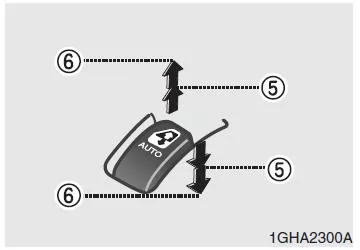
To open or close a window, press the front end of the switch or pull the front end of the switch upward.
Power Window One-Touch Function
If you briefly press the switch down past the second detent or pull it up (6), the window opens or closes fully, even after you release the switch. To stop the automatic window movement at a specific position, briefly pull or press the switch in the opposite direction of the window movement.
If the battery has been discharged or disconnected, the power window system must be reinitialized (reset) as follows:
- Switch the ignition on.
- Close each window individually, then pull the respective switch upward for at least 0.5 seconds after the window is fully closed.
Window Anti-Pinch Function (only when the window closes automatically)
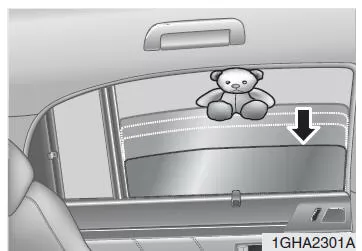
If the upward movement of the window is blocked by an object or a body part, the power window detects the resistance and stops the upward movement. The power window then moves back approx. 15 cm to release the trapped object.
WARNING- The power window anti-pinch function (the window moves back approx. 15 cm when resistance is detected) is only active when the automatic window closing is performed (switch pulled up to the second detent).The power window anti-pinch function is not active when the window is closed by pulling the switch only to the first detent (5). Before closing a window, make sure that no arms, hands or objects are within the danger zone of the window glass.
- If an object with a diameter of less than 4 mm becomes trapped between the window glass and the upper seal frame, the anti-pinch function may not detect the object and the window may not automatically move back. Therefore, before closing a window, make sure that no objects are within the danger zone of the window.
Power Window Lockout Switch
- The driver can lock the window switches in the front passenger door and rear doors by pressing the window lock switch in the driver's door to the LOCK position.
- When the window lock switch is activated, the locked windows cannot be operated with the main window switch in the driver's door even when the ignition is on.
Power window delay timer*
The power windows can still be operated for approx.
30 seconds after the ignition key is removed. However, if either front door is opened, the power windows can no longer be operated after the ignition key is removed.
Window sunshade*
Rear door side windows
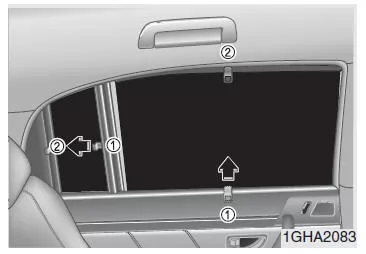
Use the side window sunshades built into the door trim if you want to protect yourself from direct sunlight through the rear door side windows.
Grasp the loop (1) of the sunshade and carefully pull the sunshade down to the corresponding hook (2).
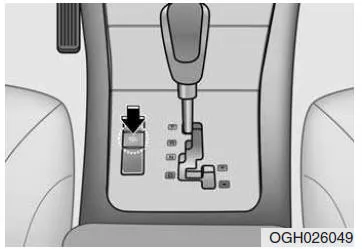
Rear window sunshade switch*
Use the rear window sunshade, located in the parcel shelf, if you want to protect yourself from direct sunlight through the rear window.
Press the front side of the rocker switch to raise the rear window sunshade. Press the rear side of the rocker switch to lower the rear window sunshade.
CAUTIONDo not try to raise or lower the rear window sunshade manually. This could damage components and impair system function.
The windows of the Kia Opirus 2003–2011 offer state-of-the-art technology and high comfort. The power windows provide easy operation, while protective features such as the anti-pinch function provide additional safety.
Thoughtful details such as the automatic window function and the protective circuits underline the high standards of functionality and durability. This makes the Kia Opirus a reliable partner for every journey.
The window sunshades and the electric rear window sunshade further enhance comfort and protect against strong sunlight, ideal for long journeys in the Kia Opirus 2003–2011.
Test yourself
A quick Kia Opirus quiz: every answer comes with an explanation and a link to the manual page.