Kia Sorento: Audio System
✽ NOTICE
If a non-genuine HID headlamp is installed, the audio system and electronic devices of your vehicle may malfunction.
Antenna
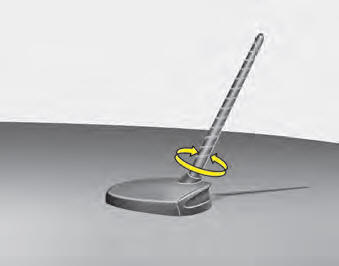
Your vehicle uses a roof antenna to receive AM and/or FM radio broadcast signals.
This antenna is removable. To remove the roof antenna, turn it counterclockwise. To install the roof antenna, turn it clockwise.
CAUTION
- Before entering a low-clearance area or an automatic car wash, remove the antenna by turning it counterclockwise. Otherwise, the antenna may be damaged.
- When reinstalling the roof antenna, it is important that it is fully tightened and adjusted to the vertical position to ensure proper reception. It may also be removed when parking the vehicle or when loading cargo onto the roof rack.
- When loading cargo on the roof rack, do not place it near the antenna mast, to ensure proper reception.
Steering Wheel Audio Controls (if equipped)
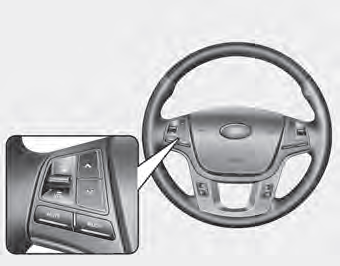
The steering wheel may have audio control buttons. These buttons are designed to help ensure safe driving.
CAUTION
Do not press the audio remote control buttons simultaneously.
VOLUME (VOL +/-) (1)
- Press the lever up (+) to increase the volume.
- Press the lever down (-) to decrease the volume.
SEEK/PRESET (
/  )
(2)
The SEEK/PRESET button has different functions depending on the system mode. For the following functions, the button must be pressed for 0.8 seconds or longer.
RADIO mode
It will function as the AUTO SEEK select button.
CD/USB/iPod® Mode
It will function as the FF/REW button. If the SEEK/PRESET button is pressed for less than 0.8 seconds, it will operate as follows in each mode.
RADIO mode
It will function as the PRESET STATION buttons.
CD/USB/iPod® Mode
It will function as the TRACK UP/DOWN button.
MODE (3)
Press the button to change the audio source.
- FM(1~2)➟AM➟SAT(1~3)➟CD➟ USB AUX(iPod®) FM...
MUTE (4)
- Press the button to mute the sound.
- Press the button to mute the microphone during a phone call.
Detailed information on the audio control buttons is provided on the following pages in this section.
Aux, USB Port (if equipped)
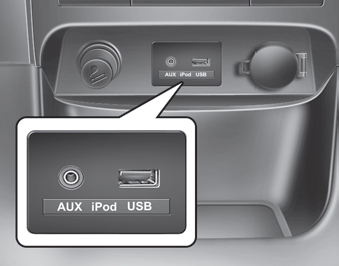
If your vehicle has an aux port and/or USB (Universal Serial Bus) port, you can use the auxiliary port to connect audio devices and USB devices, as well as an iPod®.
✽ NOTICE
When using a portable audio device connected to a power outlet, noise may occur during playback. In this case, use the power supply of the portable audio device.
How the Car Audio System Works
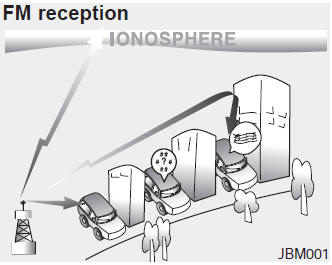
AM and FM radio signals are broadcast from transmitter towers located around your city. They are picked up by your vehicle's radio antenna.
This signal is then processed by the radio receiver and sent to your vehicle's speakers.
When a strong radio signal reaches your vehicle, the precision engineering of your audio system provides the best possible sound quality. However, in some cases the signal reaching your vehicle may not be strong and clear.
This may be caused by factors such as distance from the radio station, proximity to other strong radio stations, or buildings, bridges, or other large obstacles in the area.
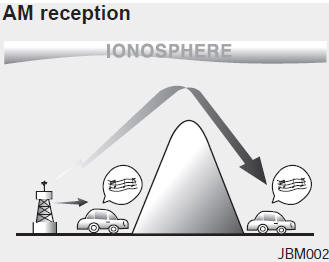
AM radio signals can be received over longer distances than FM signals. This is because AM radio waves are transmitted at lower frequencies.
These long-wave, low-frequency radio waves can follow the curvature of the Earth rather than travel in a straight line. In addition, they diffract around obstacles, which results in better signal coverage.
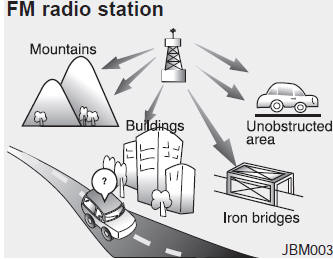
FM broadcasts are transmitted at high frequencies and do not bend to follow the surface of the Earth. Because of this, FM reception usually begins to fade within a short distance from the station. FM signals are also easily affected by buildings, mountains, and other obstacles. This may result in undesirable or unpleasant listening conditions that may make you believe there is a problem with your radio. The following conditions are normal and do not indicate a radio malfunction:
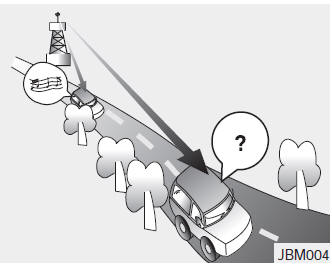
- Fading: As your vehicle moves away from the radio station, the signal weakens and the sound begins to fade out. In this case, we recommend that you select another strong station.
- Static/Multipath: Weak FM signals or large obstacles between the transmitter and your radio may interfere with the signal, causing static or fluttering noise. Reducing the treble level may reduce this effect until the interference clears.
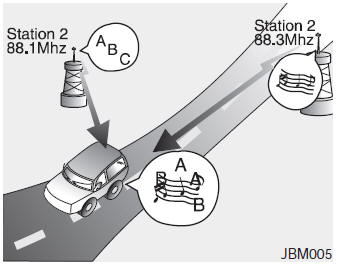
- • Station switching: As the FM signal weakens, another powerful signal near the same frequency may begin to play. This is because your radio is designed to capture the strongest signal. In this case, select another station with a stronger signal.
- • Multipath cancellation: Radio signals received from multiple directions may cause distortion or fluttering. This may be caused by direct and reflected signals from the same station, or by signals from two stations with close frequencies. In this case, select another station until the condition passes.
Using a Mobile Phone or Two-Way Radio
When a cellular phone is used in the vehicle, noise may be produced by the audio system. This does not mean that there is a problem with the audio equipment. In this case, try to keep mobile devices as far away from the audio equipment as possible.
CAUTION
When using a communication system such as a cellular phone or radio transceiver inside the vehicle, an separate external antenna must be installed. If a cellular phone or radio transceiver is used only with an internal antenna, it may interfere with the vehicle's electrical system and adversely affect the safe operation of the vehicle.
WARNING
Do not use a mobile phone while driving. Stop in a safe place to use a cellular phone.
Disc Care
- • If the temperature inside the vehicle is too high, open the vehicle windows to ventilate before using the system.
- • Copying and using MP3/WMA files without permission is illegal. Use only compact discs created by legal means.
- • Do not use volatile substances such as benzene or thinner, conventional cleaners, or anti-static sprays designed for analog records on compact discs.
- • To avoid damaging the disc surface, hold compact discs only by the edges or the center hole.
- • Clean the disc surface with a soft cloth before playback (wipe from the center toward the outer edge).
- • Do not damage the disc surface or attach pieces of adhesive tape or paper.
- • Make sure only compact discs are inserted into the CD player. (Do not insert more than one compact disc at a time.)
- • Store compact discs in their cases after use to protect them from scratches or dirt.
- • Depending on the type of CD-R/CD-RW discs, some discs may not operate normally depending on the manufacturer. Under such circumstances, continued use may cause the audio system to malfunction.
✽ NOTICE: Playing an incompatible copy-protected audio compact disc
Some copy-protected CDs that do not conform to the international audio CD standard (Red Book) may not play on your vehicle's audio system. Note that failure to properly play a copy-protected CD may indicate a defect in the CD, not in the CD player.
NOTE:
Playback order of files (folders):
1. Playback order of songs: 
to  in sequence.
2. Playback order of folders:
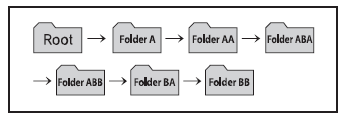
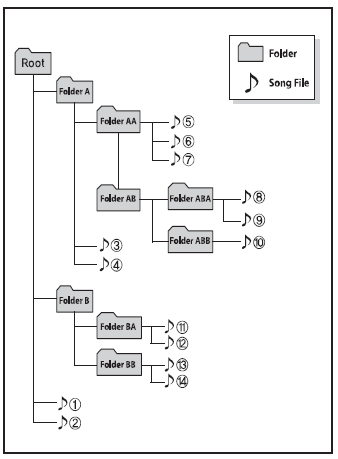
WARNING
- Do not look at the screen while driving. Looking at the screen for extended periods may cause a traffic accident.
- Do not disassemble, assemble, or modify the audio system. Such actions may cause an accident, fire, or electric shock.
- Using the phone while driving may cause you to be inattentive to road conditions and increase the likelihood of an accident. Use the phone function after parking the vehicle.
- Be careful not to spill water or allow foreign objects to get inside the device. Such actions may cause smoke, fire, or product malfunction.
- Do not continue to use the unit if the screen is blank or no sound is heard, as these may be signs of a product malfunction. Continued use under such conditions may result in an accident (fire, electric shock) or product failure.
- Do not touch the antenna during a thunderstorm or lightning, as this may cause an electric shock from lightning.
- Do not stop or park in areas where parking is restricted to operate the product. Such actions may cause a traffic accident.
- Use the system with the vehicle ignition ON. Prolonged use with the ignition OFF may discharge the battery.
CAUTION
- Using the device while driving may cause an accident due to lack of attention to the surrounding environment. First park the vehicle before operating the device.
- Adjust the volume to a level that allows the driver to hear sounds from outside the vehicle. Driving in a state where outside sounds cannot be heard may lead to accidents.
- Pay attention to the volume setting when the device is turned on. A sudden loud sound when the device is turned on may cause hearing damage. (Adjust the volume to an appropriate level before turning off the device.)
- If you want to change the installation position of the unit, please consult the place of purchase or a service center. Technical expertise is required to install or remove the unit.
- Turn on the vehicle ignition before using this device. Do not use the audio system for a long time with the ignition off, as such operation may discharge the battery.
- Do not subject the device to strong impacts or shocks. Direct pressure on the front of the monitor may damage the LCD display or touch screen.
- When cleaning the unit, always turn the unit off and use a dry, smooth cloth. Never use rough materials, chemical cloths, or solvents (alcohol, benzene, thinner, etc.), as such materials may damage the unit panel or cause discoloration/deterioration.
- Do not place drinks near the audio system. Spilled drinks may cause system malfunction.
- If the product is malfunctioning, contact the place of purchase or an after-sales service center.
- Placing the audio system in an electromagnetic environment may cause noise interference.
- Prevent contact with corrosive substances, such as perfume and cosmetic oils, on the instrument panel, as they may cause damage or discoloration.
Test yourself
A quick Kia Sorento Owner's Manual quiz: every answer comes with an explanation and a link to the manual page.