Multimedia port
Schematische darstellungen
Schematic Diagram
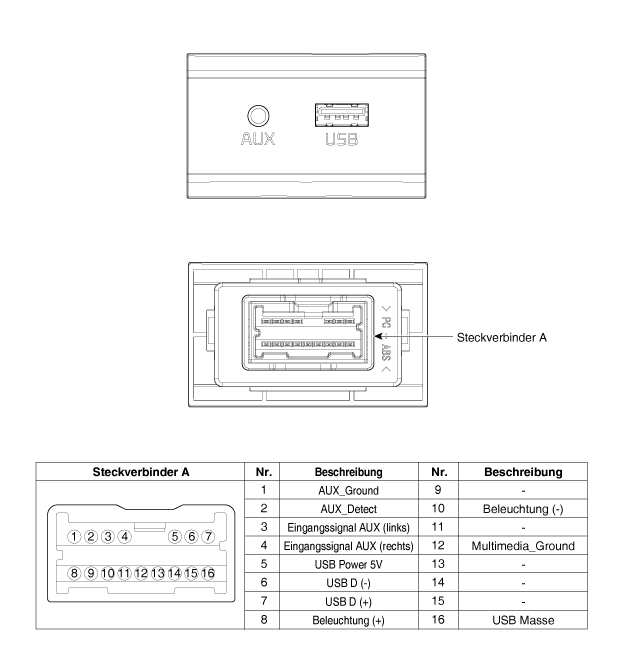
Beschreibung und bedienung
Beschreibung
The multimedia connector on the upper console cover is intended for customers who want to listen to external music from portable devices such as MP3 players through the vehicle's audio system. In this vehicle, the customer has this option.
If the output level of the external media does not match the AUX input specifications, sound distortion may occur even though the audio unit is not defective.
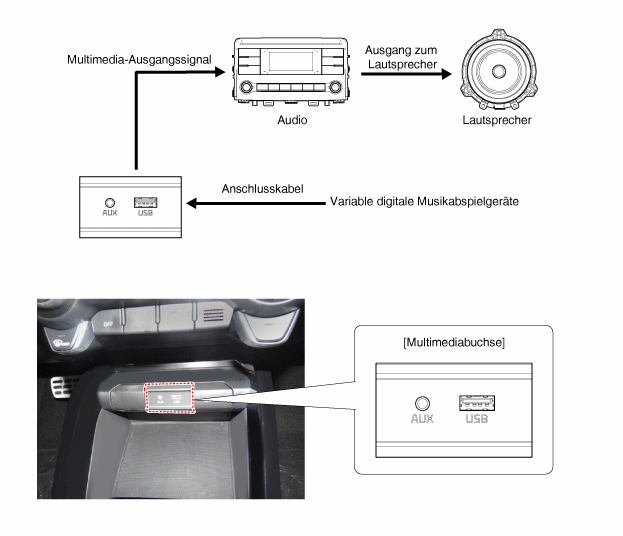
Repair Procedures
Removal
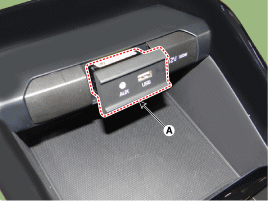
Multimedia connector
Battery
Obere Abdeckung der vorderen Konsole abnehmen.
(Siehe Kapitel Karosserie - "Bodenkonsole")
Befestigungshaken lösen und Multimediabuchse (A) abnehmen.
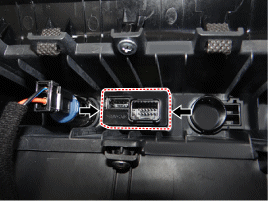
USB charger
Battery
Bodenkonsole ausbauen.
(Siehe Kapitel Karosserie - "Bodenkonsole")
Steckverbinder (A) des USB-Ladegeräts abziehen.
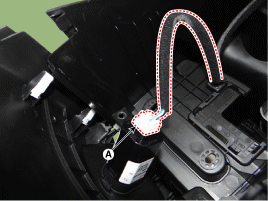
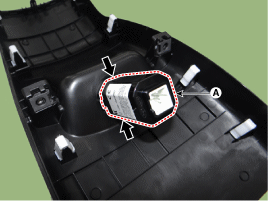
Befestigungshaken lösen und USN-Ladegerät (A) ausbauen.
Installation
Multimedia connector
Install the multimedia jack.
Vordere obere Konsolenabdeckung montieren.
Minuspol (-) der Batterie anschließen.
USB charger
USB-Ladegerät einbauen.
Steckverbinder des USB-Ladegeräts anschließen.
Bodenkonsole einbauen.
Minuspol (-) der Batterie anschließen.
Test yourself
A quick Kia Stonic quiz: every answer comes with an explanation and a link to the manual page.