Head-up display
WARNING
Always adjust the brightness and position of the display while the vehicle is stopped: Adjusting the brightness and position of the display while driving is dangerous, as it may distract your attention from the road situation and lead to an accident.
CAUTION
- Do not attempt to manually adjust the tilt angle or open/close the head-up display. Fingerprints on the display may make it difficult to read, and applying excessive force when operating it may cause damage.
- Do not place any objects near the head-up display. The head-up display may not operate, or any interference with its operation may cause damage.
- Do not place drinks near the head-up display. Water or other liquids spilled onto the Active Driving Display system may cause damage.
- Do not place objects above the head-up display screen or attach stickers to the switch, as they may cause interference.
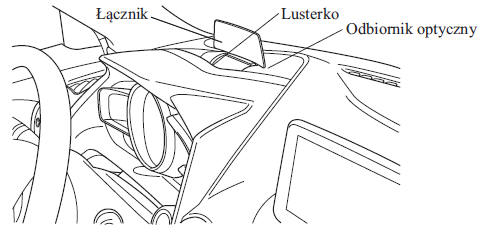
- The system has an integrated sensor that controls the display brightness. If the optical sensor is covered, the display brightness will decrease, making the information on the display harder to read.
- Do not allow intense light to reach the optical sensor, as it may cause damage.
CAUTION
Reading the information in sunglasses may be difficult. Remove your sunglasses or adjust the brightness.
If the battery has been disconnected and then reconnected, or if the battery voltage is low, the adjusted position may differ from the standard position.
Display information may be difficult to read or temporarily altered by weather conditions such as rain, snow, lighting and temperature.
If the audio system is disconnected or removed, the Head-up display cannot be operated.
The Head-up display shows the following information:
- Warnings and operating conditions for the Lane Departure Warning System (LDWS). See "Lane Departure Warning System (LDWS)" on page 4-106.
- Operating conditions for the Smart City Brake Support (SCBS). See "Smart City Brake Support (SCBS)" on page 4-127.
- Setting the vehicle speed using cruise control. See the "Cruise Control" section on page 4-140.
- Turn-by-Turn (TBT) navigation (Direction and Distance) and Lane Keep Assist
- Vehicle speed
All settings and adjustments of the Head-up display can be made on the center display (C-type/D-type audio system).
1. Select the icon on the
home screen to display the settings screen.
2. Select the AD-Disp tab.
3. Select the desired item and enter the setting/make the adjustment.
- Height: Head-up display position
- Brightness control: Brightness adjustment method (Automatic/Manual)
- Calibration: Start brightness setting (when automatic adjustment is selected)
- Brightness: Brightness adjustment (when manual adjustment is selected)
- Navigation: On/Off
- Display: On/Off
- Restore factory settings
Test yourself
A quick Mazda 2 quiz: every answer comes with an explanation and a link to the manual page.