Automatic transmission
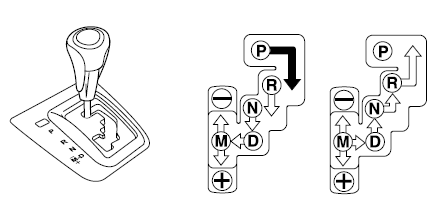
Shift lock positions:
 Indicates that the brake pedal must be pressed
to change range.
(The ignition switch must be in ON.)
 Indicates that the shift lever
can be moved freely to any position.
NOTE
The Sport AT offers a feature that a conventional automatic transmission does not have: the option for the driver to select each gear manually, instead of leaving all shift decisions to the transmission. Even if you intend to use the transmission as a conventional automatic, be aware that you may inadvertently shift into manual shift mode, and an inappropriate gear may then be kept as vehicle speed increases. If you notice that engine speed is rising or the engine is over-revving, check whether you have inadvertently shifted into manual shift mode (page 4-56).
While Driving – Transmission
Display Indication
For vehicles equipped with a Type A instrument panel, check the vehicle condition or have the vehicle inspected by an authorized Mazda dealer as indicated.
Displays
A malfunction in the system or operating conditions is indicated by a warning.
Refer to Indicator and Warning Lights on page 4-24.
Transmission Ranges
- The transmission range indicator lights up on the instrument panel.
P (Park)
The P (Park) position locks the transmission and prevents the front wheels from turning.
WARNING
Always shift the lever to P and apply the parking brake:
Shifting the lever to P without applying the parking brake to hold the vehicle stationary is dangerous. If P does not stay engaged, the vehicle may move and cause an accident.
WARNING
- Shifting into P, N or R while the vehicle is moving may damage the transmission.
- Shifting into a drive range or reverse while the engine is running above idle speed may damage the transmission.
R (Reverse)
In R, the vehicle moves backward. The vehicle must be stopped before shifting into R or before shifting out of R, except in rare situations as described in "To Free a Stuck Vehicle" (page 3-52).
N (Neutral)
In N, the wheels and transmission are not locked. On even the slightest slope, the vehicle will roll if the parking brake or the service brakes are not applied.
WARNING
Do not shift from N or P into a drive range when the engine is running above idle speed:
Shifting from N or P into a drive range while the engine is running above idle speed is dangerous. The vehicle may move suddenly and cause an accident or serious injury.
Do not shift into N while driving:
Shifting into N while driving is dangerous. Engine braking cannot be applied during deceleration, which may cause an accident or serious injury.
WARNING
Do not shift into N while driving. This may damage the transmission.
NOTE
Apply the parking brake or press the brake pedal before moving the shift lever out of N to prevent the vehicle from moving unintentionally.
D (Drive)
D is the normal position for driving. From a standstill, the transmission automatically cycles through the 6-speed shift sequence.
M (Manual)
M is the position for manual shift mode. Gears can be selected using the shift lever.
Refer to Manual Shift Mode (page 4-56).
Active Adaptive Shift (AAS)
Active Adaptive Shift (AAS) automatically controls the transmission shift points to optimally adapt to road conditions and driver operation. This improves driving comfort.
The transmission may enter AAS mode when the vehicle goes up or down slopes, enters curves, or when the accelerator pedal is depressed quickly while the shift lever is in D.
Depending on driving conditions and vehicle operation, the transmission may not shift gears. This does not indicate a malfunction, because AAS will maintain the optimal gear position.
Shift Lever Lock System
The shift lever lock system prevents the shift lever from being moved out of P unless the brake pedal is depressed.
To shift out of P:
- Press and hold the brake pedal.
- Start the engine.
- Move the shift lever.
NOTE
When the ignition switch is in ACC or OFF, the shift lever cannot be moved out of P.
The ignition switch cannot be turned to OFF unless the shift lever is in P.
Emergency Release
If the shift lever cannot be moved out of P using the normal procedure, keep the brake pedal depressed.
- Remove the release device cover using a flat-blade screwdriver wrapped in a cloth.
- Insert the screwdriver and push it downward.
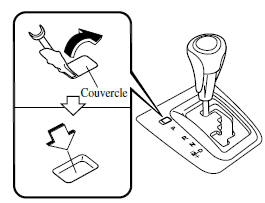
- Move the shift lever.
- Have the system checked by an authorized Mazda dealer.
Manual Shift Mode
This mode gives the feeling of driving a manual transmission vehicle. Use the shift lever to control engine speed and the torque applied to the drive wheels, as with a manual transmission, when more control is required.
To enter manual shift mode, move the shift lever from D to M.
NOTE
Entering manual shift mode while driving will not damage the transmission.
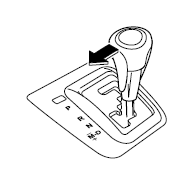 To return to automatic shift mode, move the shift lever from M to D.
NOTE
- If manual shift mode is engaged while the vehicle is stopped, gear M1 is selected.
- If you switch to manual shift mode without pressing the accelerator pedal while driving in D, 5th/6th gear, the gear will shift to M4/M5.
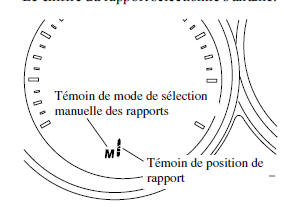
Warning lamps
Manual shift mode indicator light
In manual shift mode, the "M" shift range indicator light comes on in the instrument cluster.
Gear position indicator
The number of the selected gear lights up.
NOTE
- If gears cannot be downshifted while driving at high speed, the gear position indicator flashes twice to indicate that downshifting is not possible (to protect the transmission).
- If the automatic transmission fluid temperature rises excessively, the transmission may switch to automatic shift mode, cancelling manual shift mode and turning off the gear position indicator.
Gear selection
You can select gears using the shift lever or the steering wheel shift paddles.
Manual upshifting
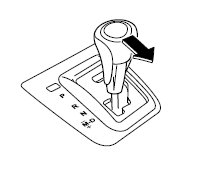
(M1 → M2 → M3 → M4 → M5 → M6) To upshift, pull the shift lever lightly toward you ( ) once.
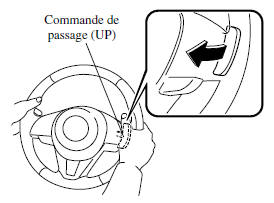
To upshift using the steering wheel shift paddles, pull the UP paddle toward you once with your fingers.
WARNING
Keep your hands on the rim of the steering wheel when operating the steering wheel shift paddles:
Placing your hands inside the steering wheel while using the steering wheel shift paddles is dangerous. If the driver's airbag deploys in a collision, your hands could be struck and injured.
NOTE
- When driving slowly, gears cannot be upshifted.
- In manual shift mode, do not raise the engine speed into the RED ZONE on the tachometer. When engine speed is high, the transmission may upshift automatically to protect the engine.
- When the accelerator is fully depressed, the transmission downshifts depending on vehicle speed.
Manual downshifting
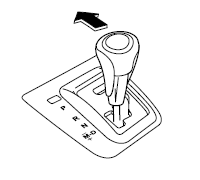
(M6 → M5 → M4 → M3 → M2 → M1) To downshift, push the shift lever lightly forward ( ) once.
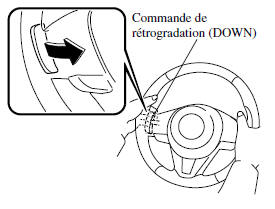
To downshift using the steering wheel shift paddles, pull the DOWN paddle away from you with your fingers.
WARNING
Do not use engine braking when driving on slippery surfaces or at high speed:
Downshifting when driving on wet, snowy or icy roads, or at high speed, causes sudden engine braking, which is dangerous.
A sudden change in wheel rotation speed may cause the wheels to skid. This may cause loss of vehicle control and an accident.
Keep your hands on the rim of the steering wheel when operating the steering wheel shift paddles:
Placing your hands inside the steering wheel while using the steering wheel shift paddles is dangerous. If the driver's airbag deploys in a collision, your hands could be struck and injured.
NOTE
- At high speeds, lower gears may not be selected.
- When decelerating, gears may downshift automatically depending on vehicle speed.
- When the accelerator is fully depressed, the transmission downshifts depending on vehicle speed.
Second gear hold mode
When the shift lever is pulled toward you ( ) while the vehicle
is stopped or driven at the following speeds, the transmission is held in second gear.
Except Mexico
10.1 km/h or less
Mexico
9.7 km/h or less
The gear is held in second when in this mode to make starting and driving on slippery roads easier. If the shift lever is pulled toward you ( +) or pushed forward (- ) while in second gear hold mode, the mode is cancelled.
NOTE
When the accelerator is fully depressed, the transmission downshifts to M1 depending on vehicle speed.
Gear selection specifications
Upshifting
If the vehicle speed is lower than the speed specified for the higher gear, the higher gear cannot be selected.

Downshifting
If the vehicle speed is higher than the speed specified for each gear, a lower gear cannot be selected to protect the transmission.
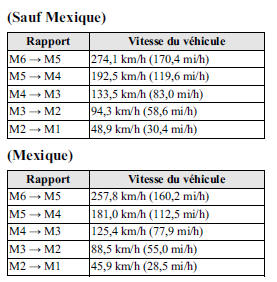
NOTE
Regarding the vehicle speed for the highest gear shown above, it may not be possible to actually reach this speed depending on driving conditions such as wind, uphill slopes and road surface.
When decelerating, the transmission downshifts automatically when the speed drops to the following values:
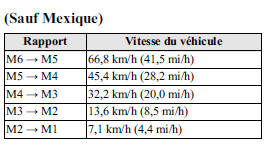
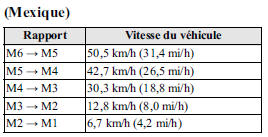
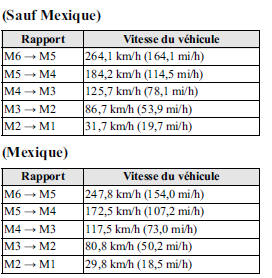
If kickdown is performed at the following speeds or lower, the gears downshift automatically:
Gear shift recommendations (United States and Canada)
Upshifting
For normal acceleration and cruising, the following shift points are recommended.
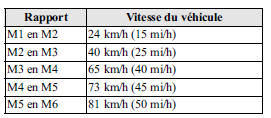
Downshifting
When you need to slow down in heavy traffic or climb a steep hill, downshift before the engine labors. This gives better acceleration when more speed is needed.
When descending a steep grade, downshift to maintain a safe speed and to reduce brake wear.
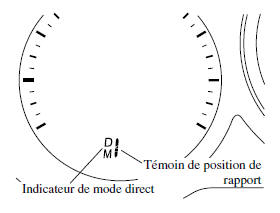
Direct mode
Direct mode can be used to temporarily change gears using the steering wheel shift paddles when the vehicle's shift lever is in the D position.
In direct mode, the D and M indicators light up and the gear in use is displayed.
Direct mode is cancelled (disabled) under the following conditions:
- The vehicle is driven for a certain period of time or longer (the time varies depending on driving conditions).
- The vehicle is stopped or moving slowly.
NOTE
Depending on vehicle speed, gear shifting may not be possible when the direct mode is activated. Also, direct mode is canceled (deactivated) depending on the acceleration level or when the accelerator pedal is pressed. Use the manual shift mode when driving at a constant speed for extended periods.
Driving tips
WARNING
Do not let the vehicle roll backward on an uphill slope with the selector lever in a forward driving position, or roll forward on a downhill slope with the selector lever in reverse:
Otherwise, the engine will stop, which disables the brake booster and power steering functions, makes the vehicle difficult to control, and may cause an accident.
Passing
For more power when passing another vehicle or climbing a steep hill, press the accelerator pedal fully down. The transmission will downshift to a lower gear, depending on vehicle speed.
NOTE
The accelerator pedal feels firmer when pressed down, but then becomes lighter, as when fully depressed.
This change in pedal resistance helps the engine control system determine how the accelerator pedal was pressed in order to downshift, and the functions used to control whether or not to downshift.
Hill start
To drive up a hill from a stopped position:
- Depress the brake pedal.
- Shift to D or M1, depending on the vehicle load and the steepness of the slope.
- Release the brake pedal while gradually accelerating.
Driving downhill
When driving down a steep slope, shift to a lower gear range, depending on the vehicle load and the steepness of the slope. Descend slowly, and use the brakes only occasionally to prevent them from overheating.
Test yourself
A quick Mazda 6 quiz: every answer comes with an explanation and a link to the manual page.