Do-it-yourself - Battery

In this manual: Do-it-yourself - Battery
Air bags, seat belts and child restraints — 1Exterior front — 1Exterior rear — 1Passenger compartment — 1Instrument panel — 1Engine compartment check locations — 1Warning and indicator lights — 1Basic Information — 1Basic Information — 1Precautions on Seat Belt Usage — 1Safety - Seats, Seat Belts and Supplemental Restraint System - Child safety — 1Precautions on child restraints — 1Precautions on SRS — 1Instruments and Controls - Instrument Panel — 1Basic Information — 1Warning & Indicator Lights — 1Basic Information — 1Instruments and Controls - Security Systems — 1Instruments and Controls - Wiper and Washer Switch — 1Headlight Control Switch — 1Instruments and Controls - Horn — 1Instruments and Controls - Heated Seat Switches — 1Instruments and Controls - Heated Steering Wheel Switch — 1Instruments and Controls - Vehicle Dynamic Control (VDC) OFF Switch — 1Instruments and Controls - Hill Descent Control Switch — 1Instruments and Controls - Warning systems switch — 1Instruments and Controls - Electronic locking rear differential (E-Lock) system switch — 1Instruments and Controls - Power inverter switch — 1Instruments and Controls - Parking Aids system switch — 1Instruments and Controls - Tow mode switch — 1Instruments and Controls - Emergency Call (SOS) button — 1Instruments and Controls - USB charging ports — 1Instruments and Controls - Wireless charger — 1Instruments and Controls - Rear Door Alert — 1Instruments and Controls - Power outlets — 1Instruments and Controls - Extended storage switch — 1Front-door pockets — 1Instruments and Controls - Windows — 1Instruments and Controls - Moonroof — 1Instruments and Controls - Interior lights — 1Instruments and Controls - HomeLink Universal Transceiver — 1Pre-driving checks and adjustments - Keys — 1Basic information — 1Basic information — 1Basic information — 1Pre-driving checks and adjustments - Hood — 1Pre-driving checks and adjustments - Fuel-filler door — 1Pre-driving checks and adjustments - Steering wheel — 1Pre-driving checks and adjustments - Sun visors — 1Pre-driving checks and adjustments - Mirrors — 1Pre-driving checks and adjustments - Truck box — 1Monitor, climate, audio, phone and voice recognition systems - NissanConnect Owner's Manual — 1Monitor, climate, audio, phone and voice recognition systems - Safety Note — 1Basic Information — 1Basic Information — 1Basic Information — 1Basic Information — 1Basic Information — 1Monitor, climate, audio, phone and voice recognition systems - Servicing air conditioner — 1Monitor, climate, audio, phone and voice recognition systems - Car phone or CB radio — 1Basic Information — 1Basic Information — 1Starting and driving - Starting the engine — 1Engine protection mode — 1Starting and driving - Parking brake — 1Starting and driving - Terrain Mode Selector — 1Starting and driving - Traffic Sign Recognition (TSR) — 1Basic Information — 1Basic Information — 1Basic Information — 1Basic Information — 1Basic Information — 1Basic Information — 1Basic Information — 1Basic Information — 1Starting and driving - Intelligent Driver Alertness (I-DA) — 1Starting and driving - Break-in schedule — 1Starting and driving - Using 4-Wheel Drive (4WD) — 1Starting and driving - Electronic locking rear differential (E-Lock) system — 1Starting and driving - Parking/parking on hills — 1Starting and driving - Brake system — 1Starting and driving - Active Brake Limited Slip (ABLS) system — 1Starting and driving - Vehicle Dynamic Control (VDC) system — 1Starting and driving - Hill descent control system — 1Starting and driving - Hill start assist system — 1Basic Information — 1Basic Information — 1Starting and driving - Cold weather driving — 1In case of emergency - Hazard warning flasher switch — 1In case of emergency - Flat tire — 1In case of emergency - Jump starting — 1In case of emergency - If your vehicle overheats — 1In case of emergency - Towing your vehicle — 1Appearance and care - Cleaning exterior — 1Appearance and care - Cleaning interior — 1Appearance and care - Corrosion protection — 1Do-it-yourself - Maintenance precautions — 1Do-it-yourself - Engine compartment check locations — 1Basic information — 1Checking engine oil level — 1Do-it-yourself - Automatic Transmission Fluid (ATF) — 1Do-it-yourself - Brake fluid — 1Do-it-yourself - Windshield-washer fluid — 1Do-it-yourself - Battery — 1Do-it-yourself - Variable voltage control system — 1Do-it-yourself - Drive belt — 1Do-it-yourself - Spark plugs — 1Do-it-yourself - Air cleaner — 1Do-it-yourself - Windshield wiper blades — 1Do-it-yourself - Brakes — 1Do-it-yourself - Fuses — 1Do-it-yourself - Intelligent Key battery replacement — 1Do-it-yourself - Lights — 1Tire pressure — 1Maintenance and schedules — 5Technical and consumer information — 14
~4min read

Basic information

Caution symbols for battery:

  • No exposed flames, No Sparks
Nissan Frontier battery warning symbol for no flames and no sparks

WARNING

Do not expose the Nissan Frontier battery to open flames, electrical sparks, cigarettes, or other ignition sources. Hydrogen gas produced by the battery is explosive.

Explosive battery gases can cause serious injury, blindness, or other severe harm.

  • Shield eyes
Nissan Frontier battery warning symbol for eye protection

WARNING

Handle the battery with extreme caution. Always wear suitable eye protection to guard against battery acid exposure or injury from a possible explosion.

  • Keep away from children
Nissan Frontier battery warning symbol to keep children away

WARNING

Never allow children to handle or play near the battery.

Keep the Nissan Frontier battery out of the reach of children at all times.

  • Battery acid
Nissan Frontier battery acid warning symbol

WARNING

Do not allow battery fluid to contact your skin, eyes, clothing, fabrics, or painted vehicle surfaces.

Battery fluid contains sulfuric acid, which can cause severe burns or blindness. After handling the battery or battery cap, do not touch or rub your eyes. Wash your hands thoroughly. If acid contacts your eyes, skin, or clothing, immediately flush the affected area with clean water for at least 15 minutes and seek medical attention. Battery fluid is highly corrosive.

If battery fluid gets into your eyes or onto your skin, it may cause serious burns or loss of eyesight.

  • Note operating instructions
Nissan Frontier battery instruction warning symbol

WARNING

Before handling the battery, carefully read all instructions to ensure safe and correct battery service procedures.

  • Explosive gas
Nissan Frontier battery explosive gas warning symbol

WARNING

Hydrogen gas generated by battery fluid is explosive. Explosive gases may cause blindness, burns, or serious personal injury.

  • If the battery is labeled "do not open," it is maintenance-free and the battery fluid level should not be checked. It is recommended that you visit a NISSAN dealer or a qualified specialist workshop to confirm battery condition and performance.
  • Keep the battery surface clean and dry.

    Clean the battery using a solution of baking soda and water, taking care to prevent the solution from entering the battery.

  • Make sure the battery terminal connections are clean, free of corrosion, and securely tightened.
  • If the Nissan Frontier will not be used for 30 days or longer, disconnect the negative (-) battery terminal cable to help prevent battery discharge.

NOTE:

Care should be taken to avoid situations that may cause battery discharge and possible no-start conditions, including:

1. Installing or using electronic accessories for extended periods while the engine is not running, such as phone chargers, GPS units, DVD players, dash cameras, or other devices that draw battery power.

2. Driving the Nissan Frontier infrequently, or using it mainly for very short trips that do not allow the battery to recharge properly.

In these situations, the battery may need to be charged periodically to maintain proper battery health and reliable starting performance.

The Nissan Frontier is equipped with a battery cover that helps protect the battery from engine heat and from damage during certain collision conditions.

When replacing the battery, the cover must always be reinstalled correctly.

WARNING

  • Do not expose the battery to flames, sparks, or other ignition sources. Hydrogen gas generated by the battery is explosive and can cause blindness or injury. Do not allow battery fluid to contact your skin, eyes, clothing, fabrics, or painted surfaces. Sulfuric acid can cause blindness, burns, or serious injury.

    After touching a battery or battery cap, do not touch or rub your eyes. Wash your hands thoroughly. If acid contacts your eyes, skin, or clothing, immediately flush the area with clean water for at least 15 minutes and seek medical attention.

  • When working on or near the Nissan Frontier battery, always wear suitable eye protection and remove all jewelry, including rings, watches, bracelets, and metal accessories.
  • Battery posts, terminals, and related accessories contain lead and lead compounds. Wash your hands after handling them.
  • Keep the battery out of the reach of children.
  • Do not tip the battery, as battery fluid may leak and cause injury or damage.
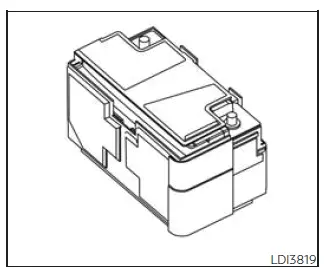
Nissan Frontier maintenance-free battery with non-removable vent caps

NOTE:

Do not attempt to open the top of the Nissan Frontier battery.

This battery is not equipped with removable vent caps and is not intended to be opened for fluid inspection.

Jump starting

If jump starting is required, refer to the "Jump starting" instructions. If the Nissan Frontier engine does not start after proper jump starting, the battery may need to be replaced. It is recommended that you visit a NISSAN dealer for inspection and service.

Proper battery care, clean terminals, correct charging habits, and safe handling procedures help maintain dependable Nissan Frontier starting performance and reduce the risk of electrical problems.


next pagenext pageWindshield-washer fluidVariable voltage control systemnext pagenext page

Nissan Frontier 2022-2026 Owner's Manual

More Nissan Vehicles

More Nissan Manuals

More Owner's Manuals

© 2023-2026 - Nissan Frontier technical manuals - www.nifrontier.com/


