Basic information

In this manual: Basic information
Air bags, seat belts and child restraints — 1Exterior front — 1Exterior rear — 1Passenger compartment — 1Instrument panel — 1Engine compartment check locations — 1Warning and indicator lights — 1Basic Information — 1Basic Information — 1Precautions on Seat Belt Usage — 1Safety - Seats, Seat Belts and Supplemental Restraint System - Child safety — 1Precautions on child restraints — 1Precautions on SRS — 1Instruments and Controls - Instrument Panel — 1Basic Information — 1Warning & Indicator Lights — 1Basic Information — 1Instruments and Controls - Security Systems — 1Instruments and Controls - Wiper and Washer Switch — 1Headlight Control Switch — 1Instruments and Controls - Horn — 1Instruments and Controls - Heated Seat Switches — 1Instruments and Controls - Heated Steering Wheel Switch — 1Instruments and Controls - Vehicle Dynamic Control (VDC) OFF Switch — 1Instruments and Controls - Hill Descent Control Switch — 1Instruments and Controls - Warning systems switch — 1Instruments and Controls - Electronic locking rear differential (E-Lock) system switch — 1Instruments and Controls - Power inverter switch — 1Instruments and Controls - Parking Aids system switch — 1Instruments and Controls - Tow mode switch — 1Instruments and Controls - Emergency Call (SOS) button — 1Instruments and Controls - USB charging ports — 1Instruments and Controls - Wireless charger — 1Instruments and Controls - Rear Door Alert — 1Instruments and Controls - Power outlets — 1Instruments and Controls - Extended storage switch — 1Front-door pockets — 1Instruments and Controls - Windows — 1Instruments and Controls - Moonroof — 1Instruments and Controls - Interior lights — 1Instruments and Controls - HomeLink Universal Transceiver — 1Pre-driving checks and adjustments - Keys — 1Basic information — 1Basic information — 1Basic information — 1Pre-driving checks and adjustments - Hood — 1Pre-driving checks and adjustments - Fuel-filler door — 1Pre-driving checks and adjustments - Steering wheel — 1Pre-driving checks and adjustments - Sun visors — 1Pre-driving checks and adjustments - Mirrors — 1Pre-driving checks and adjustments - Truck box — 1Monitor, climate, audio, phone and voice recognition systems - NissanConnect Owner's Manual — 1Monitor, climate, audio, phone and voice recognition systems - Safety Note — 1Basic Information — 1Basic Information — 1Basic Information — 1Basic Information — 1Basic Information — 1Monitor, climate, audio, phone and voice recognition systems - Servicing air conditioner — 1Monitor, climate, audio, phone and voice recognition systems - Car phone or CB radio — 1Basic Information — 1Basic Information — 1Starting and driving - Starting the engine — 1Engine protection mode — 1Starting and driving - Parking brake — 1Starting and driving - Terrain Mode Selector — 1Starting and driving - Traffic Sign Recognition (TSR) — 1Basic Information — 1Basic Information — 1Basic Information — 1Basic Information — 1Basic Information — 1Basic Information — 1Basic Information — 1Basic Information — 1Starting and driving - Intelligent Driver Alertness (I-DA) — 1Starting and driving - Break-in schedule — 1Starting and driving - Using 4-Wheel Drive (4WD) — 1Starting and driving - Electronic locking rear differential (E-Lock) system — 1Starting and driving - Parking/parking on hills — 1Starting and driving - Brake system — 1Starting and driving - Active Brake Limited Slip (ABLS) system — 1Starting and driving - Vehicle Dynamic Control (VDC) system — 1Starting and driving - Hill descent control system — 1Starting and driving - Hill start assist system — 1Basic Information — 1Basic Information — 1Starting and driving - Cold weather driving — 1In case of emergency - Hazard warning flasher switch — 1In case of emergency - Flat tire — 1In case of emergency - Jump starting — 1In case of emergency - If your vehicle overheats — 1In case of emergency - Towing your vehicle — 1Appearance and care - Cleaning exterior — 1Appearance and care - Cleaning interior — 1Appearance and care - Corrosion protection — 1Do-it-yourself - Maintenance precautions — 1Do-it-yourself - Engine compartment check locations — 1Basic information — 1Checking engine oil level — 1Do-it-yourself - Automatic Transmission Fluid (ATF) — 1Do-it-yourself - Brake fluid — 1Do-it-yourself - Windshield-washer fluid — 1Do-it-yourself - Battery — 1Do-it-yourself - Variable voltage control system — 1Do-it-yourself - Drive belt — 1Do-it-yourself - Spark plugs — 1Do-it-yourself - Air cleaner — 1Do-it-yourself - Windshield wiper blades — 1Do-it-yourself - Brakes — 1Do-it-yourself - Fuses — 1Do-it-yourself - Intelligent Key battery replacement — 1Do-it-yourself - Lights — 1Tire pressure — 1Maintenance and schedules — 5Technical and consumer information — 14
~4min read

Basic information Nissan Frontier third generation

The doors of the Nissan Frontier are equipped with multiple locking and security features designed to improve occupant protection, vehicle security, and everyday convenience. When the doors are locked using any of the available locking methods, they cannot be opened from either the inside or outside door handles until they are properly unlocked.

Always ensure that the doors are unlocked before attempting to enter or exit the Nissan Frontier.

WARNING

  • Always keep the doors locked while driving. When combined with proper seat belt use, locked doors provide additional protection in the event of a collision by helping reduce the possibility of occupants being ejected from the vehicle. Locked doors also help prevent children from accidentally opening a door and provide an added layer of protection against unauthorized entry.
  • Before opening any door of the Nissan Frontier, always check for approaching vehicles, cyclists, pedestrians, or other potential hazards.
  • To help reduce the risk of injury or death resulting from unintended vehicle operation, accidental window operation, or inadvertent door locking, never leave children, individuals requiring assistance, or pets unattended inside the vehicle. Interior temperatures can rise rapidly, even on moderately warm days, creating dangerous conditions within a short period of time.

Locking with key Nissan Frontier SUV
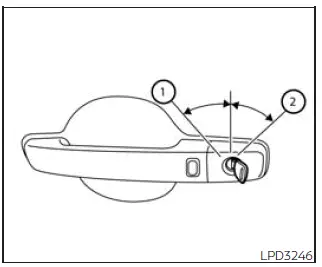
Nissan Frontier driver's door mechanical key lock operation
Driver's side

To lock the Nissan Frontier driver's door using the mechanical key, insert the key and turn it toward the rear of the vehicle 2. This action locks only the corresponding door and does not activate the vehicle security system.

To arm the Nissan Frontier security system, press the

Nissan Frontier Intelligent Key lock button

button on the Intelligent Key after exiting the vehicle.

To unlock the door using the mechanical key, turn the key toward the front of the vehicle 1. This action unlocks only the corresponding door and does not automatically deactivate the security system.

Locking with inside lock knob
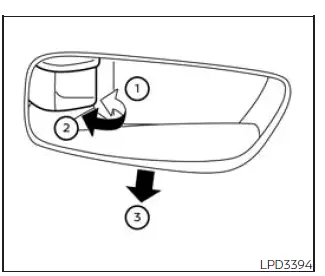
Nissan Frontier inside door lock knob operation
Inside lock

To lock a door from inside the Nissan Frontier without using a key, move the inside lock knob to the lock position 1 and then close the door.

To unlock a door manually, move the inside lock knob to the unlock position 2.

For added convenience, the front doors can also be unlocked and opened without operating the lock knob directly. Pull the interior door handle 3 once to unlock the door and pull it a second time to open the door.

This two-stage operation helps improve convenience while maintaining vehicle security.

Locking with power door lock switch
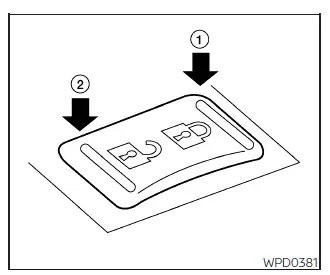
Nissan Frontier power door lock switch

To lock all doors simultaneously without using a key, press the power door lock switch located on either the driver's side or front passenger's side to the lock position 1.

When using this method, always verify that the Nissan Frontier Intelligent Key is not left inside the vehicle before locking the doors.

To unlock all doors, press the power door lock switch to the unlock position 2.

The centralized locking system allows quick and convenient control of all vehicle doors from the front seating area.

Rear doors (King Cab models) Nissan Frontier 2022
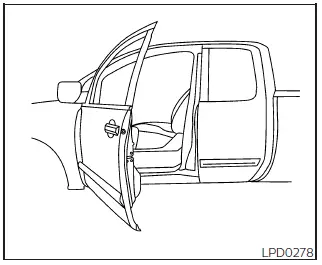
Nissan Frontier King Cab rear door opening step 1

1. Open the driver's door or front passenger's door.
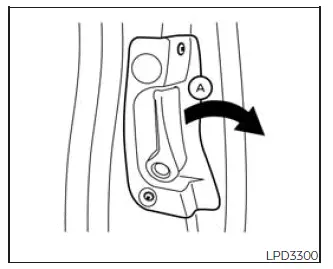
Nissan Frontier King Cab rear door handle operation step 2

2. From outside the vehicle, pull door handle A toward you.

Nissan Frontier King Cab rear door fully opened step 3

3. Open the rear door to the desired position.

The rear access doors on Nissan Frontier King Cab models provide improved access to the rear seating area and cargo storage space while maintaining a practical and durable cabin design.

Automatic door locks

  • All Nissan Frontier doors automatically lock when vehicle speed reaches approximately 24 km/h, helping enhance occupant safety while driving.
  • All doors automatically unlock when the transmission is shifted into the P (Park) position or when the ignition switch is moved to the OFF position, depending on the settings selected within the "Vehicle Settings" menu.

NOTE:

The Auto Door Unlock function can be customized through the Nissan Frontier vehicle information display using the available Vehicle Settings menu options.

Child safety rear door lock

Nissan Frontier child safety rear door lock lever

Child safety rear door locks help prevent accidental opening of the rear doors from inside the vehicle, making them especially valuable when transporting children.

The child safety lock levers are positioned along the edge of each rear door and can be easily activated or deactivated as needed.

When the child safety lock is enabled, rear passengers cannot open the door using the interior door handle.

When the lever is in the LOCK position, the rear door can only be opened from the outside of the Nissan Frontier.

This feature provides an additional level of protection for families and helps reduce the risk of accidental door opening while the vehicle is moving.


next pagenext pageKeysNISSAN Intelligent Key systemnext pagenext page

Nissan Frontier 2022-2026 Owner's Manual

Doors

More Nissan Vehicles

More Nissan Manuals

More Owner's Manuals

© 2023-2026 - Nissan Frontier technical manuals - www.nifrontier.com/


