Do-it-yourself - Intelligent Key battery replacement

In this manual: Do-it-yourself - Intelligent Key battery replacement
Air bags, seat belts and child restraints — 1Exterior front — 1Exterior rear — 1Passenger compartment — 1Instrument panel — 1Engine compartment check locations — 1Warning and indicator lights — 1Basic Information — 1Basic Information — 1Precautions on Seat Belt Usage — 1Safety - Seats, Seat Belts and Supplemental Restraint System - Child safety — 1Precautions on child restraints — 1Precautions on SRS — 1Instruments and Controls - Instrument Panel — 1Basic Information — 1Warning & Indicator Lights — 1Basic Information — 1Instruments and Controls - Security Systems — 1Instruments and Controls - Wiper and Washer Switch — 1Headlight Control Switch — 1Instruments and Controls - Horn — 1Instruments and Controls - Heated Seat Switches — 1Instruments and Controls - Heated Steering Wheel Switch — 1Instruments and Controls - Vehicle Dynamic Control (VDC) OFF Switch — 1Instruments and Controls - Hill Descent Control Switch — 1Instruments and Controls - Warning systems switch — 1Instruments and Controls - Electronic locking rear differential (E-Lock) system switch — 1Instruments and Controls - Power inverter switch — 1Instruments and Controls - Parking Aids system switch — 1Instruments and Controls - Tow mode switch — 1Instruments and Controls - Emergency Call (SOS) button — 1Instruments and Controls - USB charging ports — 1Instruments and Controls - Wireless charger — 1Instruments and Controls - Rear Door Alert — 1Instruments and Controls - Power outlets — 1Instruments and Controls - Extended storage switch — 1Front-door pockets — 1Instruments and Controls - Windows — 1Instruments and Controls - Moonroof — 1Instruments and Controls - Interior lights — 1Instruments and Controls - HomeLink Universal Transceiver — 1Pre-driving checks and adjustments - Keys — 1Basic information — 1Basic information — 1Basic information — 1Pre-driving checks and adjustments - Hood — 1Pre-driving checks and adjustments - Fuel-filler door — 1Pre-driving checks and adjustments - Steering wheel — 1Pre-driving checks and adjustments - Sun visors — 1Pre-driving checks and adjustments - Mirrors — 1Pre-driving checks and adjustments - Truck box — 1Monitor, climate, audio, phone and voice recognition systems - NissanConnect Owner's Manual — 1Monitor, climate, audio, phone and voice recognition systems - Safety Note — 1Basic Information — 1Basic Information — 1Basic Information — 1Basic Information — 1Basic Information — 1Monitor, climate, audio, phone and voice recognition systems - Servicing air conditioner — 1Monitor, climate, audio, phone and voice recognition systems - Car phone or CB radio — 1Basic Information — 1Basic Information — 1Starting and driving - Starting the engine — 1Engine protection mode — 1Starting and driving - Parking brake — 1Starting and driving - Terrain Mode Selector — 1Starting and driving - Traffic Sign Recognition (TSR) — 1Basic Information — 1Basic Information — 1Basic Information — 1Basic Information — 1Basic Information — 1Basic Information — 1Basic Information — 1Basic Information — 1Starting and driving - Intelligent Driver Alertness (I-DA) — 1Starting and driving - Break-in schedule — 1Starting and driving - Using 4-Wheel Drive (4WD) — 1Starting and driving - Electronic locking rear differential (E-Lock) system — 1Starting and driving - Parking/parking on hills — 1Starting and driving - Brake system — 1Starting and driving - Active Brake Limited Slip (ABLS) system — 1Starting and driving - Vehicle Dynamic Control (VDC) system — 1Starting and driving - Hill descent control system — 1Starting and driving - Hill start assist system — 1Basic Information — 1Basic Information — 1Starting and driving - Cold weather driving — 1In case of emergency - Hazard warning flasher switch — 1In case of emergency - Flat tire — 1In case of emergency - Jump starting — 1In case of emergency - If your vehicle overheats — 1In case of emergency - Towing your vehicle — 1Appearance and care - Cleaning exterior — 1Appearance and care - Cleaning interior — 1Appearance and care - Corrosion protection — 1Do-it-yourself - Maintenance precautions — 1Do-it-yourself - Engine compartment check locations — 1Basic information — 1Checking engine oil level — 1Do-it-yourself - Automatic Transmission Fluid (ATF) — 1Do-it-yourself - Brake fluid — 1Do-it-yourself - Windshield-washer fluid — 1Do-it-yourself - Battery — 1Do-it-yourself - Variable voltage control system — 1Do-it-yourself - Drive belt — 1Do-it-yourself - Spark plugs — 1Do-it-yourself - Air cleaner — 1Do-it-yourself - Windshield wiper blades — 1Do-it-yourself - Brakes — 1Do-it-yourself - Fuses — 1Do-it-yourself - Intelligent Key battery replacement — 1Do-it-yourself - Lights — 1Tire pressure — 1Maintenance and schedules — 5Technical and consumer information — 14
~3min read
1special tools

Basic information

WARNING

  • Ingestion hazard: swallowing a button cell or coin battery can cause death or serious injury.
  • A swallowed button cell or coin battery can cause severe internal chemical burns in as little as 2 hours.
  • Keep both new and used batteries out of the reach of children at all times.
  • Be careful that children or pets do not swallow any removed Intelligent Key parts or the battery.
  • Seek immediate medical attention if a battery may have been swallowed or inserted into any part of the body.
  • For treatment information, call the National Battery Ingestion Hotline at 1-800-498-8666.
  • There is a risk of explosion if the battery is replaced incorrectly. Replace the battery only with the same or equivalent type. Incorrect battery replacement can result in injury or death.
  • Do not crush, puncture, or cut the battery.
  • Do not expose the battery to extremely low air pressure at high altitude.
  • Do not expose the battery to excessive heat, including direct sunlight, fire, or similar heat sources.

CAUTION

  • An improperly discarded battery can harm the environment. Always follow local regulations for battery disposal.
  • When replacing the Intelligent Key battery, keep dust, oil, moisture, and dirt away from the internal components.

NISSAN Intelligent Key
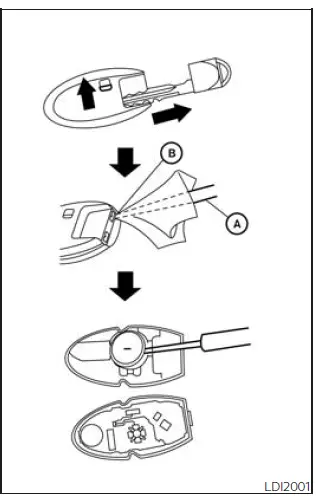
Nissan Frontier Intelligent Key case opening with small flathead screwdriver

Replace the battery in the Nissan Frontier Intelligent Key as follows:

1. Remove the mechanical key from the Intelligent Key.

2. Insert a small flathead screwdriver A into the slit B at the corner of the Intelligent Key. Gently twist the screwdriver to separate the upper part from the lower part. Place a cloth over the screwdriver to help protect the key casing from scratches or damage.
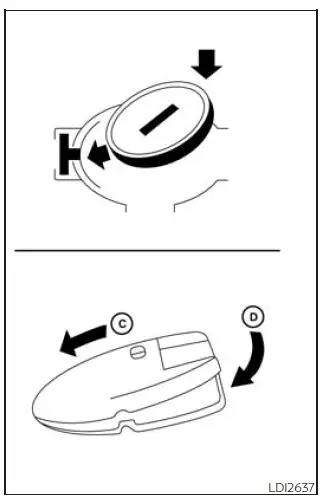
Nissan Frontier Intelligent Key CR2032 battery replacement and polarity position

3. Replace the old battery with a new one.

Recommended battery: CR2032 or equivalent.

  • Do not touch the internal circuit board or electrical terminals, as this may cause the Intelligent Key to malfunction.
  • Hold the battery only by its edges. Touching the battery across the contact surfaces may significantly reduce its stored capacity.
  • Make sure the + side of the battery faces the bottom of the lower part, as shown.

4. Close the Intelligent Key case securely as illustrated with C and D.

5. Press the buttons to confirm that the Intelligent Key operates correctly with the Nissan Frontier.

If you need assistance replacing the battery or checking Intelligent Key operation, it is recommended that you visit a NISSAN dealer for this service.

Correct battery installation helps maintain reliable remote locking, unlocking, and Nissan Frontier Intelligent Key performance. If the key operates only at a short distance after replacement, recheck the battery position and make sure the case is fully closed.

FCC Notice:

For USA:

This device complies with Part 15 of the FCC Rules. Operation is subject to the following two conditions: (1) This device may not cause harmful interference, and (2) this device must accept any interference received, including interference that may cause undesired operation.

Note:

Changes or modifications not expressly approved by the party responsible for compliance could void the user's authority to operate the equipment.

For Canada:

This device contains licence-exempt transmitter(s)/receiver(s) that comply with Innovation, Science and Economic Development Canada's licence-exempt RSS(s). Operation is subject to the following two conditions: (1) This device may not cause interference. (2) This device must accept any interference, including interference that may cause undesired operation of the device.


next pagenext pageFusesLightsnext pagenext page

Nissan Frontier 2022-2026 Owner's Manual

More Nissan Vehicles

More Nissan Manuals

More Owner's Manuals

© 2023-2026 - Nissan Frontier technical manuals - www.nifrontier.com/


