Do-it-yourself - Lights

In this manual: Do-it-yourself - Lights
Air bags, seat belts and child restraints — 1Exterior front — 1Exterior rear — 1Passenger compartment — 1Instrument panel — 1Engine compartment check locations — 1Warning and indicator lights — 1Basic Information — 1Basic Information — 1Precautions on Seat Belt Usage — 1Safety - Seats, Seat Belts and Supplemental Restraint System - Child safety — 1Precautions on child restraints — 1Precautions on SRS — 1Instruments and Controls - Instrument Panel — 1Basic Information — 1Warning & Indicator Lights — 1Basic Information — 1Instruments and Controls - Security Systems — 1Instruments and Controls - Wiper and Washer Switch — 1Headlight Control Switch — 1Instruments and Controls - Horn — 1Instruments and Controls - Heated Seat Switches — 1Instruments and Controls - Heated Steering Wheel Switch — 1Instruments and Controls - Vehicle Dynamic Control (VDC) OFF Switch — 1Instruments and Controls - Hill Descent Control Switch — 1Instruments and Controls - Warning systems switch — 1Instruments and Controls - Electronic locking rear differential (E-Lock) system switch — 1Instruments and Controls - Power inverter switch — 1Instruments and Controls - Parking Aids system switch — 1Instruments and Controls - Tow mode switch — 1Instruments and Controls - Emergency Call (SOS) button — 1Instruments and Controls - USB charging ports — 1Instruments and Controls - Wireless charger — 1Instruments and Controls - Rear Door Alert — 1Instruments and Controls - Power outlets — 1Instruments and Controls - Extended storage switch — 1Front-door pockets — 1Instruments and Controls - Windows — 1Instruments and Controls - Moonroof — 1Instruments and Controls - Interior lights — 1Instruments and Controls - HomeLink Universal Transceiver — 1Pre-driving checks and adjustments - Keys — 1Basic information — 1Basic information — 1Basic information — 1Pre-driving checks and adjustments - Hood — 1Pre-driving checks and adjustments - Fuel-filler door — 1Pre-driving checks and adjustments - Steering wheel — 1Pre-driving checks and adjustments - Sun visors — 1Pre-driving checks and adjustments - Mirrors — 1Pre-driving checks and adjustments - Truck box — 1Monitor, climate, audio, phone and voice recognition systems - NissanConnect Owner's Manual — 1Monitor, climate, audio, phone and voice recognition systems - Safety Note — 1Basic Information — 1Basic Information — 1Basic Information — 1Basic Information — 1Basic Information — 1Monitor, climate, audio, phone and voice recognition systems - Servicing air conditioner — 1Monitor, climate, audio, phone and voice recognition systems - Car phone or CB radio — 1Basic Information — 1Basic Information — 1Starting and driving - Starting the engine — 1Engine protection mode — 1Starting and driving - Parking brake — 1Starting and driving - Terrain Mode Selector — 1Starting and driving - Traffic Sign Recognition (TSR) — 1Basic Information — 1Basic Information — 1Basic Information — 1Basic Information — 1Basic Information — 1Basic Information — 1Basic Information — 1Basic Information — 1Starting and driving - Intelligent Driver Alertness (I-DA) — 1Starting and driving - Break-in schedule — 1Starting and driving - Using 4-Wheel Drive (4WD) — 1Starting and driving - Electronic locking rear differential (E-Lock) system — 1Starting and driving - Parking/parking on hills — 1Starting and driving - Brake system — 1Starting and driving - Active Brake Limited Slip (ABLS) system — 1Starting and driving - Vehicle Dynamic Control (VDC) system — 1Starting and driving - Hill descent control system — 1Starting and driving - Hill start assist system — 1Basic Information — 1Basic Information — 1Starting and driving - Cold weather driving — 1In case of emergency - Hazard warning flasher switch — 1In case of emergency - Flat tire — 1In case of emergency - Jump starting — 1In case of emergency - If your vehicle overheats — 1In case of emergency - Towing your vehicle — 1Appearance and care - Cleaning exterior — 1Appearance and care - Cleaning interior — 1Appearance and care - Corrosion protection — 1Do-it-yourself - Maintenance precautions — 1Do-it-yourself - Engine compartment check locations — 1Basic information — 1Checking engine oil level — 1Do-it-yourself - Automatic Transmission Fluid (ATF) — 1Do-it-yourself - Brake fluid — 1Do-it-yourself - Windshield-washer fluid — 1Do-it-yourself - Battery — 1Do-it-yourself - Variable voltage control system — 1Do-it-yourself - Drive belt — 1Do-it-yourself - Spark plugs — 1Do-it-yourself - Air cleaner — 1Do-it-yourself - Windshield wiper blades — 1Do-it-yourself - Brakes — 1Do-it-yourself - Fuses — 1Do-it-yourself - Intelligent Key battery replacement — 1Do-it-yourself - Lights — 1Tire pressure — 1Maintenance and schedules — 5Technical and consumer information — 14
8steps
~48min
2/5difficulty
Done 0 of 8

Basic information

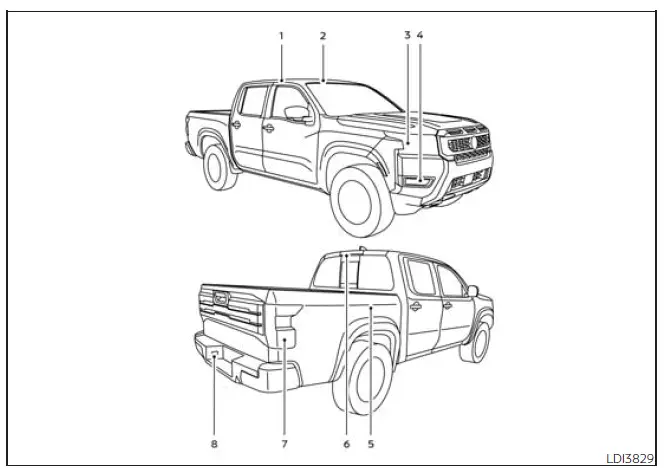
Nissan Frontier exterior and interior light locations overview
  1. Room light
  2. Map lights
  3. Headlight assembly
  4. Fog light/Fog light assembly (if so equipped)
  5. Bed lights (if so equipped)
  6. High-mount stop light/cargo light
  7. Rear combination light
  8. License plate lights

Headlights

For additional information about Nissan Frontier headlight bulb replacement, follow the instructions provided in this section and use the correct bulb type for your specific vehicle equipment.

Temporary fogging may appear inside the exterior light lenses during rain, after a car wash, or when there is a temperature difference between the inside and outside of the lens. This light moisture haze is normal and does not indicate a malfunction. If large water droplets collect inside the lens, it is recommended that you visit a NISSAN dealer for inspection and service.

If headlight replacement or service is required, it is recommended that you visit a NISSAN dealer for proper diagnosis, replacement parts, and installation.

Exterior and interior lights

Basic information

This Nissan Frontier is equipped with LED lights in selected locations.

Visit a NISSAN dealer for LED light replacement, the correct replacement bulb type, or any bulb replacement procedure not specifically listed in this section.

  • Headlight (Type A) (if so equipped)*
    Turn/Park
    • Wattage (W): 28/8
    • Bulb No.: 7444NA
  • Map lights (Type A) (if so equipped)
    • Wattage (W): 8
    • Bulb No.: -
  • Room light (Type A) (if so equipped)
    • Wattage (W): 8
    • Bulb No.: -
  • Vanity mirror light (if so equipped)*
    • Wattage (W): 1.4
    • Bulb No.: -
  • High-mounted stop light/cargo light*
    • Wattage (W): 12.8
    • Bulb No.: 912

* It is recommended that you visit a NISSAN dealer for replacement.

Always check with the Parts Department at a NISSAN dealer for the most current bulb and parts information for your Nissan Frontier.
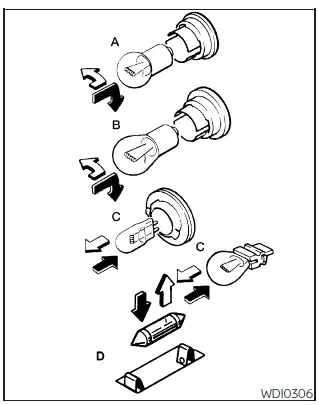
Nissan Frontier light bulb replacement type diagram

Replacement procedures

All other lights are classified as type A, B, C, or D depending on their design and installation method.

When replacing a bulb, first remove the lens and/or cover carefully using a suitable tool. Use a cloth to help protect the surrounding trim and lens from scratches.

Nissan Frontier bulb removal direction symbol: Indicates bulb removal

Nissan Frontier bulb installation direction symbol: Indicates bulb installation

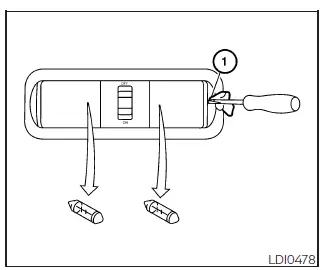
Nissan Frontier map light Type A replacement procedure
Map light (Type A) (if so equipped)

Use a cloth 1 to protect the housing while removing or installing the Nissan Frontier map light lens or bulb.
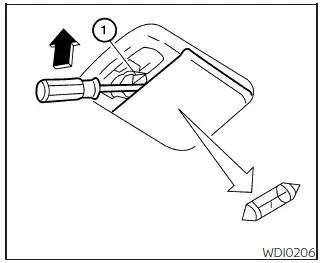
Nissan Frontier room light Type A replacement procedure
Room light (Type A) (if so equipped)

Use a cloth 1 to protect the housing while working on the room light assembly.

Correct light operation is important for visibility, signaling, interior convenience, and overall safety. After replacing any bulb, always confirm that the Nissan Frontier light operates properly before driving.


next pagenext pageIntelligent Key battery replacementWheels and tiresnext pagenext page

Nissan Frontier 2022-2026 Owner's Manual

More Nissan Vehicles

More Nissan Manuals

More Owner's Manuals

© 2023-2026 - Nissan Frontier technical manuals - www.nifrontier.com/