Appearance and care - Cleaning interior
Basic information
Maintaining a clean interior is essential for preserving the comfort, appearance, and long-term value of your Nissan Frontier. Regular cleaning helps protect interior trim panels, seating materials, electronic components, and decorative surfaces from premature wear and aging.
Periodically remove loose dust, dirt, and debris from the interior trim, plastic panels, dashboard surfaces, and seats using a vacuum cleaner or a soft-bristled brush. Clean vinyl surfaces and leather upholstery (if equipped) using a clean, soft cloth lightly dampened with a mild soap solution. After cleaning, wipe all surfaces with a dry, soft cloth to remove any remaining moisture.
Leather surfaces in the Nissan Frontier require routine care and cleaning to maintain their original appearance, softness, and durability over time.
Before applying any fabric protector to seats or interior trim, carefully review the manufacturer's recommendations. Certain fabric protection products contain chemicals that may discolor, stain, or bleach seat materials.
Use only a soft cloth dampened with clean water when cleaning the instrument cluster, meter lenses, and gauge covers.
WARNING
- Do not use wax-based or silicone-based products inside the Nissan Frontier cabin.
These products may damage interior trim components, electrical systems, switches, sensors, or electronic devices.
- Do not use excessive water, acidic cleaners, or hot steam cleaners on seats. Such cleaning methods may damage the seat materials or occupant classification sensor. Damage to these components may affect proper air bag system operation and could result in serious personal injury.
CAUTION
- Never use benzine, paint thinner, or similar aggressive chemicals on any interior surface.
- Small dirt particles can act as abrasives and may damage leather surfaces. Remove dirt promptly. Do not use saddle soap, automotive waxes, polishing compounds, oils, cleaning fluids, solvents, detergents, or ammonia-based cleaners because they may damage the natural leather finish.
- Never apply fabric protectors unless they are specifically recommended by the manufacturer of the material.
- Do not use glass cleaners or plastic cleaners on instrument cluster lenses or gauge covers. These products may cause clouding, discoloration, or surface damage.
- Never use chloride-based cleaning solutions on aluminum decorative trim pieces (if equipped), as permanent damage may occur.
Air fresheners
Many air fresheners contain solvents or chemicals that may affect interior materials. If you choose to use an air freshener inside your Nissan Frontier, follow these precautions:
- Hanging-style air fresheners may cause permanent discoloration if they touch interior panels, trim, or upholstery. Position them so they hang freely without contacting any interior surface.
- Liquid air fresheners that attach to ventilation outlets may cause immediate staining, discoloration, or damage if the liquid leaks or spills onto interior surfaces.
Always read and follow the air freshener manufacturer's instructions before use.
Power moonroof
The power moonroof sunshade is manufactured from a tricot fabric material that requires gentle cleaning techniques.
CAUTION
To help prevent damage while cleaning the moonroof sunshade:
- Do not rub the material with a cloth.
Rubbing may damage the fabric surface or spread existing stains over a larger area.
- Never use benzine, thinner, or similar chemicals to clean the sunshade.
These products may discolor the material and permanently damage the surface finish.
- For water-based stains, gently pat the affected area using a clean soft cloth dampened with warm water. Use a dry cloth to absorb excess moisture and allow the material to air dry naturally.
- For oil-based stains, carefully pat the surface using a clean soft cloth dampened with warm water.
Then use a clean dry cloth to remove as much moisture as possible and allow the material to air dry completely.
Floor mats
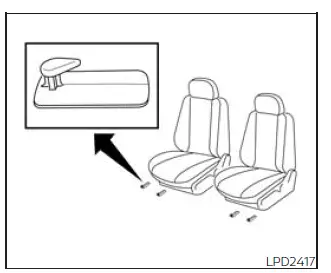
Basic information
WARNING
To avoid pedal interference that could result in a collision, serious injury, or death:
- NEVER place one floor mat on top of another in the driver's seating position and never install floor mats upside down or backwards.
- Use only Genuine NISSAN floor mats or equivalent floor mats specifically designed for your Nissan Frontier model and model year.
- Always position floor mats correctly using the factory floor mat retention hooks.
- Verify that the floor mat does not interfere with accelerator, brake, or clutch pedal operation.
- Inspect floor mat placement regularly to ensure proper installation.
- After cleaning the interior of the Nissan Frontier, confirm that all floor mats are correctly positioned.
The use of Genuine NISSAN floor mats helps protect the Nissan Frontier carpeting from wear, dirt, moisture, and stains while making routine interior cleaning easier. Floor mats should be cleaned regularly and replaced when excessively worn.
Floor mat installation
Your Nissan Frontier is equipped with floor mat retention hooks. The number, design, and location of these hooks vary depending on seating position and vehicle configuration.
When installing Genuine NISSAN floor mats, follow the supplied installation instructions and the procedures below:
1. With the ignition switch in the OFF position, the transmission in P (Park), and the parking brake fully applied, position the floor mat in the footwell so that the grommet holes align with the retention hooks.
2. Secure the grommet holes onto the hooks and verify that the floor mat is positioned correctly.
3. Confirm that the floor mat does not interfere with pedal operation. With the ignition switch still OFF, the shift lever in P (Park), and the parking brake applied, fully depress and release all pedals. The floor mat must not restrict movement or prevent any pedal from returning to its normal position.
For additional information regarding floor mat installation in the Nissan Frontier, it is recommended that you consult a NISSAN dealer.
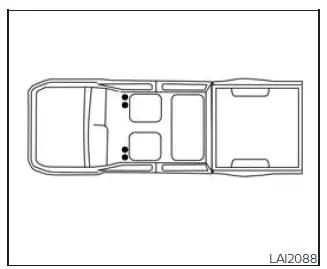
Positioning hooks
The illustration shows the location of the floor mat positioning hooks used to secure floor mats within the Nissan Frontier interior.
Seat belts
Seat belts can be cleaned using a sponge lightly dampened with a mild soap solution. After cleaning, allow the belts to dry completely in a shaded area before use.
WARNING
Do not allow wet seat belts to retract into the retractor mechanism. NEVER use bleach, dyes, chemical solvents, or harsh cleaning products on seat belts, as these substances can significantly weaken the seat belt webbing and reduce its effectiveness in protecting occupants during a collision.
Regular interior care helps maintain the premium appearance of your Nissan Frontier, protects sensitive materials and electronics, and ensures a cleaner, more comfortable driving environment for years of ownership.

 Cleaning exteriorCorrosion protection


