Instruments and Controls - Power outlets
12v Outlets
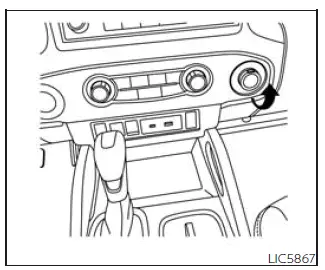
Instrument panel
The Nissan Frontier is equipped with convenient power outlets designed to supply electricity to a variety of portable electronic devices and accessories, including mobile phones, GPS units, air compressors, dash cameras, and other compatible equipment.
The 12-volt power outlet located on the instrument panel receives power only when the ignition switch is in the ACC or ON position, ensuring controlled operation while helping to manage battery usage.
To access the outlet, simply open the protective cap and insert the appropriate plug securely into the socket.
The Nissan Frontier power outlet system is engineered to provide reliable auxiliary power for everyday convenience, whether you are commuting, working on a job site, traveling, or enjoying outdoor activities.
CAUTION
- The outlet and plug may become hot during operation or immediately after use.
- Do not connect accessories that exceed a 12-volt, 120W (10A) electrical load.
- Do not use double adapters or connect multiple accessories to the outlet simultaneously.
- Operate power outlets with the engine running whenever possible to help prevent excessive battery discharge.
- Avoid prolonged use of the outlet when high electrical loads such as the air conditioner, headlights, or rear window defroster (if equipped) are operating.
- Before connecting or disconnecting an accessory, ensure that the accessory itself is switched OFF.
- Insert the plug fully into the outlet. Poor electrical contact may result in overheating or activation of the internal thermal protection fuse.
- When the outlet is not being used, always close the protective cap and prevent water, dirt, or other liquids from entering the socket.
120v Outlets
120V OUTLETS (if so equipped)
Basic Information
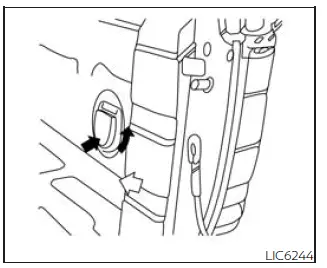
In truck box (if so equipped)
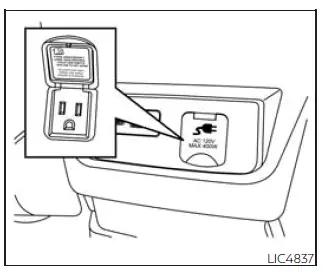
Center console (if so equipped)
The available 120-volt outlets in the Nissan Frontier provide household-style AC power for compatible electrical devices. Depending on equipment level, these outlets may be located in the truck bed and/or inside the center console, offering additional flexibility for work, recreation, camping, tailgating, and other outdoor activities.
These outlets can be used to power a wide range of portable electronics and small appliances within the specified power limits of the system. The Nissan Frontier power inverter system is designed to deliver practical utility while maintaining safe vehicle operation.
CAUTION
- Operating the 120-volt power system with the ignition switch in the ON position while the engine is not running may significantly discharge the vehicle battery. This can result in a no-start condition.
- The outlet and connected plug may become hot during operation or immediately after use.
- Use the 120V outlets with the engine running whenever possible to minimize battery drain.
- Do not use double adapters or connect multiple electrical accessories to the same outlet.
- Avoid operating high-power accessories while the air conditioner, headlights, or rear window defroster are being used.
- Always switch OFF electrical equipment before connecting or disconnecting it from the outlet.
- Push the plug fully into the outlet to ensure proper electrical contact. Incomplete insertion may cause overheating or activation of the outlet's protective circuitry.
- Keep the outlet closed when not in use and protect it from water, moisture, dust, and other contaminants.
WHAT IS PLUGGED IN
The type of equipment connected to a Nissan Frontier power outlet directly affects system performance and power availability. Always verify the power requirements of the connected device before use.
Portable electronics such as laptop computers, battery chargers, cameras, smartphones, tablets, work lights, and small power tools may operate normally when their power requirements fall within the system's rated capacity.
Devices with high startup current demands, heating elements, compressors, or large electric motors may exceed the available power output and could fail to operate correctly. In such cases, the system's protection features may interrupt power to prevent damage.
For maximum reliability and safety, use only properly grounded and manufacturer-approved equipment when utilizing the Nissan Frontier 120V power outlets.
The combination of 12V and available 120V outlets makes the Nissan Frontier especially versatile, allowing drivers to power and charge essential devices whether on the road, at a worksite, or during outdoor adventures.
Shifter in Park
1. No device connected, but the inverter switch is ON
- Indicator: 150W and 400W
- Inverter Status: ON
2. Connected device uses less than 150W
- Indicator: 150W and 400W
- Inverter Status: ON
3. Connected device uses more than 150W but less than 400W
- Indicator: 150W and 400W
- Inverter Status: ON
4. Connected device exceeds 400W
- Indicator: OFF
- Inverter Status: OFF
Shifter Out of Park
1. No device connected, but the inverter switch is ON
- Indicator: 150W
- Inverter Status: ON
2. Connected device uses less than 150W
- Indicator: 150W
- Inverter Status: ON
3. Connected device uses more than 150W but less than 400W
- Indicator: OFF
- Inverter Status: OFF
4. Connected device exceeds 400W
- Indicator: OFF
- Inverter Status: OFF
Shifter Back in Park
1. No device connected, but the inverter switch is ON
- Indicator: 150W and 400W
- Inverter Status: ON
2. Connected device uses less than 150W
- Indicator: 150W and 400W
- Inverter Status: ON
3. Connected device uses more than 150W but less than 400W
- Indicator: 150W and 400W
- Inverter Status: ON
4. Connected device exceeds 400W
- Indicator: OFF
- Inverter Status: OFF
SWITCH RESET
Shifter in Park
1. No device connected, but the inverter switch is ON
- Indicator: 150W and 400W
- Inverter Status: ON
2. Connected device uses less than 150W
- Indicator: 150W and 400W
- Inverter Status: ON
3. Connected device uses more than 150W but less than 400W
- Indicator: 150W and 400W
- Inverter Status: ON
4. Connected device exceeds 400W
- Indicator: OFF**
- Inverter Status: OFF**
Shifter out of Park
1. No device connected, but the inverter switch is ON
- Indicator: 150W
- Inverter Status: ON
2. Connected device uses less than 150W
- Indicator: 150W
- Inverter Status: ON
3. Connected device uses more than 150W but less than 400W
- Indicator: OFF**
- Inverter Status: OFF**
4. Connected device exceeds 400W
- Indicator: OFF**
- Inverter Status: OFF**
** OFF means that the Nissan Frontier inverter system cannot be reset until the connected device is brought back within the approved operating range. If the device requires more power than the system is designed to provide, the inverter will automatically shut OFF to protect the electrical components.
The inverter operating voltage range is between 11.5V and 15V. If the Nissan Frontier engine is not idling, battery voltage can gradually drop. When voltage falls below 11.5V, the inverter may shut down to help prevent excessive battery discharge and possible starting problems.
When the Nissan Frontier is in the P (Park) position, the inverter can operate at up to 400W, provided the connected device remains within the permitted power range. If the shifter is moved to any position other than Park, available output is limited and higher-demand devices may cause the inverter to switch off.
Do not use the outlet located in the truck box with accessories that exceed the rated 120V system capability or the maximum wattage supported by the vehicle.
Do not use double adapters, power strips, or more than one electrical accessory at the same time. Connecting multiple devices may overload the Nissan Frontier power inverter system and can lead to overheating, automatic shutdown, or possible electrical damage.
For reliable operation, always check the wattage label on the accessory before plugging it into the Nissan Frontier outlet, and disconnect the device when it is no longer needed.

 Rear Door AlertExtended storage switch


