Starting and driving - Drive Mode Selector

In this manual: Starting and driving - Drive Mode Selector
Air bags, seat belts and child restraints — 1Warning and indicator lights — 1Safety-Seats, seat belts and supplemental restraint system - Seats — 1Safety-Seats, seat belts and supplemental restraint system - Head restraints/headrests — 1Safety-Seats, seat belts and supplemental restraint system - Seat belts — 1Safety-Seats, seat belts and supplemental restraint system - Child safety — 1Safety-Seats, seat belts and supplemental restraint system - Child restraints — 1Safety-Seats, seat belts and supplemental restraint system - Supplemental Restraint System (SRS) — 1Instruments and controls - Instrument panel — 1Instruments and controls - Meters and gauges — 1Instruments and controls - Warning lights, indicator lights and audible reminders — 1Instruments and controls - Vehicle information display 7 inch (18 cm) Type A — 1Instruments and controls - Vehicle information display 12.3 inch (31 cm) Type B — 1Instruments and controls - Security systems — 1Instruments and controls - Wiper and washer switch — 1Instruments and controls - Headlight and turn signal switch — 1Instruments and controls - Climate controlled seat switches — 1Instruments and controls - Heated seat switches — 1Instruments and controls - Heated 2nd row seat switches — 1Instruments and controls - Hill descent control switch — 1Instruments and controls - Head Up Display (HUD) — 1Instruments and controls - Emergency call (SOS) button — 1Instruments and controls - Rear Door Alert — 1Instruments and controls - Power outlets — 1Instruments and controls - USB/iPod charging ports — 1Instruments and controls - Wireless charger — 1Instruments and controls - Storage — 1Instruments and controls - Windows — 1Instruments and controls - Power moonroof — 1Instruments and controls - Interior lights — 1Instruments and controls - HomeLink Universal Transceiver — 1Pre-driving checks and adjustments - Keys — 1Pre-driving checks and adjustments - Doors — 1Pre-driving checks and adjustments - NISSAN Intelligent Key system — 1Pre-driving checks and adjustments - Remote Engine Start — 1Pre-driving checks and adjustments - Hood — 1Pre-driving checks and adjustments - Liftgate — 1Pre-driving checks and adjustments - Fuel-filler door — 1Pre-driving checks and adjustments - Steering wheel — 1Pre-driving checks and adjustments - Sun visors — 1Pre-driving checks and adjustments - Mirrors — 1Pre-driving checks and adjustments - Memory seat — 1Monitor, climate, audio, phone and voice recognition systems - NissanConnect Owner's Manual — 1Monitor, climate, audio, phone and voice recognition systems - RearView Monitor — 1Monitor, climate, audio, phone and voice recognition systems - Intelligent Around View Monitor — 1Monitor, climate, audio, phone and voice recognition systems - Camera aiding sonar (parking sensor) — 1Monitor, climate, audio, phone and voice recognition systems - Moving Object Detection (MOD) — 1Monitor, climate, audio, phone and voice recognition systems - Heater and air conditioner (automatic) — 1Monitor, climate, audio, phone and voice recognition systems - Servicing air conditioner — 1Monitor, climate, audio, phone and voice recognition systems - Car phone or CB radio — 1Starting and driving - Precautions when starting and driving — 1Starting and driving - Push-button ignition switch — 1Starting and driving - Starting the engine — 1Starting and driving - Driving the vehicle — 1Starting and driving - Parking brake — 1Starting and driving - Automatic brake hold — 1Starting and driving - Drive Mode Selector — 1Starting and driving - Traffic Sign Recognition (TSR) — 1Starting and driving - Lane Departure Warning (LDW) — 1Starting and driving - Intelligent Lane Intervention (I-LI) — 1Starting and driving - Blind Spot Warning (BSW) — 1Starting and driving - Intelligent Blind Spot Intervention (I-BSI) — 1Starting and driving - Rear Cross Traffic Alert (RCTA) — 1Starting and driving - Cruise control — 1Starting and driving - ProPILOT Assist — 1Starting and driving - Rear Automatic Braking (RAB) — 1Starting and driving - Automatic Emergency Braking (AEB) with Pedestrian Detection — 1Starting and driving - Intelligent Forward Collision Warning (I-FCW) — 1Starting and driving - Intelligent Driver Alertness (I-DA) — 1Starting and driving - Fuel efficient driving tips — 1Starting and driving - Intelligent 4X4 (I-4X4) — 1Starting and driving - Parking/parking on hills — 1Starting and driving - Power steering — 1Starting and driving - Brake system — 1Starting and driving - Vehicle Dynamic Control (VDC) system — 1Starting and driving - Active Brake Limited Slip (ABLS) system — 1Starting and driving - Chassis control — 1Starting and driving - Hill descent control system — 1Starting and driving - Hill start assist system — 1Starting and driving - Front and Rear Sonar System — 1Starting and driving - Idling Stop System — 1Starting and driving - Cold weather driving — 1In case of emergency - Hazard warning flasher switch — 1In case of emergency - Flat tire — 1In case of emergency - Jump starting — 1In case of emergency - If your vehicle overheats — 1In case of emergency - Towing your vehicle — 1Appearance and care - Cleaning exterior — 1Appearance and care - Cleaning interior — 1Appearance and care - Corrosion protection — 1Do-it-yourself - Maintenance precautions — 1Do-it-yourself - Engine compartment check locations — 1Do-it-yourself - Engine oil — 1Do-it-yourself - Automatic Transmission Fluid (ATF) — 1Do-it-yourself - Windshield-washer fluid — 1Do-it-yourself - Battery — 1Do-it-yourself - Variable voltage control system — 1Do-it-yourself - Drive belt — 1Do-it-yourself - Spark plugs — 1Do-it-yourself - Air cleaner — 1Do-it-yourself - Windshield wiper blades — 1Do-it-yourself - Brakes — 1Do-it-yourself - Fuses — 1Do-it-yourself - Battery replacement — 1Do-it-yourself - Lights — 1Do-it-yourself - Wheels and tires — 1Maintenance and schedules - Maintenance requirements — 1Maintenance and schedules - General maintenance — 1Maintenance and schedules - Explanation of scheduled maintenance items — 1Maintenance and schedules - Maintenance schedules — 1Technical and consumer information - Recommended fluids/lubricants and capacities — 1Technical and consumer information - Specifications — 1Technical and consumer information - Vehicle identification — 1Technical and consumer information - Vehicle loading information — 1Technical and consumer information - Towing a trailer — 1Technical and consumer information - Flat towing your vehicle — 1Technical and consumer information - Uniform tire quality grading — 1Technical and consumer information - Reporting safety defects — 1Technical and consumer information - Readiness for Inspection/Maintenance (I/M) test — 1Technical and consumer information - Event Data Recorders (EDR) — 1
6steps
~36min
2/5difficulty
Done 0 of 6

Basic information

Nissan Pathfinder. Basic information
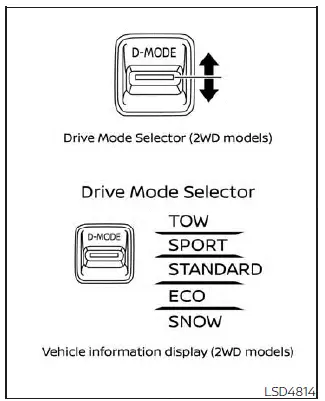
Drive Mode Selector (2WD models)

Multiple driving modes can be selected by using the Drive Mode Selector.

2WD: TOW, SPORT, STANDARD, ECO, and SNOW
Nissan Pathfinder. Basic information
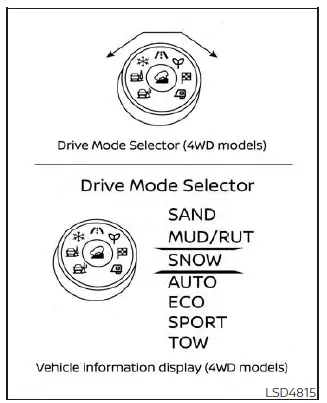
Drive Mode Selector (4WD models)

To change the mode, push the Drive Mode Selector up or down.

4WD: SAND, MUD/RUT, SNOW, AUTO, ECO, SPORT, and TOW

To change the mode, turn the Drive Mode Selector right or left.

NOTE: When the Drive Mode Selector selects a mode, the mode may not switch immediately.

This is not a malfunction.

The current mode is displayed in the vehicle information display. The mode list will appear in the vehicle information display and you can select the mode.

NOTE: The mode list will be turned off in approximately 5 seconds after the mode is selected.

You can also clear the message by pushing the scroll dial on the steering wheel mounted controls.

If the driving mode cannot be switched using the Drive Mode Selector when the ignition switch is in the ON position, have the system checked. It is recommended you visit a NISSAN dealer for this service.

NOTE: The STANDARD (2WD models)/AUTO (4WD models) MODE will be selected first each time the ignition switch is placed in the ON position.

WARNING

  • Do not stare at the Drive Mode Selector or the display while driving so that full attention may be given to vehicle operation.
  • Avoid abrupt acceleration, steering or sudden braking especially on slippery roads. Otherwise tire slip, skid or tail-swing occurs; this may cause an accident.

STANDARD MODE (2WD models)/AUTO MODE (4WD models)

This is the standard mode that is most suitable for normal driving.

SPORT mode

  • Adjusts the engine points for a higher response.
  • The setting of the steering system is adjusted to moderately increase steering wheel effort for a sporty feel.

NOTE: In the SPORT mode, fuel economy may be reduced.

SNOW mode

This mode makes it easier to start and drive on snowy roads and frozen roads.

CAUTION Never drive on dry, hard surface roads in the SNOW mode, as this will overload the powertrain and may cause a serious malfunction. Additionally, this will cause premature tire wear and reduced fuel economy.

When the SNOW mode is selected, small vibration in cornering may occur. This is not a malfunction.

TOW mode

The mode controls the shifting points to facilitate the acceleration or deceleration while towing.

TOW mode is available regardless of the availability of the tow bar.

The Idling Stop System is disabled when the vehicle is in TOW mode.

MUD/RUT mode (4WD models)

This mode allows for easier driving or starting on a bumpy road surface such as an uneven dirt road or a steep uphill slope.

CAUTION Never drive on dry, hard surface roads in the MUD/RUT mode, as this will overload the powertrain and may cause a serious malfunction. Additionally, this will cause premature tire wear and reduced fuel economy.

NOTE: When the MUD/RUT mode is selected, small tight-corner braking phenomenon or small vibration in cornering may occur.

This is not a malfunction.

SAND mode (4WD models)

This mode allows for easier driving or starting on sand.

CAUTION Never drive on dry, hard surface roads in the SAND mode, as this will overload the powertrain and may cause a serious malfunction. Additionally, this will cause premature tire wear and reduced fuel economy.

NOTE: When the SAND mode is selected, small tight-corner braking phenomenon or small vibration in cornering may occur.

This is not a malfunction

ECO mode

Basic information

Assists the driver's ECO-driving. The engine points are adjusted for improved fuel economy, providing such driving features as smooth starting or constant cruising.

NOTE:

  • Selecting the ECO mode will not necessarily improve fuel economy as many driving factors influence its effectiveness.
  • It is recommended to select other than ECO mode when acceleration is required such as when:
    • Driving with a heavy load of passengersor cargo in the vehicle.
    • Driving on a steep uphill slope.

Operation

Select the ECO mode using the Drive Mode Selector. The ECO indicator illuminates.

When the accelerator pedal is depressed within the range of economy drive, the ECO drive indicator illuminates in green. When the accelerator pedal is depressed above the range of economy drive, the ECO drive indicator turns off.

The ECO drive indicator will not illuminate in the following cases:

  • When the shift lever is in the R (Reverse) position.
  • When the vehicle speed is below 3,2 km/h or over 144 km/h.
  • When the Cruise Control (if so equipped) or Intelligent Cruise Control (ICC) system (if so equipped) is operated.

ECO Customize

The "ECO Customize" is a function that can change the priority from the Cruise Control (if so equipped) or Intelligent Cruise Control (ICC) (if so equipped) to fuel efficiency improvements.

It can be set when the ECO mode is selected. To activate or deactivate this function, see "ECO Mode Setting".

  • Cruise Control
    When the setting is ON, the fuel efficiency while cruising will be improved by lowering acceleration target from normal (setting OFF) mode.

NOTE: When the vehicle speed is reduced (for example, when the vehicle is driven on an uphill road from a flat road), it will take more time to return to the previously set speed than normal mode.

Tire Pres ECO advice

The "Tire Pres ECO advice" is a function to show ECO advice information in the vehicle information display when low tire pressure is detected. To activate or deactivate this function, see "ECO Mode Setting".

When the setting is on, the ECO Drive Report display shows "See Tire Pressures". You can switch the display to the Tire Pressures display by selecting it in the vehicle information display.

Nissan Pathfinder. ECO mode

Eco Drive Report (if so equipped)

When the ignition switch is in the OFF position, the ECO management display appears.

  1. Previous 5 times (History)
  2. Current fuel economy
  3. Best fuel economy

The result of ECO evaluation is displayed 30 seconds after the ignition switch is placed in the ON position and the vehicle is driven at least 1/3 miles (500 meters).

  1. The average fuel economy for the previous 5 times will be displayed.
  2. The average fuel economy since the last reset will be displayed.
  3. The best fuel economy of the past history will be displayed.

The ECO Drive Report can be set to be ON or OFF.