Pre-driving checks and adjustments - Keys

In this manual: Pre-driving checks and adjustments - Keys
Air bags, seat belts and child restraints — 1Warning and indicator lights — 1Safety-Seats, seat belts and supplemental restraint system - Seats — 1Safety-Seats, seat belts and supplemental restraint system - Head restraints/headrests — 1Safety-Seats, seat belts and supplemental restraint system - Seat belts — 1Safety-Seats, seat belts and supplemental restraint system - Child safety — 1Safety-Seats, seat belts and supplemental restraint system - Child restraints — 1Safety-Seats, seat belts and supplemental restraint system - Supplemental Restraint System (SRS) — 1Instruments and controls - Instrument panel — 1Instruments and controls - Meters and gauges — 1Instruments and controls - Warning lights, indicator lights and audible reminders — 1Instruments and controls - Vehicle information display 7 inch (18 cm) Type A — 1Instruments and controls - Vehicle information display 12.3 inch (31 cm) Type B — 1Instruments and controls - Security systems — 1Instruments and controls - Wiper and washer switch — 1Instruments and controls - Headlight and turn signal switch — 1Instruments and controls - Climate controlled seat switches — 1Instruments and controls - Heated seat switches — 1Instruments and controls - Heated 2nd row seat switches — 1Instruments and controls - Hill descent control switch — 1Instruments and controls - Head Up Display (HUD) — 1Instruments and controls - Emergency call (SOS) button — 1Instruments and controls - Rear Door Alert — 1Instruments and controls - Power outlets — 1Instruments and controls - USB/iPod charging ports — 1Instruments and controls - Wireless charger — 1Instruments and controls - Storage — 1Instruments and controls - Windows — 1Instruments and controls - Power moonroof — 1Instruments and controls - Interior lights — 1Instruments and controls - HomeLink Universal Transceiver — 1Pre-driving checks and adjustments - Keys — 1Pre-driving checks and adjustments - Doors — 1Pre-driving checks and adjustments - NISSAN Intelligent Key system — 1Pre-driving checks and adjustments - Remote Engine Start — 1Pre-driving checks and adjustments - Hood — 1Pre-driving checks and adjustments - Liftgate — 1Pre-driving checks and adjustments - Fuel-filler door — 1Pre-driving checks and adjustments - Steering wheel — 1Pre-driving checks and adjustments - Sun visors — 1Pre-driving checks and adjustments - Mirrors — 1Pre-driving checks and adjustments - Memory seat — 1Monitor, climate, audio, phone and voice recognition systems - NissanConnect Owner's Manual — 1Monitor, climate, audio, phone and voice recognition systems - RearView Monitor — 1Monitor, climate, audio, phone and voice recognition systems - Intelligent Around View Monitor — 1Monitor, climate, audio, phone and voice recognition systems - Camera aiding sonar (parking sensor) — 1Monitor, climate, audio, phone and voice recognition systems - Moving Object Detection (MOD) — 1Monitor, climate, audio, phone and voice recognition systems - Heater and air conditioner (automatic) — 1Monitor, climate, audio, phone and voice recognition systems - Servicing air conditioner — 1Monitor, climate, audio, phone and voice recognition systems - Car phone or CB radio — 1Starting and driving - Precautions when starting and driving — 1Starting and driving - Push-button ignition switch — 1Starting and driving - Starting the engine — 1Starting and driving - Driving the vehicle — 1Starting and driving - Parking brake — 1Starting and driving - Automatic brake hold — 1Starting and driving - Drive Mode Selector — 1Starting and driving - Traffic Sign Recognition (TSR) — 1Starting and driving - Lane Departure Warning (LDW) — 1Starting and driving - Intelligent Lane Intervention (I-LI) — 1Starting and driving - Blind Spot Warning (BSW) — 1Starting and driving - Intelligent Blind Spot Intervention (I-BSI) — 1Starting and driving - Rear Cross Traffic Alert (RCTA) — 1Starting and driving - Cruise control — 1Starting and driving - ProPILOT Assist — 1Starting and driving - Rear Automatic Braking (RAB) — 1Starting and driving - Automatic Emergency Braking (AEB) with Pedestrian Detection — 1Starting and driving - Intelligent Forward Collision Warning (I-FCW) — 1Starting and driving - Intelligent Driver Alertness (I-DA) — 1Starting and driving - Fuel efficient driving tips — 1Starting and driving - Intelligent 4X4 (I-4X4) — 1Starting and driving - Parking/parking on hills — 1Starting and driving - Power steering — 1Starting and driving - Brake system — 1Starting and driving - Vehicle Dynamic Control (VDC) system — 1Starting and driving - Active Brake Limited Slip (ABLS) system — 1Starting and driving - Chassis control — 1Starting and driving - Hill descent control system — 1Starting and driving - Hill start assist system — 1Starting and driving - Front and Rear Sonar System — 1Starting and driving - Idling Stop System — 1Starting and driving - Cold weather driving — 1In case of emergency - Hazard warning flasher switch — 1In case of emergency - Flat tire — 1In case of emergency - Jump starting — 1In case of emergency - If your vehicle overheats — 1In case of emergency - Towing your vehicle — 1Appearance and care - Cleaning exterior — 1Appearance and care - Cleaning interior — 1Appearance and care - Corrosion protection — 1Do-it-yourself - Maintenance precautions — 1Do-it-yourself - Engine compartment check locations — 1Do-it-yourself - Engine oil — 1Do-it-yourself - Automatic Transmission Fluid (ATF) — 1Do-it-yourself - Windshield-washer fluid — 1Do-it-yourself - Battery — 1Do-it-yourself - Variable voltage control system — 1Do-it-yourself - Drive belt — 1Do-it-yourself - Spark plugs — 1Do-it-yourself - Air cleaner — 1Do-it-yourself - Windshield wiper blades — 1Do-it-yourself - Brakes — 1Do-it-yourself - Fuses — 1Do-it-yourself - Battery replacement — 1Do-it-yourself - Lights — 1Do-it-yourself - Wheels and tires — 1Maintenance and schedules - Maintenance requirements — 1Maintenance and schedules - General maintenance — 1Maintenance and schedules - Explanation of scheduled maintenance items — 1Maintenance and schedules - Maintenance schedules — 1Technical and consumer information - Recommended fluids/lubricants and capacities — 1Technical and consumer information - Specifications — 1Technical and consumer information - Vehicle identification — 1Technical and consumer information - Vehicle loading information — 1Technical and consumer information - Towing a trailer — 1Technical and consumer information - Flat towing your vehicle — 1Technical and consumer information - Uniform tire quality grading — 1Technical and consumer information - Reporting safety defects — 1Technical and consumer information - Readiness for Inspection/Maintenance (I/M) test — 1Technical and consumer information - Event Data Recorders (EDR) — 1
3steps
~18min
2/5difficulty
Done 0 of 3

NISSAN Intelligent Key

Nissan Pathfinder. Keys
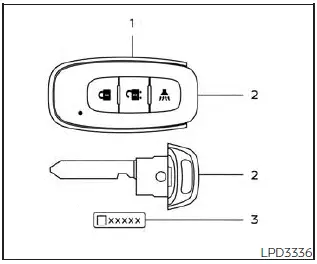
Type A (if so equipped)

Basic Information

Your vehicle can only be driven with the Intelligent Keys which are registered to your vehicle's Intelligent Key System components and NISSAN Vehicle Immobilizer System components.

Never leave these keys in the vehicle.

As many as four Intelligent Keys can be registered and used with one vehicle. The new keys must be registered prior to use with the Intelligent Key System and NISSAN Vehicle Immobilizer System of your vehicle.
Nissan Pathfinder. Keys
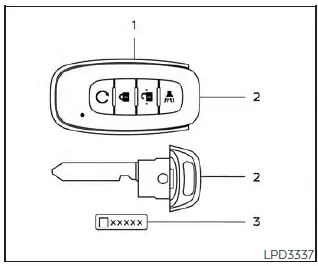
Type B (if so equipped)

It is recommended that you visit a NISSAN dealer for this service. Since the registration process requires erasing all memory in the Intelligent Key components when registering new keys, be sure to take all Intelligent Keys that you have to the NISSAN dealer.

A key number plate is supplied with your keys. Record the key number and keep it in a safe place (such as your wallet), not in the vehicle. If you lose your keys, it is recommended that you visit a NISSAN dealer for duplicates by using the key number.
Nissan Pathfinder. Keys
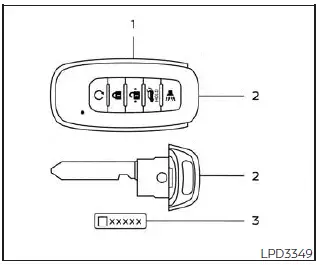
Type C (if so equipped)

  1. Intelligent Key (two sets)
  2. Mechanical key
  3. Key number plate (one plate)

NISSAN does not record key numbers so it is very important to keep track of your key number plate.

A key number is only necessary when you have lost all keys and do not have one to duplicate from. If you still have a key, it can be duplicated without knowing the key number.

CAUTION

Listed below are conditions or occurrences which will damage the Intelligent Key:

  • Do not allow the Intelligent Key, which contains electrical components, to come into contact with water or saltwater. This could affect the system function.
  • Do not drop the Intelligent Key.
  • Do not strike the Intelligent Key sharply against another object.
  • Do not change or modify the Intelligent Key.
  • Wetting may damage the Intelligent Key. If the Intelligent Key gets wet, immediately wipe until it is completely dry.
  • Do not place the Intelligent Key for an extended period in an area where temperatures exceed 140ºF (60ºC).
  • Do not attach the Intelligent Key with a key holder that contains a magnet.
  • Do not place the Intelligent Key near equipment that produces a magnetic field, such as a TV, audio equipment and personal computers.

    If an Intelligent Key is lost or stolen, NISSAN recommends erasing the ID code of that Intelligent Key from the vehicle. This may prevent the unauthorized use of the Intelligent Key to operate the vehicle. For information regarding the erasing procedure, it is recommended that you visit a NISSAN dealer.
Nissan Pathfinder. Keys

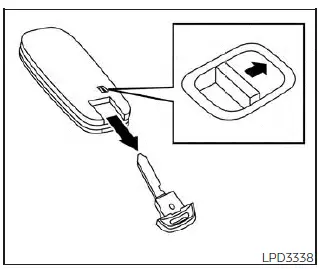
Mechanical key

The Intelligent Key contains the mechanical key.

To remove the mechanical key, release the lock knob on the back of the Intelligent Key.

To install the mechanical key, firmly insert it into the Intelligent Key until the lock knob returns to the lock position.

Use the mechanical key to lock or unlock the driver's door and glove box.

CAUTION Always carry the mechanical key installed in the Intelligent Key slot.

Valet hand-off

When you have to leave a key with a valet, give them the Intelligent Key itself and keep the mechanical key with you to protect your belongings.

To prevent the glove box from being opened during valet hand-off, follow the procedure below.

1. Remove the mechanical key from the Intelligent Key.

2. Lock the glove box with the mechanical key.

3. Hand the Intelligent Key to the valet and keep the mechanical key with you.

NISSAN Vehicle Immobilizer System keys

Additional or replacement keys: If you still have a key, the key number is not necessary when you need extra NISSAN Vehicle Immobilizer System keys. Your existing key can be duplicated without knowing the key number. As many as four NISSAN Vehicle Immobilizer System keys can be used with one vehicle. You should bring all NISSAN Vehicle Immobilizer System keys that you have to the NISSAN dealer for registration. This is because the registration process will erase the memory of all key codes previously registered into the NISSAN Vehicle Immobilizer System. After the registration process, these components will only recognize keys coded into the NISSAN Vehicle Immobilizer System during registration. Any virtual key accessories (if so equipped) will also have to be reregistered. Any key that is not given to the dealer at the time of registration will no longer be able to start your vehicle.

CAUTION Do not allow the immobilizer system key, which contains an electrical transponder, to come into contact with water or salt water. This could affect system function.