Instruments and controls - Head Up Display (HUD)

In this manual: Instruments and controls - Head Up Display (HUD)
Air bags, seat belts and child restraints — 1Warning and indicator lights — 1Safety-Seats, seat belts and supplemental restraint system - Seats — 1Safety-Seats, seat belts and supplemental restraint system - Head restraints/headrests — 1Safety-Seats, seat belts and supplemental restraint system - Seat belts — 1Safety-Seats, seat belts and supplemental restraint system - Child safety — 1Safety-Seats, seat belts and supplemental restraint system - Child restraints — 1Safety-Seats, seat belts and supplemental restraint system - Supplemental Restraint System (SRS) — 1Instruments and controls - Instrument panel — 1Instruments and controls - Meters and gauges — 1Instruments and controls - Warning lights, indicator lights and audible reminders — 1Instruments and controls - Vehicle information display 7 inch (18 cm) Type A — 1Instruments and controls - Vehicle information display 12.3 inch (31 cm) Type B — 1Instruments and controls - Security systems — 1Instruments and controls - Wiper and washer switch — 1Instruments and controls - Headlight and turn signal switch — 1Instruments and controls - Climate controlled seat switches — 1Instruments and controls - Heated seat switches — 1Instruments and controls - Heated 2nd row seat switches — 1Instruments and controls - Hill descent control switch — 1Instruments and controls - Head Up Display (HUD) — 1Instruments and controls - Emergency call (SOS) button — 1Instruments and controls - Rear Door Alert — 1Instruments and controls - Power outlets — 1Instruments and controls - USB/iPod charging ports — 1Instruments and controls - Wireless charger — 1Instruments and controls - Storage — 1Instruments and controls - Windows — 1Instruments and controls - Power moonroof — 1Instruments and controls - Interior lights — 1Instruments and controls - HomeLink Universal Transceiver — 1Pre-driving checks and adjustments - Keys — 1Pre-driving checks and adjustments - Doors — 1Pre-driving checks and adjustments - NISSAN Intelligent Key system — 1Pre-driving checks and adjustments - Remote Engine Start — 1Pre-driving checks and adjustments - Hood — 1Pre-driving checks and adjustments - Liftgate — 1Pre-driving checks and adjustments - Fuel-filler door — 1Pre-driving checks and adjustments - Steering wheel — 1Pre-driving checks and adjustments - Sun visors — 1Pre-driving checks and adjustments - Mirrors — 1Pre-driving checks and adjustments - Memory seat — 1Monitor, climate, audio, phone and voice recognition systems - NissanConnect Owner's Manual — 1Monitor, climate, audio, phone and voice recognition systems - RearView Monitor — 1Monitor, climate, audio, phone and voice recognition systems - Intelligent Around View Monitor — 1Monitor, climate, audio, phone and voice recognition systems - Camera aiding sonar (parking sensor) — 1Monitor, climate, audio, phone and voice recognition systems - Moving Object Detection (MOD) — 1Monitor, climate, audio, phone and voice recognition systems - Heater and air conditioner (automatic) — 1Monitor, climate, audio, phone and voice recognition systems - Servicing air conditioner — 1Monitor, climate, audio, phone and voice recognition systems - Car phone or CB radio — 1Starting and driving - Precautions when starting and driving — 1Starting and driving - Push-button ignition switch — 1Starting and driving - Starting the engine — 1Starting and driving - Driving the vehicle — 1Starting and driving - Parking brake — 1Starting and driving - Automatic brake hold — 1Starting and driving - Drive Mode Selector — 1Starting and driving - Traffic Sign Recognition (TSR) — 1Starting and driving - Lane Departure Warning (LDW) — 1Starting and driving - Intelligent Lane Intervention (I-LI) — 1Starting and driving - Blind Spot Warning (BSW) — 1Starting and driving - Intelligent Blind Spot Intervention (I-BSI) — 1Starting and driving - Rear Cross Traffic Alert (RCTA) — 1Starting and driving - Cruise control — 1Starting and driving - ProPILOT Assist — 1Starting and driving - Rear Automatic Braking (RAB) — 1Starting and driving - Automatic Emergency Braking (AEB) with Pedestrian Detection — 1Starting and driving - Intelligent Forward Collision Warning (I-FCW) — 1Starting and driving - Intelligent Driver Alertness (I-DA) — 1Starting and driving - Fuel efficient driving tips — 1Starting and driving - Intelligent 4X4 (I-4X4) — 1Starting and driving - Parking/parking on hills — 1Starting and driving - Power steering — 1Starting and driving - Brake system — 1Starting and driving - Vehicle Dynamic Control (VDC) system — 1Starting and driving - Active Brake Limited Slip (ABLS) system — 1Starting and driving - Chassis control — 1Starting and driving - Hill descent control system — 1Starting and driving - Hill start assist system — 1Starting and driving - Front and Rear Sonar System — 1Starting and driving - Idling Stop System — 1Starting and driving - Cold weather driving — 1In case of emergency - Hazard warning flasher switch — 1In case of emergency - Flat tire — 1In case of emergency - Jump starting — 1In case of emergency - If your vehicle overheats — 1In case of emergency - Towing your vehicle — 1Appearance and care - Cleaning exterior — 1Appearance and care - Cleaning interior — 1Appearance and care - Corrosion protection — 1Do-it-yourself - Maintenance precautions — 1Do-it-yourself - Engine compartment check locations — 1Do-it-yourself - Engine oil — 1Do-it-yourself - Automatic Transmission Fluid (ATF) — 1Do-it-yourself - Windshield-washer fluid — 1Do-it-yourself - Battery — 1Do-it-yourself - Variable voltage control system — 1Do-it-yourself - Drive belt — 1Do-it-yourself - Spark plugs — 1Do-it-yourself - Air cleaner — 1Do-it-yourself - Windshield wiper blades — 1Do-it-yourself - Brakes — 1Do-it-yourself - Fuses — 1Do-it-yourself - Battery replacement — 1Do-it-yourself - Lights — 1Do-it-yourself - Wheels and tires — 1Maintenance and schedules - Maintenance requirements — 1Maintenance and schedules - General maintenance — 1Maintenance and schedules - Explanation of scheduled maintenance items — 1Maintenance and schedules - Maintenance schedules — 1Technical and consumer information - Recommended fluids/lubricants and capacities — 1Technical and consumer information - Specifications — 1Technical and consumer information - Vehicle identification — 1Technical and consumer information - Vehicle loading information — 1Technical and consumer information - Towing a trailer — 1Technical and consumer information - Flat towing your vehicle — 1Technical and consumer information - Uniform tire quality grading — 1Technical and consumer information - Reporting safety defects — 1Technical and consumer information - Readiness for Inspection/Maintenance (I/M) test — 1Technical and consumer information - Event Data Recorders (EDR) — 1
6steps
~36min
2/5difficulty
Done 0 of 6
  • Basic Information
  • How to use the HUD

Basic Information Nissan Pathfinder 2026
Nissan Pathfinder. Head Up Display (HUD)

WARNING

  • Failure to properly adjust the brightness and position of the displayed image may interfere with the drivers ability to see through the windshield which could cause an accident leading to severe injury or death.
  • Do not use the head up display for extended periods of time as that can cause you to not see other vehicles, pedestrians or objects, which could cause an accident leading to severe injury or death.

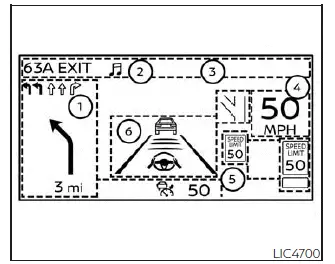
The HUD can display one or more of the following features (if so equipped):

  1. Navigation/Warning
  2. Audio
  3. TEL/SMS
  4. Vehicle speed display
  5. Traffic Sign Recognition
  6. Driving Aids

NOTE:

  • Do not place any type of liquid on or near the projector. Doing so may cause malfunction of the equipment.
Nissan Pathfinder. Head Up Display (HUD)

NOTE:

  • Do not touch any internal parts of the projector. Doing so may cause malfunction of the equipment.
  • To prevent scratches to the projector glass, do not place any sharp objects on or near the projector opening.
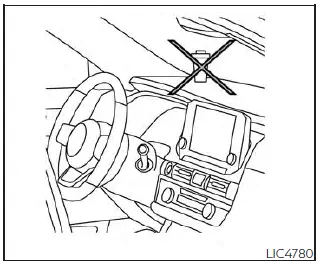
  • Do not place any objects on the instrument panel which may obstruct the display of the HUD.
  • If you wear polarized sunglasses the display may be difficult to see. Increase the brightness of the HUD in the vehicle information display or remove your sunglasses.
  • Depending on weather conditions (rain, snow, sunlight, etc.), the display may be difficult to see.
  • For cleaning, use a dry soft clean cloth.

    If dirt, etc. cannot be removed, use a clean, soft cloth dampened with water and then use a clean, dry soft cloth.

    Never use a rough cloth, alcohol, benzine, thinner or any kind of solvent or paper towel with a chemical cleaning agent. They will scratch or cause discoloration to the projector lens. Do not spray any liquid such as water on the projector lens. Spraying liquid may cause the system to malfunction.

  • If the displayed image appears distorted, it is recommended that you have the system checked by a NISSAN dealer or qualified workshop.
  • The HUD has a special windshield to allow the image to be displayed clearly.

    If your windshield needs replacing, this should be completed by a NISSAN dealer.

How to use the HUD Nissan Pathfinder SUV
Nissan Pathfinder. Head Up Display (HUD)

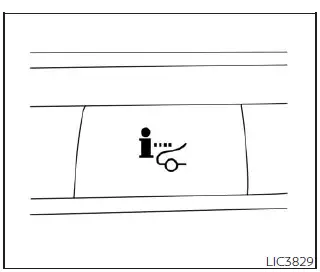
To turn the HUD on, push the HUD switch.

To turn the HUD off, push the switch again.

If the HUD is turned off, it will remain off even if the vehicle is restarted.

The following settings can be changed in the vehicle information display:

  • Brightness
  • Height
  • Rotation
  • Contents selection
    • Navigation
    • Driving Assist
    • Speed Limit Sign
    • Audio
    • TEL/SMS
  • Reset

NOTE:

  • Emergency information may display even if the HUD is turned off.
  • If the HUD is turned off, the settings items are grayed out and cannot be modified until the HUD is turned back on.

This product includes the following software.

(1) Panasonic Corporation or software developed for Panasonic Corporation (2) Third-party software licensed to Panasonic Corporation (3) Open source software Regarding (3) Open source software, it includes open source software (OSS), including various software to which license information applies.

Refer to the license web site at: http://car.panasonic.jp/oss/i02lln39

Driver Assistance/Navigation linking

Basic Information

The HUD will display driver assistance and navigation information.

The driver assistance display will show warning situations for the following systems:

  • Automatic Emergency Braking (AEB) with Pedestrian Detection
  • Lane Departure Warning (LDW)
  • Intelligent Forward Collision Warning (I-FCW)
  • Hands-free warning (for vehicles with ProPILOT Assist) (if so equipped)
  • Traffic Sign Recognition (TSR) (if so equipped)

The navigation system linking display will show the following items:

  • Intersection names
  • Arrows indicating turning direction
  • Distance to the next intersection

The Audio System linking display will show the following items:

  • Songs
  • Radio stations

The TEL/SMS linking display will show the following items:

  • Caller's name or phone number
Nissan Pathfinder. Driver Assistance/Navigation linking

Display brightness

The brightness of the display may be controlled by the navigation system. The brightness will also be adjusted automatically according to the exterior ambient lighting brightness.

NOTE:

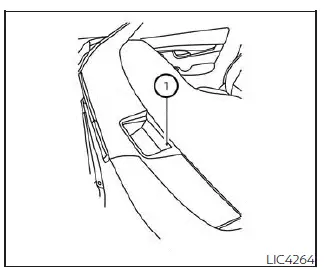
  • The HUD has a built-in sensor 1 that controls the brightness of the displayed image. If you block the sensor with an object, the display will darken, making it difficult to see.
  • Do not apply strong light to the sensor of the Head-Up Display. Doing so may cause a malfunction.