Starting and driving - Vehicle Dynamic Control (VDC) system
- Basic information
- How to turn off the VDC system
Basic information Nissan Pathfinder SUV
The VDC system uses various sensors to monitor driver inputs and vehicle motion.
Under certain driving conditions, the VDC system helps to perform the following functions:
- Controls brake pressure to reduce wheel slip on one slipping drive wheel so power is transferred to a non-slipping drive wheel on the same axle.
- Controls brake pressure and engine output to reduce drive wheel slip based on vehicle speed (traction control function).
- Controls brake pressure at individual wheels and engine output to help the driver maintain control of the vehicle in the following conditions:
- Understeer (vehicle tends to not follow the steered path despite increased steering input)
- Oversteer (vehicle tends to spin due to certain road or driving conditions)
The VDC system can help the driver to maintain control of the vehicle, but it cannot prevent loss of vehicle control in all driving situations.
When the VDC system operates, the  indicator light in the instrument panel flashes so note the following:
- The road may be slippery or the system may determine some action is required to help keep the vehicle on the steered path.
- You may feel a pulsation in the brake pedal and hear a noise or vibration from under the hood. This is normal and indicates that the VDC system is working properly.
- Adjust your speed and driving to the road conditions.
If a malfunction occurs in the system, the  and
 indicator lights come on in the instrument panel. The VDC system automatically turns off when these indicator lights are on.
The vehicle information display is used to turn off the VDC system. The  indicator light and the AEB with Pedestrian Detection system OFF warning light illuminate to indicate the VDC and AEB with Pedestrian Detection systems are off.
When the vehicle information display is used to turn off the system, the VDC system still operates to prevent one drive wheel from slipping by transferring power to a non-slipping drive wheel. The  indicator light flashes if this occurs. All other VDC functions are off and the
 indicator light will not flash.
The VDC system is automatically reset to on when the ignition switch is placed in the OFF position then back to the ON position.
The computer has a built-in diagnostic feature that tests the system each time you start the engine and move the vehicle forward or in reverse at a slow speed. When the self-test occurs, you may hear a clunk noise and/or feel a pulsation in the brake pedal. This is normal and is not an indication of a malfunction.
WARNING
- The VDC system is designed to help the driver maintain stability but does not prevent accidents due to abrupt steering operation at high speeds or by careless or dangerous driving techniques. Reduce vehicle speed and be especially careful when driving and cornering on slippery surfaces and always drive carefully.
- Do not modify the vehicle's suspension.
If suspension parts such as shock absorbers, struts, springs, stabilizer bars, bushings and wheels are not NISSAN recommended for your vehicle or are extremely deteriorated, the VDC system may not operate properly. This could adversely affect vehicle handling performance, and the
 indicator light may flash or both the
 and
 indicator lights may illuminate.
- If brake related parts such as brake pads, rotors and calipers are not NISSAN recommended or are extremely deteriorated, the VDC system may not operate properly and both the
 and the
 indicator lights may illuminate.
- If engine control related parts are not NISSAN recommended or are extremely deteriorated, both the
 and
 indicator lights may illuminate.
- When driving on extremely inclined surfaces such as higher banked corners, the VDC system may not operate properly and the
 indicator light may flash or both the
 and
 indicator lights may illuminate.
Do not drive on these types of roads.
- When driving on an unstable surface such as a turntable, ferry, elevator or ramp, the
 indicator light may flash or both the
 and
 indicator lights may illuminate. This is not a malfunction. Restart the engine after driving onto a stable surface.
- If wheels or tires other than the NISSAN recommended ones are used, the VDC system may not operate properly and the
 indicator light may flash or both the
 and
 indicator lights may illuminate.
- The VDC system is not a substitute for winter tires or tire chains on a snow covered road.
How to turn off the VDC system Nissan Pathfinder Fifth generation
The vehicle should be driven with the Vehicle Dynamic Control (VDC) system ON for most driving conditions.
When the vehicle is stuck in mud or snow, the VDC system reduces the engine output to reduce wheel spin. The engine speed will be reduced even if the accelerator is depressed to the floor. If maximum engine power is needed to free a stuck vehicle, turn the VDC system off.
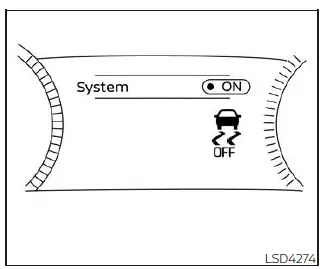
To turn off the VDC system, perform the following steps in the vehicle information display.
1. Press the  button on the steering wheel until "Settings" appears and then press the OK button.
2. Use the scroll dial to select the "VDC Setting" and then press the OK button.
3. Select "System" and press the OK button.
The  indicator light will illuminate.
Turn "VDC Setting" back on in the vehicle information display or restart the engine to turn on the VDC system.
Rise-up and build-up
The system gradually adjusts braking power during normal braking to help provide an enhanced brake feel.
Brake force distribution
During braking while driving through turns, the system optimizes the distribution of force to each of the four wheels depending on the radius of the turn.
WARNING
- The VDC system is designed to help the driver maintain stability but does not prevent accidents due to abrupt steering operation at high speeds or by careless or dangerous driving techniques. Reduce vehicle speed and be especially careful when driving and cornering on slippery surfaces and always drive carefully.
- Do not modify the vehicle's suspension.
If suspension parts such as shock absorbers, struts, springs, stabilizer bars, bushings and wheels are not NISSAN recommended for your vehicle or are extremely deteriorated, the VDC system may not operate properly. This could adversely affect vehicle handling performance, and the
 indicator light may flash or both the
 and
 indicator lights may illuminate.
- If brake related parts such as brake pads, rotors and calipers are not NISSAN recommended or are extremely deteriorated, the VDC system may not operate properly and both the
 and
 the indicator lights may illuminate.
- If engine control related parts are not NISSAN recommended or are extremely deteriorated, both the
 and
 indicator lights may illuminate.
- When driving on extremely inclined surfaces such as higher banked corners, the VDC system may not operate properly and the indicator
 light may flash or both the
 and
 indicator lights may illuminate.
Do not drive on these types of roads.
- When driving on an unstable surface such as a turntable, ferry, elevator or ramp, the
 indicator light may flash or both the
 and
 indicator lights may illuminate. This is not a malfunction. Restart the engine after driving onto a stable surface.
- If wheels or tires other than the NISSAN recommended ones are used, the VDC system may not operate properly and the
 indicator light may flash or both the
 and
 indicator lights may illuminate.
- The VDC system is not a substitute for winter tires or tire chains on a snow covered road.