Do-it-yourself - Windshield wiper blades

In this manual: Do-it-yourself - Windshield wiper blades
Air bags, seat belts and child restraints — 1Warning and indicator lights — 1Safety-Seats, seat belts and supplemental restraint system - Seats — 1Safety-Seats, seat belts and supplemental restraint system - Head restraints/headrests — 1Safety-Seats, seat belts and supplemental restraint system - Seat belts — 1Safety-Seats, seat belts and supplemental restraint system - Child safety — 1Safety-Seats, seat belts and supplemental restraint system - Child restraints — 1Safety-Seats, seat belts and supplemental restraint system - Supplemental Restraint System (SRS) — 1Instruments and controls - Instrument panel — 1Instruments and controls - Meters and gauges — 1Instruments and controls - Warning lights, indicator lights and audible reminders — 1Instruments and controls - Vehicle information display 7 inch (18 cm) Type A — 1Instruments and controls - Vehicle information display 12.3 inch (31 cm) Type B — 1Instruments and controls - Security systems — 1Instruments and controls - Wiper and washer switch — 1Instruments and controls - Headlight and turn signal switch — 1Instruments and controls - Climate controlled seat switches — 1Instruments and controls - Heated seat switches — 1Instruments and controls - Heated 2nd row seat switches — 1Instruments and controls - Hill descent control switch — 1Instruments and controls - Head Up Display (HUD) — 1Instruments and controls - Emergency call (SOS) button — 1Instruments and controls - Rear Door Alert — 1Instruments and controls - Power outlets — 1Instruments and controls - USB/iPod charging ports — 1Instruments and controls - Wireless charger — 1Instruments and controls - Storage — 1Instruments and controls - Windows — 1Instruments and controls - Power moonroof — 1Instruments and controls - Interior lights — 1Instruments and controls - HomeLink Universal Transceiver — 1Pre-driving checks and adjustments - Keys — 1Pre-driving checks and adjustments - Doors — 1Pre-driving checks and adjustments - NISSAN Intelligent Key system — 1Pre-driving checks and adjustments - Remote Engine Start — 1Pre-driving checks and adjustments - Hood — 1Pre-driving checks and adjustments - Liftgate — 1Pre-driving checks and adjustments - Fuel-filler door — 1Pre-driving checks and adjustments - Steering wheel — 1Pre-driving checks and adjustments - Sun visors — 1Pre-driving checks and adjustments - Mirrors — 1Pre-driving checks and adjustments - Memory seat — 1Monitor, climate, audio, phone and voice recognition systems - NissanConnect Owner's Manual — 1Monitor, climate, audio, phone and voice recognition systems - RearView Monitor — 1Monitor, climate, audio, phone and voice recognition systems - Intelligent Around View Monitor — 1Monitor, climate, audio, phone and voice recognition systems - Camera aiding sonar (parking sensor) — 1Monitor, climate, audio, phone and voice recognition systems - Moving Object Detection (MOD) — 1Monitor, climate, audio, phone and voice recognition systems - Heater and air conditioner (automatic) — 1Monitor, climate, audio, phone and voice recognition systems - Servicing air conditioner — 1Monitor, climate, audio, phone and voice recognition systems - Car phone or CB radio — 1Starting and driving - Precautions when starting and driving — 1Starting and driving - Push-button ignition switch — 1Starting and driving - Starting the engine — 1Starting and driving - Driving the vehicle — 1Starting and driving - Parking brake — 1Starting and driving - Automatic brake hold — 1Starting and driving - Drive Mode Selector — 1Starting and driving - Traffic Sign Recognition (TSR) — 1Starting and driving - Lane Departure Warning (LDW) — 1Starting and driving - Intelligent Lane Intervention (I-LI) — 1Starting and driving - Blind Spot Warning (BSW) — 1Starting and driving - Intelligent Blind Spot Intervention (I-BSI) — 1Starting and driving - Rear Cross Traffic Alert (RCTA) — 1Starting and driving - Cruise control — 1Starting and driving - ProPILOT Assist — 1Starting and driving - Rear Automatic Braking (RAB) — 1Starting and driving - Automatic Emergency Braking (AEB) with Pedestrian Detection — 1Starting and driving - Intelligent Forward Collision Warning (I-FCW) — 1Starting and driving - Intelligent Driver Alertness (I-DA) — 1Starting and driving - Fuel efficient driving tips — 1Starting and driving - Intelligent 4X4 (I-4X4) — 1Starting and driving - Parking/parking on hills — 1Starting and driving - Power steering — 1Starting and driving - Brake system — 1Starting and driving - Vehicle Dynamic Control (VDC) system — 1Starting and driving - Active Brake Limited Slip (ABLS) system — 1Starting and driving - Chassis control — 1Starting and driving - Hill descent control system — 1Starting and driving - Hill start assist system — 1Starting and driving - Front and Rear Sonar System — 1Starting and driving - Idling Stop System — 1Starting and driving - Cold weather driving — 1In case of emergency - Hazard warning flasher switch — 1In case of emergency - Flat tire — 1In case of emergency - Jump starting — 1In case of emergency - If your vehicle overheats — 1In case of emergency - Towing your vehicle — 1Appearance and care - Cleaning exterior — 1Appearance and care - Cleaning interior — 1Appearance and care - Corrosion protection — 1Do-it-yourself - Maintenance precautions — 1Do-it-yourself - Engine compartment check locations — 1Do-it-yourself - Engine oil — 1Do-it-yourself - Automatic Transmission Fluid (ATF) — 1Do-it-yourself - Windshield-washer fluid — 1Do-it-yourself - Battery — 1Do-it-yourself - Variable voltage control system — 1Do-it-yourself - Drive belt — 1Do-it-yourself - Spark plugs — 1Do-it-yourself - Air cleaner — 1Do-it-yourself - Windshield wiper blades — 1Do-it-yourself - Brakes — 1Do-it-yourself - Fuses — 1Do-it-yourself - Battery replacement — 1Do-it-yourself - Lights — 1Do-it-yourself - Wheels and tires — 1Maintenance and schedules - Maintenance requirements — 1Maintenance and schedules - General maintenance — 1Maintenance and schedules - Explanation of scheduled maintenance items — 1Maintenance and schedules - Maintenance schedules — 1Technical and consumer information - Recommended fluids/lubricants and capacities — 1Technical and consumer information - Specifications — 1Technical and consumer information - Vehicle identification — 1Technical and consumer information - Vehicle loading information — 1Technical and consumer information - Towing a trailer — 1Technical and consumer information - Flat towing your vehicle — 1Technical and consumer information - Uniform tire quality grading — 1Technical and consumer information - Reporting safety defects — 1Technical and consumer information - Readiness for Inspection/Maintenance (I/M) test — 1Technical and consumer information - Event Data Recorders (EDR) — 1
~2min read

Cleaning

If your windshield is not clear after using the windshield-washer or if a wiper blade chatters when running, wax or other material may be on the blade or windshield.

Clean the outside of the windshield with a washer solution or a mild detergent. Your windshield is clean if beads do not form when rinsing with clear water.

Clean each blade by wiping it with a cloth soaked in a washer solution or a mild detergent.

Then rinse the blades with clear water. If your windshield is still not clear after cleaning the blades and using the wiper, replace the blades.

CAUTION Worn windshield wiper blades can damage the windshield and impair driver vision.

Replacing
Nissan Pathfinder. Replacing

Basic Information

Replace the wiper blades if they are worn.

To replace the windshield wiper blades, follow the procedure below:

1. When the ignition switch is ON or within 60 seconds after placing the ignition switch from the ON to OFF position, place the windshield wiper and washer lever into the OFF position.

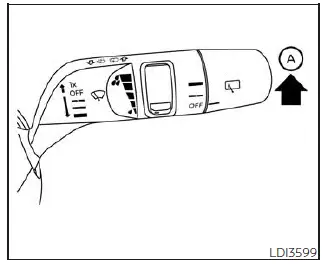
2. Rapidly lift the windshield wiper and washer lever A upwards twice within 0.5 seconds. This action will cause the wipers to automatically take the service position.
Nissan Pathfinder. Replacing

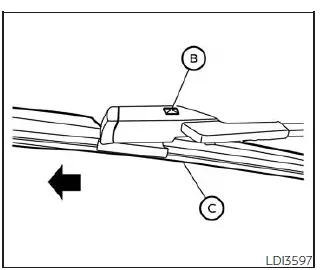
3. Once the wipers are in the service position, push the release tab B .

4. Move the wiper blade C down the wiper arm and remove.

5. Insert the new wiper blade onto the wiper arm until it clicks into place.

6. Rotate the wiper blade so the dimple is in the groove.
Nissan Pathfinder. Replacing

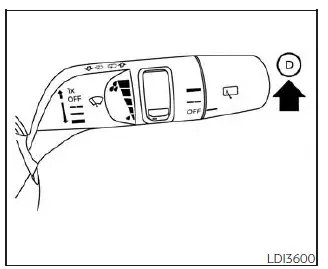
7. Finally, lift the windshield wiper and washer lever to the mist position D once and release. This action will cause the wipers to resume the set position.

CAUTION

  • After wiper blade replacement, return the wiper arm to its original position; otherwise it may be damaged when the hood is opened.
  • Make sure the wiper blades contact the glass; otherwise the arms may be damaged from wind pressure.
Nissan Pathfinder. Replacing

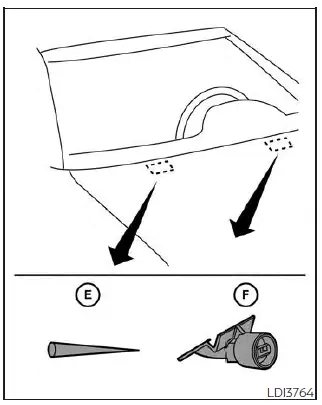
If you wax the surface of the hood, be careful not to let wax get into the washer nozzle F . This may cause clogging or improper windshield-washer operation. If wax gets into the nozzle, remove it with a needle or small pin E .

Rear window wiper blade

If checking or replacement is required, it is recommended that you visit a NISSAN dealer for this service.