Starting and driving - Rear Cross Traffic Alert (RCTA)

In this manual: Starting and driving - Rear Cross Traffic Alert (RCTA)
Air bags, seat belts and child restraints — 1Warning and indicator lights — 1Safety-Seats, seat belts and supplemental restraint system - Seats — 1Safety-Seats, seat belts and supplemental restraint system - Head restraints/headrests — 1Safety-Seats, seat belts and supplemental restraint system - Seat belts — 1Safety-Seats, seat belts and supplemental restraint system - Child safety — 1Safety-Seats, seat belts and supplemental restraint system - Child restraints — 1Safety-Seats, seat belts and supplemental restraint system - Supplemental Restraint System (SRS) — 1Instruments and controls - Instrument panel — 1Instruments and controls - Meters and gauges — 1Instruments and controls - Warning lights, indicator lights and audible reminders — 1Instruments and controls - Vehicle information display 7 inch (18 cm) Type A — 1Instruments and controls - Vehicle information display 12.3 inch (31 cm) Type B — 1Instruments and controls - Security systems — 1Instruments and controls - Wiper and washer switch — 1Instruments and controls - Headlight and turn signal switch — 1Instruments and controls - Climate controlled seat switches — 1Instruments and controls - Heated seat switches — 1Instruments and controls - Heated 2nd row seat switches — 1Instruments and controls - Hill descent control switch — 1Instruments and controls - Head Up Display (HUD) — 1Instruments and controls - Emergency call (SOS) button — 1Instruments and controls - Rear Door Alert — 1Instruments and controls - Power outlets — 1Instruments and controls - USB/iPod charging ports — 1Instruments and controls - Wireless charger — 1Instruments and controls - Storage — 1Instruments and controls - Windows — 1Instruments and controls - Power moonroof — 1Instruments and controls - Interior lights — 1Instruments and controls - HomeLink Universal Transceiver — 1Pre-driving checks and adjustments - Keys — 1Pre-driving checks and adjustments - Doors — 1Pre-driving checks and adjustments - NISSAN Intelligent Key system — 1Pre-driving checks and adjustments - Remote Engine Start — 1Pre-driving checks and adjustments - Hood — 1Pre-driving checks and adjustments - Liftgate — 1Pre-driving checks and adjustments - Fuel-filler door — 1Pre-driving checks and adjustments - Steering wheel — 1Pre-driving checks and adjustments - Sun visors — 1Pre-driving checks and adjustments - Mirrors — 1Pre-driving checks and adjustments - Memory seat — 1Monitor, climate, audio, phone and voice recognition systems - NissanConnect Owner's Manual — 1Monitor, climate, audio, phone and voice recognition systems - RearView Monitor — 1Monitor, climate, audio, phone and voice recognition systems - Intelligent Around View Monitor — 1Monitor, climate, audio, phone and voice recognition systems - Camera aiding sonar (parking sensor) — 1Monitor, climate, audio, phone and voice recognition systems - Moving Object Detection (MOD) — 1Monitor, climate, audio, phone and voice recognition systems - Heater and air conditioner (automatic) — 1Monitor, climate, audio, phone and voice recognition systems - Servicing air conditioner — 1Monitor, climate, audio, phone and voice recognition systems - Car phone or CB radio — 1Starting and driving - Precautions when starting and driving — 1Starting and driving - Push-button ignition switch — 1Starting and driving - Starting the engine — 1Starting and driving - Driving the vehicle — 1Starting and driving - Parking brake — 1Starting and driving - Automatic brake hold — 1Starting and driving - Drive Mode Selector — 1Starting and driving - Traffic Sign Recognition (TSR) — 1Starting and driving - Lane Departure Warning (LDW) — 1Starting and driving - Intelligent Lane Intervention (I-LI) — 1Starting and driving - Blind Spot Warning (BSW) — 1Starting and driving - Intelligent Blind Spot Intervention (I-BSI) — 1Starting and driving - Rear Cross Traffic Alert (RCTA) — 1Starting and driving - Cruise control — 1Starting and driving - ProPILOT Assist — 1Starting and driving - Rear Automatic Braking (RAB) — 1Starting and driving - Automatic Emergency Braking (AEB) with Pedestrian Detection — 1Starting and driving - Intelligent Forward Collision Warning (I-FCW) — 1Starting and driving - Intelligent Driver Alertness (I-DA) — 1Starting and driving - Fuel efficient driving tips — 1Starting and driving - Intelligent 4X4 (I-4X4) — 1Starting and driving - Parking/parking on hills — 1Starting and driving - Power steering — 1Starting and driving - Brake system — 1Starting and driving - Vehicle Dynamic Control (VDC) system — 1Starting and driving - Active Brake Limited Slip (ABLS) system — 1Starting and driving - Chassis control — 1Starting and driving - Hill descent control system — 1Starting and driving - Hill start assist system — 1Starting and driving - Front and Rear Sonar System — 1Starting and driving - Idling Stop System — 1Starting and driving - Cold weather driving — 1In case of emergency - Hazard warning flasher switch — 1In case of emergency - Flat tire — 1In case of emergency - Jump starting — 1In case of emergency - If your vehicle overheats — 1In case of emergency - Towing your vehicle — 1Appearance and care - Cleaning exterior — 1Appearance and care - Cleaning interior — 1Appearance and care - Corrosion protection — 1Do-it-yourself - Maintenance precautions — 1Do-it-yourself - Engine compartment check locations — 1Do-it-yourself - Engine oil — 1Do-it-yourself - Automatic Transmission Fluid (ATF) — 1Do-it-yourself - Windshield-washer fluid — 1Do-it-yourself - Battery — 1Do-it-yourself - Variable voltage control system — 1Do-it-yourself - Drive belt — 1Do-it-yourself - Spark plugs — 1Do-it-yourself - Air cleaner — 1Do-it-yourself - Windshield wiper blades — 1Do-it-yourself - Brakes — 1Do-it-yourself - Fuses — 1Do-it-yourself - Battery replacement — 1Do-it-yourself - Lights — 1Do-it-yourself - Wheels and tires — 1Maintenance and schedules - Maintenance requirements — 1Maintenance and schedules - General maintenance — 1Maintenance and schedules - Explanation of scheduled maintenance items — 1Maintenance and schedules - Maintenance schedules — 1Technical and consumer information - Recommended fluids/lubricants and capacities — 1Technical and consumer information - Specifications — 1Technical and consumer information - Vehicle identification — 1Technical and consumer information - Vehicle loading information — 1Technical and consumer information - Towing a trailer — 1Technical and consumer information - Flat towing your vehicle — 1Technical and consumer information - Uniform tire quality grading — 1Technical and consumer information - Reporting safety defects — 1Technical and consumer information - Readiness for Inspection/Maintenance (I/M) test — 1Technical and consumer information - Event Data Recorders (EDR) — 1
~7min read
  • Basic information
  • System temporarily unavailable

Basic information Nissan Pathfinder 2026

WARNING Failure to follow the warnings and instructions for proper use of the RCTA system could result in serious injury or death.

  • The RCTA system is not a replacement for proper driving procedures and is not designed to prevent contact with vehicles or objects. When backing out of a parking space, always use the side and rear mirrors and turn and look in the direction your vehicle will move. Never rely solely on the RCTA system.
  • Do no use the RCTA system when towing a trailer. The system may not function properly.

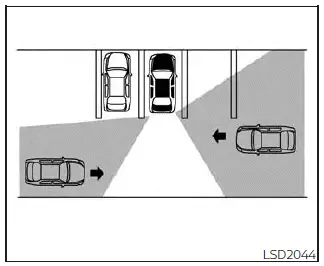
The RCTA system will assist you when backing out from a parking space. When the vehicle is in reverse, the system is designed to detect other vehicles approaching from the right or left of the vehicle. If the system detects cross traffic, it will alert you.

RCTA system operation
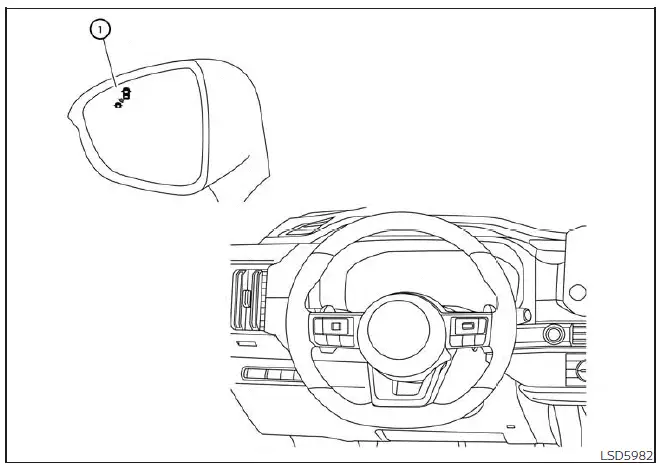
Nissan Pathfinder. Rear Cross Traffic Alert (RCTA)
For vehicles with the 7 inch (18 cm) display

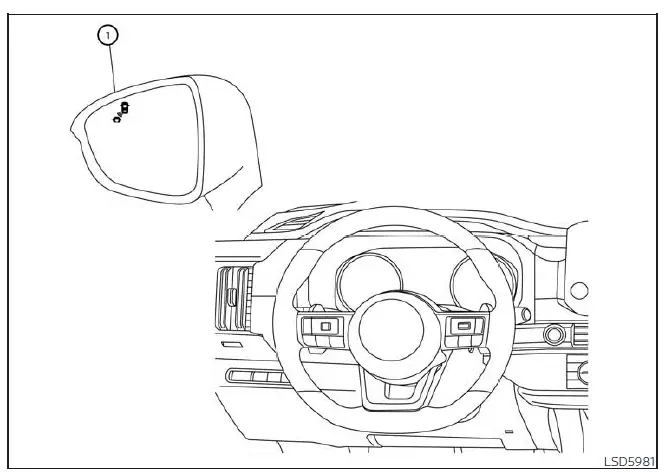
  1. Side BSW/RCTA Indicator Light

Nissan Pathfinder. Rear Cross Traffic Alert (RCTA)
For vehicles with the 12.3 inch (31.2 cm) display

The RCTA system can help alert the driver of an approaching vehicle when the driver is backing out of a parking space.

When the shift position is in R (Reverse) and the vehicle speed is less than approximately 8 km/h, the RCTA system is operational.

If the radar detects an approaching vehicle from either side, the system chimes (once) and the side BSW/RCTA indicator light flashes on the side the vehicle is approaching from.
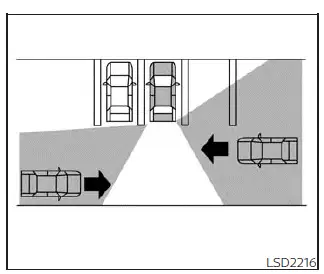
Nissan Pathfinder. Rear Cross Traffic Alert (RCTA)

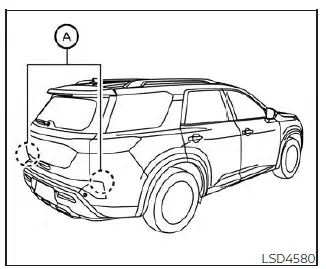
The RCTA system uses radar sensors A installed on both sides near the rear bumper to detect an approaching vehicle.

The radar sensors A can detect an approaching vehicle from up to approximately 66 ft. (20 m) away.

How to enable/disable the RCTA system
Nissan Pathfinder. Rear Cross Traffic Alert (RCTA)
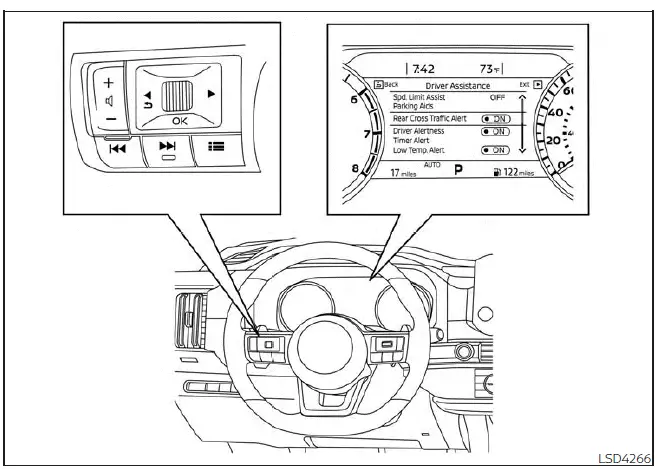
For vehicles with the 7 inch (18 cm) display

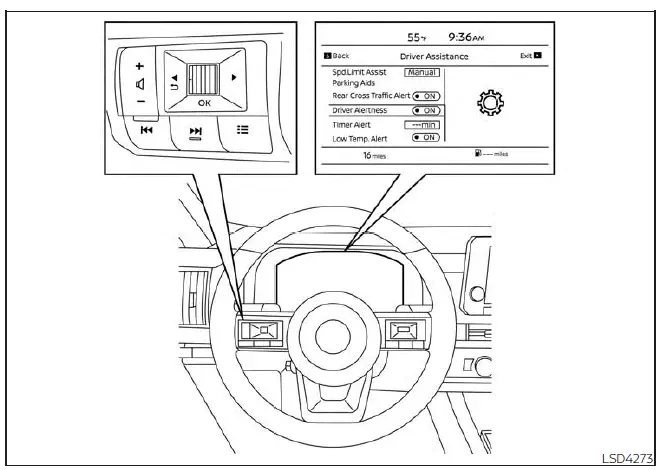
Perform the following steps to enable or disable the RCTA system.

1. Press the button until "Settings" displays in the vehicle information display.

Use the scroll dial to select "Driver Assistance." Then press the OK button.

2. Select "Rear Cross Traffic Alert" and press the OK button to turn the system on or off.

NOTE:

  • When enabling/disabling the system, the system setting will be retained even if the engine is restarted.
Nissan Pathfinder. Rear Cross Traffic Alert (RCTA)
For vehicles with the 12.3 inch (31.2 cm) display

RCTA system limitations
Nissan Pathfinder. Rear Cross Traffic Alert (RCTA)

WARNING Listed below are the system limitations for the RCTA system. Failure to operate the vehicle in accordance with these system limitations could result in serious injury or death.

  • Always check surroundings and turn to check what is behind you before backing up. The radar sensors detect approaching (moving) vehicles. The radar sensors cannot detect every object such as:
    • Pedestrians, bicycles, motorcycles, animals or child-operated toy vehicles
    • A vehicle that is passing at speeds greater than approximately 30 km/h
    • A vehicle that is passing at speeds lower than approximately 8 km/h
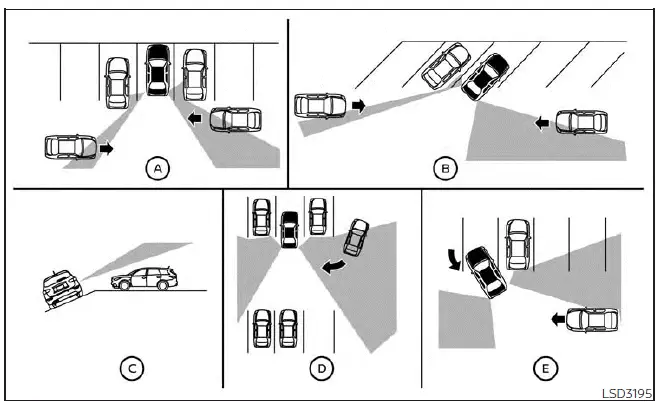
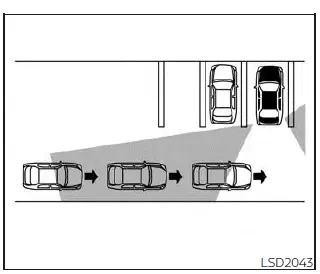
  • The radar sensors may not detect approaching vehicles in certain situations:
    • Illustration A : When a vehicle parked next to you obstructs the beam of the radar sensor.
    • Illustration B : When the vehicle is parked in an angled parking space.
    • Illustration C : When the vehicle is parked on inclined ground.
    • Illustration D : When an approaching vehicle turns into your vehicle's parking lot aisle.
    • Illustration E : When the angle formed by your vehicle and approaching vehicle is small
  • The following conditions may reduce the ability of the radar to detect other vehicles:
    • Severe weather
    • Road spray
    • Ice/frost/snow/dirt build-up on the vehicle
  • Do not attach stickers (including transparent material), install accessories or apply additional paint near the radar sensors. These conditions may reduce the ability of the radar to detect other vehicles
  • Excessive noise (e.g., audio system volume, open vehicle window) will interfere with the chime sound, and it may not be heard.
Nissan Pathfinder. Rear Cross Traffic Alert (RCTA)
Illustration 1

Nissan Pathfinder. Rear Cross Traffic Alert (RCTA)
Illustration 2

NOTE: In the case of several vehicles approaching in a row (Illustration 1) or in the opposite direction (Illustration 2),a chime may not be sounded by the RCTA system after the first vehicle passes the sensors.

System temporarily unavailable Nissan Pathfinder SUV

Basic information

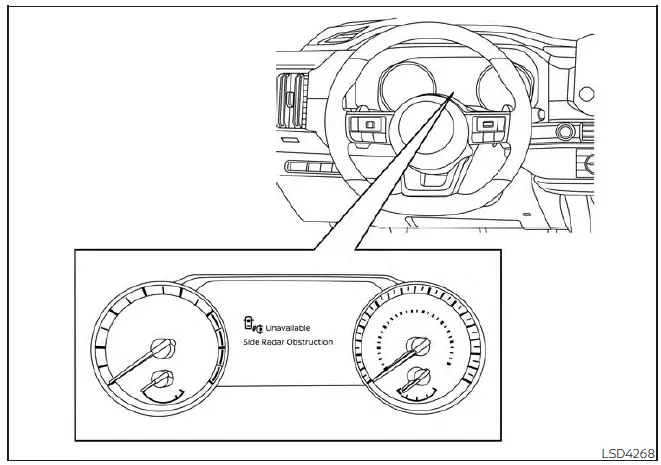
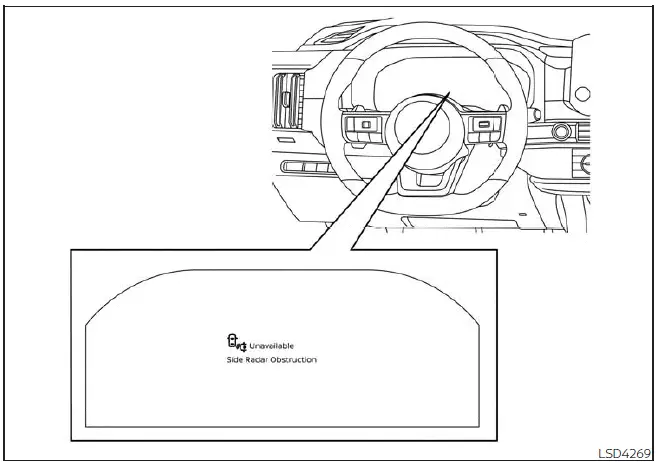
When radar blockage is detected, the system will be deactivated automatically.

The "Unavailable: Side Radar Obstruction" warning message will appear in the vehicle information display.

The systems are not available until the conditions no longer exist.

The radar sensors may be blocked by temporary ambient conditions such as splashing water, mist or fog.

The blocked condition may also be caused by conditions such as ice, snow, frost or dirt obstructing the radar sensors.

NOTE: If the BSW system stops working, the RCTA and I-BSI systems (if so equipped) will also stop working.

Action to take

When the above conditions no longer exist, the system will resume automatically.
Nissan Pathfinder. Rear Cross Traffic Alert (RCTA)
For vehicles with the 7 inch (18 cm) display
Nissan Pathfinder. Rear Cross Traffic Alert (RCTA)
For vehicles with the 12.3 inch (31.2 cm) display

Malfunction

When the RCTA system malfunctions, it will turn off automatically. The system malfunction warning message will appear in the vehicle information display.

NOTE: If the BSW system stops working, the RCTA and I-BSI systems (if so equipped) will also stop working.

Action to take

Stop the vehicle in a safe location, place the vehicle in the P (Park) position, turn the engine off and restart the engine. If the message continues to appear, have the system checked. It is recommended that you visit a NISSAN dealer for this service.

System maintenance
Nissan Pathfinder. Rear Cross Traffic Alert (RCTA)

Basic information

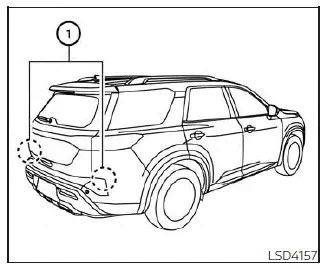
The two radar sensors 1 for the BSW and RCTA systems are located near the rear bumper. Always keep the area near the radar sensors clean.

The radar sensors may be blocked by temporary ambient conditions such as splashing water, mist or fog.

The blocked condition may also be caused by objects such as ice, frost or dirt obstructing the radar sensors.

Check for and remove objects obstructing the area around the radar sensors.

Do not attach stickers (including transparent material), install accessories or apply additional paint near the radar sensors.

Do not strike or damage the area around the radar sensors. It is recommended that you consult a NISSAN dealer if the area around the radar sensors is damaged due to a collision.

Radio frequency statement

For USA

CAUTION TO USERS

Changes or modifications not expressly approved by the party responsible for compliance could void the user's authority to operate the equipment.

This device complies with Part 15 of the FCC Rules and with the RSS of the Industry Canada. Operation is subject to the following two conditions:

1. This device may not cause harmful interference,

and

2. this device must accept any interference received, including interference that may cause undesired operation.

In order to comply with FCC RF Exposure requirements, this device must be installed to provide at least 20 cm separation from the human body at all times.

For Canada

This device complies with Industry Canada licence-exempt RSS standard(s).

Operation is subject to the following two conditions: (1) this device may not cause interference, and (2) this device must accept any interference, including interference that may cause undesired operation of the device.

Afin de se conformer aux exigences d'exposition RF MIC / FCC / ISED, cet appareil doit etre installe pour foutnir au moins 20 cm de separation du corps humain en tout temps.