Starting and driving - Traffic Sign Recognition (TSR)

In this manual: Starting and driving - Traffic Sign Recognition (TSR)
Air bags, seat belts and child restraints — 1Warning and indicator lights — 1Safety-Seats, seat belts and supplemental restraint system - Seats — 1Safety-Seats, seat belts and supplemental restraint system - Head restraints/headrests — 1Safety-Seats, seat belts and supplemental restraint system - Seat belts — 1Safety-Seats, seat belts and supplemental restraint system - Child safety — 1Safety-Seats, seat belts and supplemental restraint system - Child restraints — 1Safety-Seats, seat belts and supplemental restraint system - Supplemental Restraint System (SRS) — 1Instruments and controls - Instrument panel — 1Instruments and controls - Meters and gauges — 1Instruments and controls - Warning lights, indicator lights and audible reminders — 1Instruments and controls - Vehicle information display 7 inch (18 cm) Type A — 1Instruments and controls - Vehicle information display 12.3 inch (31 cm) Type B — 1Instruments and controls - Security systems — 1Instruments and controls - Wiper and washer switch — 1Instruments and controls - Headlight and turn signal switch — 1Instruments and controls - Climate controlled seat switches — 1Instruments and controls - Heated seat switches — 1Instruments and controls - Heated 2nd row seat switches — 1Instruments and controls - Hill descent control switch — 1Instruments and controls - Head Up Display (HUD) — 1Instruments and controls - Emergency call (SOS) button — 1Instruments and controls - Rear Door Alert — 1Instruments and controls - Power outlets — 1Instruments and controls - USB/iPod charging ports — 1Instruments and controls - Wireless charger — 1Instruments and controls - Storage — 1Instruments and controls - Windows — 1Instruments and controls - Power moonroof — 1Instruments and controls - Interior lights — 1Instruments and controls - HomeLink Universal Transceiver — 1Pre-driving checks and adjustments - Keys — 1Pre-driving checks and adjustments - Doors — 1Pre-driving checks and adjustments - NISSAN Intelligent Key system — 1Pre-driving checks and adjustments - Remote Engine Start — 1Pre-driving checks and adjustments - Hood — 1Pre-driving checks and adjustments - Liftgate — 1Pre-driving checks and adjustments - Fuel-filler door — 1Pre-driving checks and adjustments - Steering wheel — 1Pre-driving checks and adjustments - Sun visors — 1Pre-driving checks and adjustments - Mirrors — 1Pre-driving checks and adjustments - Memory seat — 1Monitor, climate, audio, phone and voice recognition systems - NissanConnect Owner's Manual — 1Monitor, climate, audio, phone and voice recognition systems - RearView Monitor — 1Monitor, climate, audio, phone and voice recognition systems - Intelligent Around View Monitor — 1Monitor, climate, audio, phone and voice recognition systems - Camera aiding sonar (parking sensor) — 1Monitor, climate, audio, phone and voice recognition systems - Moving Object Detection (MOD) — 1Monitor, climate, audio, phone and voice recognition systems - Heater and air conditioner (automatic) — 1Monitor, climate, audio, phone and voice recognition systems - Servicing air conditioner — 1Monitor, climate, audio, phone and voice recognition systems - Car phone or CB radio — 1Starting and driving - Precautions when starting and driving — 1Starting and driving - Push-button ignition switch — 1Starting and driving - Starting the engine — 1Starting and driving - Driving the vehicle — 1Starting and driving - Parking brake — 1Starting and driving - Automatic brake hold — 1Starting and driving - Drive Mode Selector — 1Starting and driving - Traffic Sign Recognition (TSR) — 1Starting and driving - Lane Departure Warning (LDW) — 1Starting and driving - Intelligent Lane Intervention (I-LI) — 1Starting and driving - Blind Spot Warning (BSW) — 1Starting and driving - Intelligent Blind Spot Intervention (I-BSI) — 1Starting and driving - Rear Cross Traffic Alert (RCTA) — 1Starting and driving - Cruise control — 1Starting and driving - ProPILOT Assist — 1Starting and driving - Rear Automatic Braking (RAB) — 1Starting and driving - Automatic Emergency Braking (AEB) with Pedestrian Detection — 1Starting and driving - Intelligent Forward Collision Warning (I-FCW) — 1Starting and driving - Intelligent Driver Alertness (I-DA) — 1Starting and driving - Fuel efficient driving tips — 1Starting and driving - Intelligent 4X4 (I-4X4) — 1Starting and driving - Parking/parking on hills — 1Starting and driving - Power steering — 1Starting and driving - Brake system — 1Starting and driving - Vehicle Dynamic Control (VDC) system — 1Starting and driving - Active Brake Limited Slip (ABLS) system — 1Starting and driving - Chassis control — 1Starting and driving - Hill descent control system — 1Starting and driving - Hill start assist system — 1Starting and driving - Front and Rear Sonar System — 1Starting and driving - Idling Stop System — 1Starting and driving - Cold weather driving — 1In case of emergency - Hazard warning flasher switch — 1In case of emergency - Flat tire — 1In case of emergency - Jump starting — 1In case of emergency - If your vehicle overheats — 1In case of emergency - Towing your vehicle — 1Appearance and care - Cleaning exterior — 1Appearance and care - Cleaning interior — 1Appearance and care - Corrosion protection — 1Do-it-yourself - Maintenance precautions — 1Do-it-yourself - Engine compartment check locations — 1Do-it-yourself - Engine oil — 1Do-it-yourself - Automatic Transmission Fluid (ATF) — 1Do-it-yourself - Windshield-washer fluid — 1Do-it-yourself - Battery — 1Do-it-yourself - Variable voltage control system — 1Do-it-yourself - Drive belt — 1Do-it-yourself - Spark plugs — 1Do-it-yourself - Air cleaner — 1Do-it-yourself - Windshield wiper blades — 1Do-it-yourself - Brakes — 1Do-it-yourself - Fuses — 1Do-it-yourself - Battery replacement — 1Do-it-yourself - Lights — 1Do-it-yourself - Wheels and tires — 1Maintenance and schedules - Maintenance requirements — 1Maintenance and schedules - General maintenance — 1Maintenance and schedules - Explanation of scheduled maintenance items — 1Maintenance and schedules - Maintenance schedules — 1Technical and consumer information - Recommended fluids/lubricants and capacities — 1Technical and consumer information - Specifications — 1Technical and consumer information - Vehicle identification — 1Technical and consumer information - Vehicle loading information — 1Technical and consumer information - Towing a trailer — 1Technical and consumer information - Flat towing your vehicle — 1Technical and consumer information - Uniform tire quality grading — 1Technical and consumer information - Reporting safety defects — 1Technical and consumer information - Readiness for Inspection/Maintenance (I/M) test — 1Technical and consumer information - Event Data Recorders (EDR) — 1
~3min read

Basic information

Nissan Pathfinder. Traffic Sign Recognition (TSR)

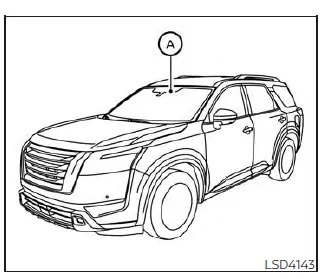
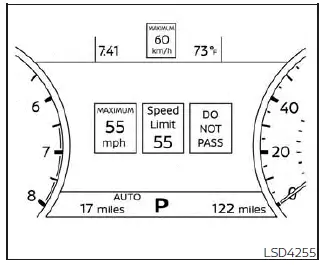
The TSR system provides the driver with information about the most recently detected speed limit. The system captures the road sign information with the multi-sensing front camera unit A located on the windshield in front of the inside rearview mirror and displays the detected signs in the vehicle information display. For vehicles equipped with a navigation system, the speed limit displayed is based on a combination of navigation system data and live camera recognition. TSR information is always displayed at the top of the

vehicle information display, and optionally in the main central area of the display screen.

WARNING The TSR system is only intended to be a support device to help provide the driver with information. It is not a replacement for the driver's attention to traffic conditions or responsibility to drive safely. It cannot prevent accidents due to carelessness. It is the driver's responsibility to stay alert and drive safely at all times.

System operation
Nissan Pathfinder. Traffic Sign Recognition (TSR)

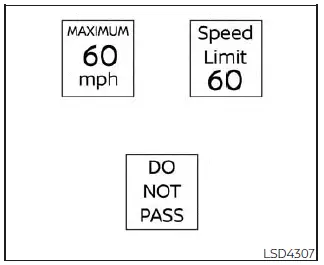
The Traffic Sign Recognition (TSR) system displays the following types of road signs:
Nissan Pathfinder. Traffic Sign Recognition (TSR)

CAUTION

  • The TSR system is intended as an aid to careful driving. It is the driver's responsibility to stay alert, drive safely, and observe all road regulations that currently apply, including looking out for road signs.
  • The TSR system may not function properly under the following conditions:
    • When the road sign is not clearly visible, for example, due to damage or weather conditions.
    • When rain, snow or dirt adheres to the windshield in front of the multi-sensing camera unit.
    • When the headlights are not bright, for example, due to dirt on the lens or if the aiming is not adjusted properly.
    • When strong light enters the camera unit. (For example, the light directly shines on the front of the vehicle at sunrise or sunset.)
    • When a sudden change in brightness occurs. (For example, when the vehicle enters or exits a tunnel or under a bridge.)
    • If there are deviations in relation to the navigation, for example due to changes in the road routing.
    • When overtaking buses or trucks with speed stickers.

Turning the Traffic Sign Recognition (TSR) system on and off
Nissan Pathfinder. Traffic Sign Recognition (TSR)
For vehicles with the 7 inch (18 cm) display
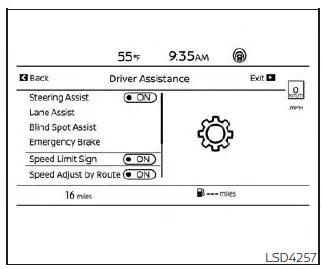
Nissan Pathfinder. Traffic Sign Recognition (TSR)

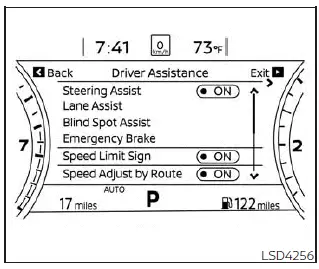
Perform the following steps to enable or disable the TSR system.

1. Press the button until "Settings" displays in the vehicle information display.

Use the scroll dial to select "Driver Assistance." Then press the OK button.

2. Select "Speed Limit Sign" and press the OK button to turn the system on or off.

System temporarily unavailable

If the vehicle is parked in direct sunlight under high temperature conditions (over approximately 104ºF [40ºC] ) and then started, the TSR system may be deactivated automatically. The "Unavailable: High Cabin Temperature" warning message will appear in the vehicle information display.

Action to take:

When the interior temperature is reduced, the TSR system will resume operating automatically.

System malfunction

If the TSR system malfunctions, it will be turned off automatically and the system "Malfunction" warning message will appear in the vehicle information display.

Action to take:

If the TSR "Malfunction: See Owner's Manual" message appears, pull off the road at a safe location and stop the vehicle. Turn the engine off and restart the engine. If the TSR "Malfunction: See Owner's Manual" message continues to appear, have the system checked. It is recommended that you visit a NISSAN dealer for this service.

System maintenance

The TSR system uses the same multi-sensing front camera unit that is used by the Lane Departure Warning (LDW) system, located in front of the interior rearview mirror.