Calibration
1. DESCRIPTION
(a) Follow the chart below to perform calibration.
Parts to be Replaced | Necessary Operation |
|---|---|
Brake actuator assembly (Skid control ECU) |
Perform engine variant learning |
2. ENGINE VARIANT LEARNING (When Using the Techstream)
(a) Perform Engine Variant Learning
HINT:
Engine variant learning is automatically performed immediately after the Test Mode is entered.
(1) Turn the ignition switch off.
(2) Connect the Techstream to the DLC3.
(3) Turn the ignition switch to ON.
(4) Turn the Techstream on.
(5) Select the skid control ECU to Test Mode using the Techstream. Enter the following menus: Chassis / ABS/VSC/TRAC / Utility / Test Mode.
(6) Check that the ABS warning and slip indicator lights blink in Test Mode.
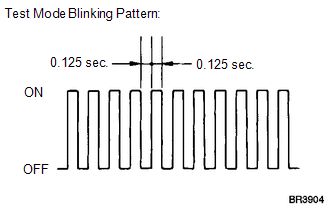
HINT:
If learning has not yet been performed, the ABS warning and slip indicator lights will remain on and DTC C1288 (ECU Version Miss Match) will be stored.
(7) Turn the ignition switch off and disconnect the Techstream.
3. ENGINE VARIANT LEARNING (When not Using the Techstream)
(a) Perform Engine Variant Learning
HINT:
Engine variant learning is automatically performed immediately after the Test Mode is entered.
(1) Turn the ignition switch off.
(2) Using SST, connect terminals TS and CG of the DLC3.
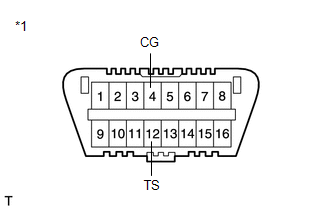
SST: 09843-18040
Text in Illustration*1 |
Front view of DLC3 |
(3) Turn the ignition switch to ON.
(4) Check that the ABS warning and slip indicator lights blink in Test Mode.
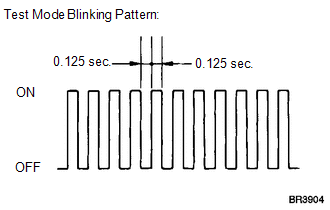
HINT:
If learning has not yet been performed, the ABS warning and slip indicator lights will remain on and DTC 88 (ECU Version Miss Match) will be stored.
(5) Turn the ignition switch off and disconnect SST from the DLC3.
Test yourself
A quick Toyota Venza quiz: every answer comes with an explanation and a link to the manual page.