Auto Door Unlock
The auto door unlock function has five settings:
Auto door unlock function is off.
• The driver's door unlocks when the shift lever is moved to the P (Park) position, provided the brake pedal is pressed (for vehicles with automatic transmission).
• This setting is the default.
• All side doors and the liftgate unlock when the shift lever is moved to the P (Park) position, provided the brake pedal is pressed (for vehicles with automatic transmission).
• The driver's door unlocks when the ignition key is turned to the ACCESSORY (I) position.
• This setting is selected by default on vehicles with a manual transmission.
• All side doors and the liftgate unlock when the ignition key is turned to the ACCESSORY (I) position.
To disable the automatic door unlock function, perform the following steps:
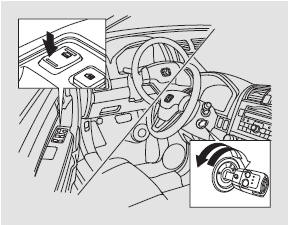
1. Make sure the shift lever is in the P (Park) position (for vehicles with automatic transmission).
2. Turn the ignition key to the ON (II) position and open the driver's door.
3. Press and hold the rear part of the central locking switch on the driver's door. A click will sound, and after 5 seconds another click will sound.
4. Release the switch and turn the ignition key to the LOCK (0) position within 20 seconds.
To enable the door unlock mode when the shift lever is moved to the P (Park) position, perform the following steps:
In this mode, all side doors and the liftgate unlock when the shift lever is moved to the P (Park) position, provided the brake pedal is pressed (for vehicles with an automatic transmission).

1. Make sure the shift lever is in the P (Park) position.
2. Turn the ignition key to the ON (II) position and close the driver's door.
3. Press and hold the rear part of the central locking switch on the driver's door. A click will sound.
Continue holding the switch:
• Until another click sounds (approximately 5 seconds later) to activate the driver's door only unlock mode.
• Or until two more clicks sound (approximately 10 seconds later) to enable the unlock mode for all side doors and the liftgate.
4. Release the switch and turn the ignition key to the LOCK (0) position within 20 seconds.
To enable the door unlock mode when the ignition key is turned from the ON (II) position, perform the following steps:
In this mode, the driver's door or all doors, including the liftgate, unlock when the ignition key is turned from the ON (II) position.

1. Make sure the shift lever is in the P (Park) position (for vehicles with an automatic transmission).
2. Turn the ignition key to the ON (II) position and close the driver's door.
3. On vehicles with automatic transmission, press and hold the brake pedal, then move the shift lever from the P (Park) position.
4. Press and hold the rear part of the central locking switch on the driver's door. A click will sound.
Continue holding the switch:
• Until another click sounds (approximately 5 seconds later) to activate the driver's door only unlock mode.
• Or until two more clicks sound (approximately 10 seconds later) to enable the unlock mode for all side doors and the liftgate.
5. Release the switch and turn the ignition key to the ACCESSORY (I) position within 20 seconds. On vehicles with automatic transmission, move the shift lever to the P (Park) position.
6. Turn the ignition key to the LOCK (0) position.
Test yourself
A quick Honda CR-V quiz: every answer comes with an explanation and a link to the manual page.