Using the ACC System
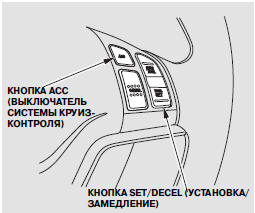
1. Press the ACC button located on the steering wheel.
The ACC indicator (green) will illuminate on the instrument panel, and the symbol will appear on the multi-information display.
2. Accelerate the vehicle to the desired speed (above 30 km/h).
3. Press and release the SET/DECEL button located on the steering wheel, then release the accelerator pedal.
If you press the SET/DECEL button at a speed below approximately 30 km/h, three short beeps will sound. This means the ACC system has not activated and is not controlling vehicle speed.

After you accelerate the vehicle to 30 km/h or above, the ACC system will enter standby mode. The symbol shown in the illustration or the message "ACC STANDBY" will appear on the multi-information display.
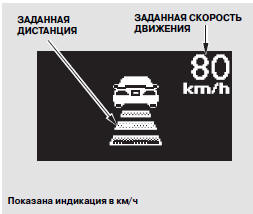
When a set speed is selected, its value is displayed on the multi-information display to the right of the vehicle icon and the distance bar indicator.
Setting and Changing the Distance to the Vehicle Ahead.
Changing the Speed Unit of Measurement.

If you change the speed units set at the factory, the default units will also be shown on the display along with the selected units.

If you cancel cruise control by pressing the CANCEL button or the brake pedal, the previously set speed remains on the display. To store a new set speed in memory, press and release the RES/ACCEL button.
Test yourself
A quick Honda CR-V quiz: every answer comes with an explanation and a link to the manual page.