Increasing the Set Speed
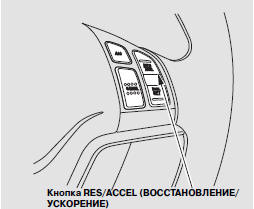
The set speed can be increased using the RES/ACCEL button or the accelerator pedal.
To increase the set speed using the RES/ACCEL button, do the following:
Press and hold the RES/ACCEL button. The vehicle will accelerate.
Once the vehicle reaches the desired speed during acceleration, release the button.
To increase the set speed in steps, briefly press the RES/ACCEL button. Each press increases the speed by approximately 5 km/h.
While the vehicle accelerates to the set speed, the set speed value on the multi-function display will flash.
If the vehicle ahead is traveling slower than the speed you want to set, your vehicle will not accelerate in order to maintain a safe distance from the vehicle ahead.
To increase the set speed using the accelerator pedal, press the pedal and accelerate to the desired speed, then press the SET/DECEL button.
The set speed value will be shown on the multi-function information display.
If you do not press the SET/DECEL button, the vehicle will decelerate to the previously set speed. When the accelerator pedal is pressed, the ACC system does not sound the warning chime no matter how close you approach the vehicle ahead.
Test yourself
A quick Honda CR-V quiz: every answer comes with an explanation and a link to the manual page.