Changing the Distance to the Vehicle Ahead
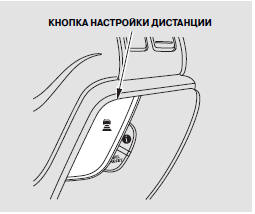
When the ACC system is active, it controls and maintains the distance between your vehicle and the vehicle ahead. You can select one of three distance settings to the vehicle ahead: long, medium, or short.
To adjust the distance, press the DISTANCE button. Each press cycles the set distance through: long, medium, short, long, and so on.
The higher your vehicle speed, the larger the distance to the vehicle ahead that the system sets (see table).
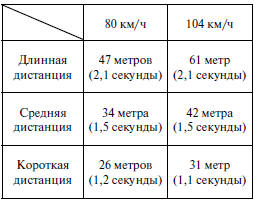
Under all circumstances, the driver is fully responsible for the safe operation of the vehicle and must maintain a sufficient, safe distance from the vehicle or obstacle ahead, complying with all traffic regulations.
The set distance is shown on the multi-function information display.

Test yourself
A quick Honda CR-V quiz: every answer comes with an explanation and a link to the manual page.