Decreasing the Set Speed
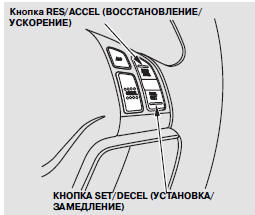
The set speed can be decreased using the SET/DECEL button or by pressing the brake pedal.
To decrease the set speed using the SET/DECEL button, do the following:
Press and hold the SET/DECEL button. Release the button once the vehicle reaches the desired speed.
To decrease the set speed in steps, briefly press the SET/DECEL button. Each press decreases the speed by approximately 5 km/h.
The set speed value will be shown on the multi-function information display.
When driving downhill, the vehicle speed may exceed the set speed.
To decrease the set speed using the brake pedal, do the following:
Briefly press the brake pedal. Once the vehicle slows to the desired speed, press the SET/DECEL button.
The set speed value will be shown on the multi-function information display. If you reduce speed by pressing the brake pedal and then press the RES/ACCEL button, the vehicle will accelerate again to the previously set speed.
Manual transmission vehicles only: With the Adaptive Cruise Control system on, shifting to a lower gear does not reduce vehicle speed. Use the brake pedal to reduce speed.
Test yourself
A quick Honda CR-V quiz: every answer comes with an explanation and a link to the manual page.