Comfort and Convenience Features
Detecting a Vehicle Ahead
In this manual: Comfort and Convenience Features
~1min read

If the system detects a vehicle ahead of you, a vehicle symbol drawn with solid lines will appear on the display.
For information on setting the vehicle approach warning function, refer to page
125. The warning function is turned off by default.
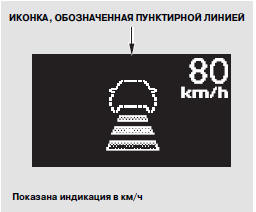
If there is no other vehicle ahead of you within the detection range of the ACC radar sensor, the vehicle symbol will be shown as a dashed line on the multi-function information display.
You can set the warning function that sounds when a vehicle ahead is detected (see pages 125 and 126).
Test yourself
A quick Honda CR-V quiz: every answer comes with an explanation and a link to the manual page.
Was this page helpful?