Vehicle Detection
The sensor may be limited when:
- The system may not operate for 15 seconds after the engine is started or while the camera is initializing.
- The radar sensor or camera is covered by a foreign object or debris.
- The camera lens is contaminated by window tint, film, or coating on the windshield, a damaged windshield, or a foreign object (sticker, bug, etc.) stuck to the glass.
- Bad weather, such as heavy rain or snow, blocks the field of view of the radar sensor or camera.
- Electromagnetic interference or waves are present.
- Strong irregular reflections are present at the radar sensor.
- Radar sensor/camera recognition is limited
- The vehicle ahead is too small to be detected (e.g. a motorcycle or bicycle, etc.).
- The vehicle ahead is an oversized vehicle or trailer that is too large to be detected by the camera recognition system (e.g. a tractor-trailer, etc.).
- The camera's field of view is poorly lit (either too dark, or too much reflection or too much light that obscures the field of view).
- The vehicle ahead does not have its taillights properly illuminated, or its taillights are positioned unusually.
- External brightness changes suddenly, for example when entering or exiting a tunnel.
- Light from a street lamp or an oncoming vehicle is reflected off a wet road surface, such as a puddle on the road.
- The forward field of view is limited by sun glare.
- The windshield is fogged; a clear view of the road is obstructed.
- The vehicle ahead is driving erratically.
- The vehicle is on an unpaved or uneven, rough surface, or a road with sharp changes in gradient.
- The vehicle is driving near areas containing metallic objects, such as a construction zone or railway, etc.
- The vehicle enters a building, such as an underground parking garage.
- The camera does not recognize the entire vehicle ahead.
- The camera is damaged.
- The outside brightness is too low, for example, when the headlamps are not on at night or the vehicle is passing through a tunnel.
- Shadows on the road from a median strip, trees, etc.
- The vehicle passes through a toll gate.
- The rear of the vehicle ahead is not normally visible (the vehicle is turning to the side or the vehicle is overturned).
- Excessive vehicle vibration during driving due to adverse road conditions
- Sensor recognition changes suddenly when driving over a speed bump.
- The vehicle ahead moves vertically relative to the direction of travel.
- The vehicle ahead is stopped across the direction of travel.
- The vehicle ahead moves toward your vehicle or in reverse.
- You are on a roundabout and the vehicle is in the front circles.
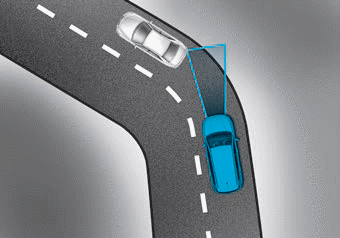
• Driving on curves
FCA system performance may be limited while driving on a curved road.
In some cases on a curved road, the FCA system may activate prematurely.
Also, in some cases, the front radar sensor or camera recognition system may not detect a vehicle driving on a curved road.
In these cases, the driver must maintain a safe braking distance and, if necessary, press the brake pedal to reduce vehicle speed and maintain a safe distance.
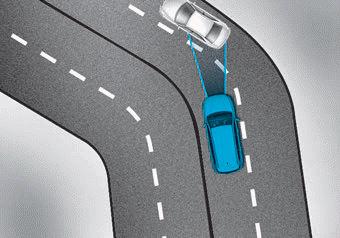
The FCA system may recognize a vehicle in the adjacent lane while driving on a curved road.
In this case, the system may unnecessarily alert the driver and apply the brakes.
Always pay attention to the road and driving conditions while driving. If necessary, press the brake pedal to reduce speed and maintain a safe distance.
In addition, if necessary, press the accelerator pedal to prevent the system from unnecessarily decelerating your vehicle.
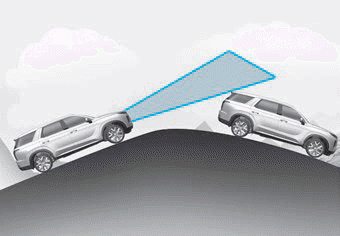
• Driving on slopes
FCA performance is reduced when driving uphill or downhill, when it does not recognize a vehicle ahead in the same lane. A warning message and warning chime may be output unnecessarily, or a warning message and warning chime may not be output at all.
When FCA suddenly recognizes a vehicle ahead while driving on a slope, you may experience sudden braking.
Always look ahead when driving uphill or downhill and, if necessary, press the brake pedal to reduce driving speed and maintain a safe distance.
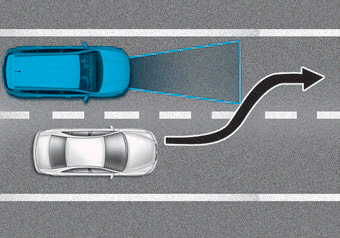
• Lane changes
When a vehicle changes lanes in front of you, the FCA system may not immediately detect the vehicle, especially if the vehicle changes lanes abruptly. In this case, maintain a safe braking distance and, if necessary, press the brake pedal to reduce driving speed and maintain a safe distance.
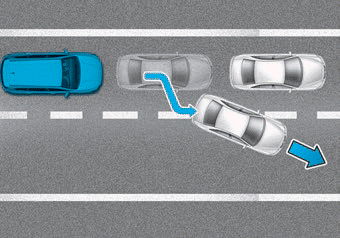
When driving in stop-and-go traffic and a vehicle ahead of you merges into your lane, the FCA system may not immediately detect the new vehicle in front of you. In this case, maintain a safe braking distance and, if necessary, press the brake pedal to reduce driving speed and maintain a safe distance.
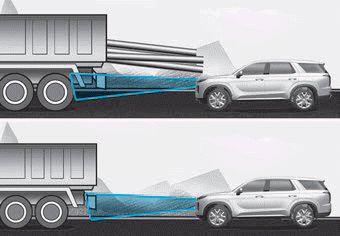
• Detection of the vehicle ahead
If the vehicle ahead is carrying cargo that extends rearward from the cab, or when the vehicle ahead has a raised body, extra caution is required. The FCA system may be unable to detect cargo extending from the vehicle. In these cases, maintain a safe braking distance from the rearmost object and, if necessary, press the brake pedal to reduce driving speed and maintain a safe distance.
Test yourself
A quick Hyundai Palisade quiz: every answer comes with an explanation and a link to the manual page.