Electrochromic Mirror with HomeLink
Your vehicle may be equipped with a Gentex auto-dimming mirror with a built-in HomeLink® wireless control system.
During night driving, this function automatically detects and dims the mirror glass. The HomeLink® Universal Transceiver allows you to activate garage door(s), electric gates, home lighting, etc.
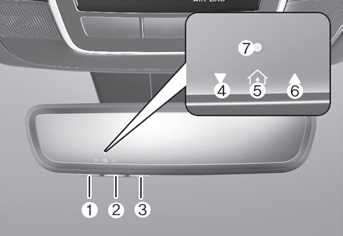
(1) HomeLink Channel 1
(2) HomeLink Channel 2
(3) HomeLink Channel 3
(4) Garage Door Opener Status Indicator: Closing or Closed
(5) HomeLink Activity Indicator
(6) Garage Door Opener Status Indicator: Opening or Open
(7) HomeLink User Interface Indicator
Built-in HomeLink® Wireless Control System
The HomeLink® Wireless Control System provides a convenient way to replace up to three hand-held radio frequency transmitters used to activate compatible devices such as gate operators, garage door openers, door locks, security systems and home lighting.
NOTICE
HomeLink® operates with the ignition switch in the ACC or ON position for safety reasons. This prevents unintended security issues from occurring when the vehicle is parked outside the garage.
WARNING
Before programming HomeLink® to a garage door opener or gate operator, make sure people and objects are not in the path of the device to prevent potential injury or damage. Do not use HomeLink® with any garage door opener that lacks the safety stop and reverse features required by U.S. federal safety standards (this includes any garage door opener model manufactured before April 1, 1982). A garage door that cannot detect an object and signal the door to stop and reverse does not comply with the current U.S. federal safety standard. Using a garage door opener without these features increases the risk of serious injury or death.
For more information, contact HomeLink® at www.homelink.com, or call the HomeLink customer support line at 1-800-355-3515.
It is also recommended to replace the battery in the handheld transmitter of the device being trained to HomeLink® for faster training and accurate radio frequency transmission.
1. HomeLink® Programming
The following steps show how to program HomeLink. If you have questions or difficulties programming the HomeLink buttons, visit the HomeLink website or call the HomeLink toll-free customer support number. Do this before returning to the dealer who sold you the vehicle.
- Visit the HomeLink website at www.homelink.com. Then, at the top of the page, select your vehicle make. Then watch the video on YouTube and/or access additional information on the website.
- If you choose to access the website through your mobile phone, scan the QR code.

- Or call HomeLink support at 1-800-355-3515. (Please have the vehicle make/model and the transmitter make/model readily available.)
1) Preparation for Programming

1. When programming the garage door opener, it is recommended to park the vehicle outside the garage.
2. It is recommended that a new battery be installed in the hand-held transmitter of the device to be programmed to HomeLink for faster learning and accurate transmission of the radio frequency signal.
3. Turn the ignition key to the ACC (Accessory) position for HomeLink programming.
2) Programming a New HomeLink®
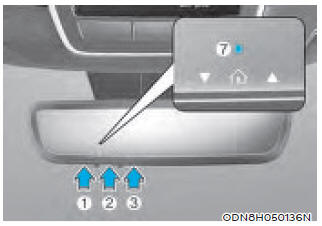
1. Press and release the HomeLink button (1), (2) or (3) you want to program. The HomeLink indicator (7) will flash slowly orange (if it does not, perform the steps in "Erasing a HomeLink Button" and start over).

2. Position the hand-held transmitter of the garage door opener 1–3 in. (2–8 cm) away from the HomeLink buttons.
3. While the HomeLink indicator (7) is flashing orange, press and hold the hand-held transmitter button. Continue holding the transmitter button until the HomeLink indicator (7) changes from orange to green. You can now release the hand-held transmitter button.
4. Wait until the garage door has opened or closed and come to a complete stop, regardless of position, before proceeding to the next steps.
5. Press and release the HomeLink button you are programming and observe the indicator light.
- If the indicator light stays green, your device should operate when the HomeLink button is pressed. At this point, if your device operates, programming is complete.
- If the indicator light flashes green rapidly, firmly press and hold the HomeLink button for two seconds, then release. Repeat up to three times in succession to slowly complete the programming process. Do not press the HomeLink button rapidly. At this point, if your device operates, programming is complete. If the device does not operate, continue with step 6.
6. On the garage door opener motor unit (guard station, etc.), locate the "Learn", "Smart", "Set" or "Program" button. This is usually found where the antenna wire is attached to the motor unit (see the device manual to identify this button). The name and color of the button may vary depending on the manufacturer.

A ladder and/or a second person may make the following steps easier.
7. Firmly press and release the "Learn", "Smart", "Set" or "Program" button. You now have up to 30 seconds to complete the next step.
8. Return to the vehicle and firmly press and hold the HomeLink button for two seconds, then release. Repeat up to three times in succession slowly. Do not press the HomeLink button rapidly. As soon as you see the garage door begin to move, stop pressing any buttons until a few seconds after the garage door has completely stopped, regardless of position. At this point, programming is complete and your device should operate when the HomeLink button is pressed and released.
3) Two-Way Communication Programming (for Some Garage Door Openers)
If the garage door opener has a "myQ" logo on the side, your opener most likely has two-way communication capability. HomeLink is capable of two-way communication with the garage door opener. HomeLink can receive and display "closed" or "open" status messages from compatible garage door openers. At any time, HomeLink can also recall and display the last recorded status reported by the garage door opener, indicating whether your garage door is "closed" or "open".
To check whether your garage door opener is compatible with this feature, see www.homelink.com/compatible/Two-way-Communication. If your garage door opener has this feature AND the two-way communication indicators (4), (6) in the mirror appear when the garage door opens/closes, no further action is required. Two-way communication programming is already complete. However, if your garage door opener has this feature AND the two-way communication indicators (4), (6) in the mirror DO NOT appear while the garage door opens/closes, use the following instructions to enable this functionality.
1. In the vehicle, press and hold the programmed HomeLink button for 2 seconds, then release. Confirm that the garage door moves. After it stops, you will have one minute to perform the following steps:
A ladder and/or a second person may make the following steps easier.
2. On the garage door opener unit in your garage, locate the "Learn" button (usually near where the antenna wire is attached to the garage door opener). If you have difficulty locating this button, refer to the device owner's manual.
3. Press and release the "Learn" button.
4. The light on your garage door may flash, and your two-way communication indicators (4), (6) in the vehicle may flash, confirming the process is complete.
5. Return to the vehicle and firmly press and release the programmed HomeLink button to activate your garage door. The two-way communication indicators (4), (6) flash orange while the door is moving. Do not press any additional buttons until AFTER the garage door has completely stopped.
6. Your two-way communication programming is complete.
Information
If your garage door opener has two-way communication capability, HomeLink may stop operating the garage door shortly after initial programming if two-way communication programming was not properly completed. This usually occurs after the programmed HomeLink button has been pressed the first 10 times. If you experience this, performing "Programming a New HomeLink Button" and "Two-Way Communication Programming" will restore door operation.
4) Canadian Programming
Canadian radio frequency laws require hand-held transmitters to "time out" (shut off) a few seconds after transmission, which may not be long enough for HomeLink to capture the signal during programming.
If you live in Canada, or if you have difficulty programming your gate operator or garage door opener using the programming procedure, replace Step 3 of "Programming a New HomeLink Button" with the following:
When the HomeLink indicator (7) flashes orange, press and release ("cycle") the hand-held remote control of your device every two seconds until the HomeLink indicator (7) changes from orange to green. You may now release the hand-held remote control button. Then proceed to the "Programming a New HomeLink Button" section, Step 4.
2. Using HomeLink®
1) Using HomeLink®

1. Press and release the desired programmed HomeLink button (1, 2 or 3).
Information
The HomeLink indicator (7) should be light green, steady or flashing, and your programmed device should operate. If your device does not operate, HomeLink programming was not successful and you will need to reprogram the button.
2) Two-Way Communication Display Behavior
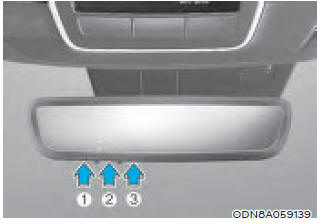
1. Press and release one of the programmed HomeLink buttons (1, 2 or 3).
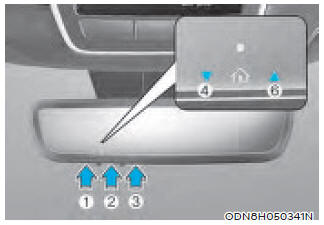
2. Indicators (4) and (6) operate as described below if the garage door opener has two-way communication capability.
- If indicator (4) flashes orange, this indicates that the garage door is "Closing."
- Indicator (4) remains steady green once the garage door has closed.
- If indicator (6) flashes orange, this indicates that the garage door is "Opening."
- Indicator (6) remains steady green once the garage door has fully opened.
- If indicator (4) or (6) does not turn green, this means the last state of the garage door was not received properly. The HomeLink mirror attempts to obtain the last known state of the garage door for several seconds.
3) Recalling the Garage Door Status
The HomeLink mirror with two-way communication allows you to view the last stored message from the garage door opener. To recall the last known status of the last activated device, press the "1 and 2" OR "2 and 3" buttons simultaneously.
- If indicator (4) remains steady green, this means the last activated device was "closed" correctly.
- If indicator (6) remains steady green, this means the last activated device was "opened" correctly.
3. Erasing HomeLink® Buttons
1) Erasing and Reprogramming a Single HomeLink® Button:
1. Press and hold the desired HomeLink button you want to reprogram. DO NOT release the button.
2. The HomeLink indicator (7) will light steady green. Release the button as soon as the HomeLink indicator (7) begins to flash orange, usually after about 20 seconds.
3. Perform the steps described in the "Programming a New HomeLink Button" section.
Information
If you do not complete reprogramming of the new device to the button, it will return to the previously stored programming.
2) The following instructions will erase ALL HomeLink® programming from ALL buttons:

1. Press and hold buttons (1) and (3) simultaneously.
2. The HomeLink indicator (7) will light steady orange for about 10 seconds.
3. Release the buttons as soon as the HomeLink indicator (7) changes to green and flashes rapidly.
4. All three HomeLink buttons (1), (2) and (3) are now cleared of any programming.
Information
HomeLink® and the HomeLink® house logo are registered trademarks of Gentex Corporation.
The myQ logo is a registered trademark of The Chamberlain Group, Inc.
HomeLink Programming Flow Chart

Test yourself
A quick Hyundai Tucson quiz: every answer comes with an explanation and a link to the manual page.