Using the iPod
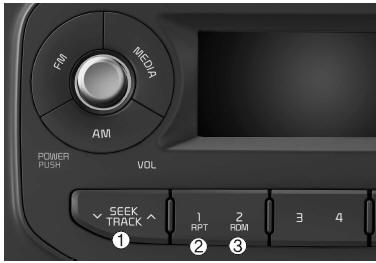
❋ iPod® is a trademark of Apple Inc.
1. Button
- Press the button
 Press for less than 0.8 seconds to play the currently playing track from the beginning.
Press the button for less than 0.8 seconds, then press it again within 3 seconds to go to and play the previous track.
Press and hold the button for 0.8 seconds or more to fast-reverse the current track.
 Press for less than 0.8 seconds to go to the next track.
2. Button (REPEAT)
Repeats the currently playing track continuously.
3. Button (RANDOM)
- Press this button to shuffle the order of all tracks in the current category.
- To cancel RANDOM playback, press this button again.
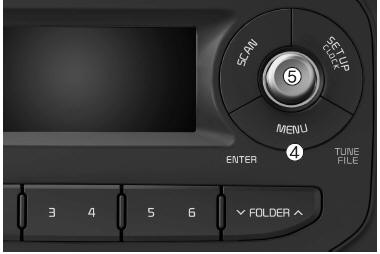
4. Button (MENU)
- RPT: Repeats the current track.
- RDM: Plays all tracks in the currently playing category in random order.
- INFO: Displays information about the current track.
- Search: Switches from the currently playing category to the next higher category of the iPod®. To go to the displayed category (play the displayed track), press the knob
 . Search can then be performed within the subcategory of the selected category. The iPod® category order is Playlist, Artist, Album, Genre, Song, Composer
5. Knob and Button

Turn the knob clockwise to display the tracks (categories) after the currently playing track (at the same level). Turn it counterclockwise to display the previous tracks.
When the knob is turned counterclockwise, the tracks (category) before the currently playing track (category of the same level) will be displayed.
To listen to the track displayed in the track category, press the button to play the selected track.
AUX
This function is used to play the external MEDIA currently connected to the AUX terminal.
❈The AUX mode cannot be started until an external device is connected to the AUX terminal.
Test yourself
A quick Kia Picanto JA quiz: every answer comes with an explanation and a link to the manual page.