Turn and Lane-Change Signals
To use the turn signals and the lane change signal, the ignition switch must be in the ON position.
Turn Signals
Push the lever down (left turn) or up (right turn) until it stops.
The lever returns to the center position automatically, and the turn signal turns off after the turn is completed.
If the turn signal indicator keeps flashing after the turn, move the lever by hand to the center position.
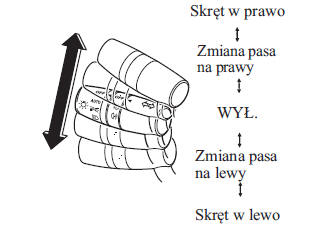
The turn signal indicators (green) in the instrument cluster flash according to the position of the turn signal lever to show which turn signal is on.
CAUTION
If the turn signal is on and the indicator light stays on continuously or flashes abnormally, one of the turn signal bulbs may be burned out.
The volume of the turn signal sound can be changed using the personalization function. (page 9-13)
Lane change signal
Move the lever halfway in the direction of the lane change until the indicator starts flashing, and hold it in that position. When released, the lever returns to its original position (OFF).
Three-flash turn signal
To signal a lane change, lightly push the turn signal lever down or up and release it. After the lever is released, the turn signals flash three times.
CAUTION
The three-flash turn signal function can be turned on/off using the personalization function.
See the "Customizable Features" section on page 9-13.
Test yourself
A quick Mazda 2 quiz: every answer comes with an explanation and a link to the manual page.