Driving the Vehicle
Continuously Variable Transmission
WARNING
- Do not depress the accelerator pedal while moving the selector lever from P (Park) or N (Neutral) to R (Reverse), D (Drive), Ds (Sport) or M (Manual) (if equipped). Release the brake pedal only after the selector lever is in position.
Failure to follow these instructions may result in loss of vehicle control and cause an accident.
WARNING
- Except in an emergency, do not move the selector lever to N (Neutral) while driving. Coasting with the transmission in N (Neutral) may severely damage the transmission.
- When stopping the vehicle on an uphill slope, do not hold the vehicle in place by depressing the accelerator pedal. Use the brake pedal instead.
The vehicle's continuously variable transmission is electronically controlled to provide optimal efficiency and smooth operation.
The continuously variable transmission can operate in two different automatic driving modes:
- D (Drive) mode - Move the selector lever to the D (Drive) position. The transmission is in normal automatic forward driving mode. The position indicator displays "D". In D (Drive) mode, the transmission does not produce the shift feel of a conventional automatic transmission.
- Ds (Sport) mode - Move the selector lever from the D (Drive) position to the Ds (Sport) position. The position indicator displays "Ds". In Ds (Sport) mode, the transmission operates in a more "sporty" manner and provides stronger acceleration than in D (Drive) mode, with a shift feel when the driver accelerates or uses the manual shift buttons (if equipped). While driving in Ds (Sport) mode, the driver must move the selector lever from Ds (Sport) to D (Drive) and back again to select Ds (Sport) mode again.
- To cancel Ds (Sport) mode, return the selector lever to the D (Drive) position. The transmission returns to automatic driving mode.
The continuously variable transmission can operate in two manual driving modes:
- M (Manual) mode (if equipped) - When the selector lever is in Ds (Sport) mode, using the shift paddles (if equipped) up (+) or down (-) produces noticeable upshifts and downshifts. The position indicator displays "M".
- To leave Ds (Sport) mode, move the selector lever back to the D (Drive) position.
To get the maximum performance from your vehicle and enjoy driving it to the fullest, follow these procedures.
NOTE:
To protect the continuously variable transmission, engine torque may be automatically reduced if engine speed rises suddenly while driving on slippery road surfaces or during vehicle testing on a dynamometer.
Starting the vehicle
- After starting the engine, fully depress the brake pedal before moving the selector lever out of P (Park).
- While keeping the brake pedal depressed, move the selector lever to a driving position.
- Release the brake pedal, then let the vehicle begin to move gradually.
- Bring the vehicle to a complete stop before moving the selector lever to P (Park).
Your vehicle's continuously variable transmission is designed so that the brake pedal must be depressed before moving the lever from P (Park) to another position when the ignition switch is in the ON position.
You cannot move the selector lever out of P (Park) or change positions if the ignition switch is in the LOCK (Off) position.
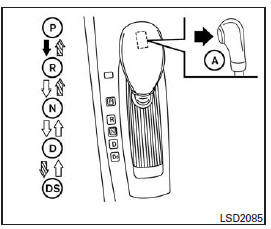
To move the selector lever:
 Press the
button A and depress the brake pedal.
 Press the
button A to move the selector lever.
 Move the
selector lever without pressing button A.
Gear Shifting
Once the engine is running, fully depress the brake pedal and move the selector lever from P (Park) to any other desired position.
WARNING
Apply the parking brake if the selector lever is engaged while the engine is not running. Otherwise, the vehicle may move or roll unexpectedly and cause serious injury or major property damage.
P (Park)
WARNING
To avoid damaging the transmission, select P (Park) or R (Reverse) only when the vehicle is completely stopped.
Use P (Park) once the vehicle is parked or when starting the engine.
Make sure the vehicle is completely stopped. The brake pedal must be depressed to move the selector lever from N (Neutral) or any forward driving position to P (Park). Apply the parking brake. Apply the parking brake first before moving the selector lever to P (Park) if you need to park on a slope.
R (Reverse)
WARNING
To avoid damaging the transmission, select P (Park) or R (Reverse) only when the vehicle is completely stopped.
This position is used to drive in reverse. Make sure your vehicle is completely stopped before moving the selector lever to R (Reverse). The brake pedal must be depressed to move the selector lever from P (Park), N (Neutral) or any forward driving position to R (Reverse).
N (Neutral)
This is not a forward or reverse driving position. However, you can start the engine of your vehicle in this position.
If the engine stalls while driving, you can move the selector lever to N (Neutral), then restart.
D (Drive)
This position is used for normal forward driving.
Ds (Sport Drive) (if equipped):
When the selector lever is moved from D (Drive) to Ds (Sport Drive), the transmission enters Ds (Sport Drive) mode. Moving the selector lever in Ds (Sport Drive) mode gives you a "sporty" drive on winding roads, and smooth acceleration and deceleration on mountain roads through automatic downshifting.
To cancel Ds (Sport Drive) mode, return the selector lever to D (Drive). The transmission returns to normal driving mode.
Manual Shift Mode (if equipped)
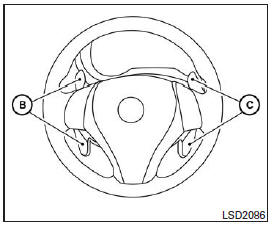
When the selector lever is in Ds (Sport Drive), the transmission is ready for manual shift mode.
Gears can be selected manually by pulling the right or left shift paddle.
To upshift, pull the right shift paddle (+) C (if equipped). The transmission shifts to a higher gear.
To downshift, pull the left shift paddle ( ) B (if equipped). The transmission shifts to a lower gear.
To cancel manual shift mode, return the selector lever to D (Drive). The transmission returns to normal driving mode. When you pull the shift paddle (if equipped) while the transmission is in D (Drive), the transmission will temporarily shift to a higher or lower gear. The transmission will automatically return to D (Drive) after a short period of time. If you want to return to D (Drive) manually, pull and hold the shift paddle for approximately one and a half seconds.
In manual shift mode, the gear range position is shown on the indicator.
The upshift and downshift gear range positions are displayed one at a time as follows:
1⇔ 2 ⇔ 3 ⇔ 4 ⇔ 5 ⇔ 6 ⇔ 7
M7 (7th): This position is used for normal forward driving on highways.
M6 (6th) and M5 (5th): Use this position to climb long grades or to obtain engine braking when descending long grades.
M4 (4th), M3 (3rd) and M2 (2nd): These positions are used to climb steep grades or for engine braking on steep descents.
M1 (manual 1st): This position is used for low-speed driving on steep uphill grades, in deep snow, sand or mud, or to obtain maximum engine braking on steep descents.
- Remember that you must not drive at high speeds for long periods in a gear range lower than 7. Turning on overdrive reduces fuel consumption when driving at high speeds.
Upshifting
Move the selector lever toward the + (up) side.
(The transmission upshifts.)
Downshifting
Move the selector lever toward the - (down) side.
(The transmission downshifts.)
- Moving the selector lever twice quickly in the same direction causes successive gear changes.
Canceling manual shift mode
Return the selector lever to the D (Drive) position to resume normal transmission operation.
- In manual shift mode, the transmission may not shift to the selected gear.
Releasing the selector lever
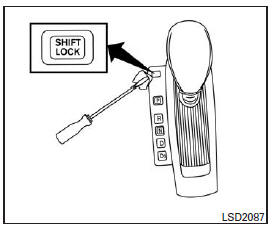
You may not be able to move the selector lever out of the P (Park) position if the battery charge is low or the battery is discharged, even when the brake pedal is depressed and the selector lever button is pressed.
You will need to jump start the vehicle or have the battery recharged. See the "Jump starting" section in the "In an emergency" chapter. Contact your NISSAN dealer or a professional towing service.
To move the selector lever, follow these steps:
- Push the ignition switch to the LOCK position.
- Apply the parking brake.
- Wrap the tip of a 3 mm flat-blade screwdriver with a protective cloth, then use it to remove the shift lock release cover.
- If you have one, you can use a plastic trim removal tool instead.
- Insert the small screwdriver into the shift lock release hole and press.
- Move the selector lever to the N (Neutral) position while holding the shift lock release down.
If the selector lever cannot be moved out of the P (Park) position, have the transmission checked by a NISSAN dealer as soon as possible.
WARNING
If the selector lever cannot be moved out of the P (Park) position while the engine is running and the brake pedal is depressed, the brake lights may not operate. Malfunctioning brake lights can cause an accident resulting in injury to you and others.
O/D OFF (overdrive cancel) switch (if equipped)

When the O/D OFF (overdrive cancel) switch is pressed and the selector lever is in the D (Drive) position, the indicator
illuminates in the instrument panel.
See the "O/D OFF indicator" section in the "Instruments and controls" chapter of this manual.
Use overdrive cancel mode when increased engine braking is needed.
Press the O/D OFF switch again to turn off overdrive cancel mode. The indicator goes out.
Whenever the engine is started, or when the selector lever is moved to a position other than D (Drive), overdrive cancel mode is automatically turned off.
Kickdown - In D (Drive) -
Fully depress the accelerator pedal if you need to pass another vehicle or climb a steep grade. The transmission will downshift to a gear appropriate for the vehicle speed.
Transmission fluid overheat protection mode
This continuously variable transmission has a transmission fluid overheat protection mode. If the fluid temperature becomes too high (for example, when climbing a steep grade at full load, in hot weather, or while towing a trailer), engine torque and, under certain conditions, vehicle speed may be reduced automatically to prevent damage to the transmission. Vehicle speed can still be controlled with the accelerator, but engine torque and vehicle speed may be limited.
Full protection
Full protection mode may activate under extreme driving conditions, such as excessive wheel spin followed by sudden braking. The malfunction indicator light may illuminate to show that full protection mode is active; see the "Malfunction indicator light" section in the "Instruments and controls" chapter. This mode may activate even when all electrical circuits are operating properly.
In this case, turn the ignition switch to the OFF position and wait 10 seconds. Turn the ignition switch back to the ON position. Normal vehicle operation should resume.
Otherwise, have the CVT inspected by a NISSAN dealer and repaired if necessary.
WARNING
When the high coolant temperature protection mode or the full protection mode is activated, the vehicle speed may be gradually reduced. Driving at a speed lower than the surrounding traffic increases the risk of a collision. Drive with extra caution. If necessary, pull over safely to the shoulder and allow the CVT to return to normal operation, or have it repaired if necessary.
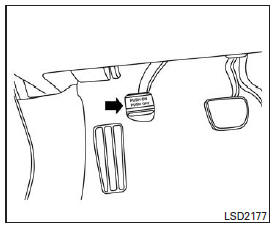
- To engage, firmly depress the brake pedal.
- To release:
- Move the selector lever to the P (park) position.
- Firmly depress the parking brake pedal to release it.
- Make sure the brake warning light is off before driving.
Test yourself
A quick Nissan Altima quiz: every answer comes with an explanation and a link to the manual page.