Chassis
Clutch pedal
In this manual: Chassis
~4min read
LEFT-HAND DRIVE
Tightening torques |
|
| clutch pedal bracket nuts | 2.1 daN.m |
| battery cover screw | 0.4 daN.m |

REMOVAL
- Disconnect the battery, starting with the negative terminal.
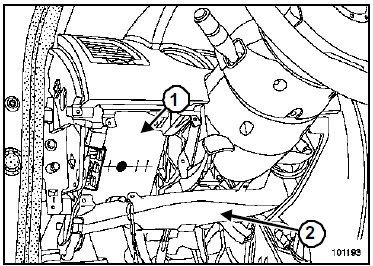
- Remove:
- the lower left undertray (see Chapter Mechanisms and Accessories),
- the cabin central unit (1) (see Chapter Cabin Interconnection Box),
- the left air duct (2).
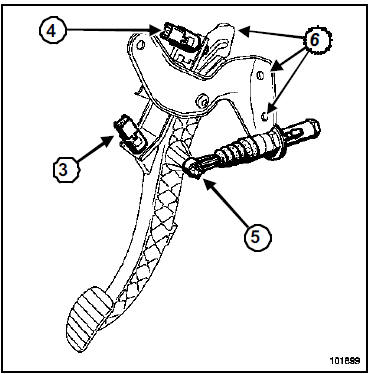
- Remove the grey switch (3) (start of travel) by turning it one quarter turn.
- Disconnect the connector from switch (3).
- Remove the green switch (4) (end of travel) by turning it one quarter turn.
- Disconnect the connector from switch (4).
- Disconnect the clutch transmitter ball joint from the pedal (5).
- Remove the three nuts (6) from the clutch pedal assembly.
- Remove the clutch pedal assembly.
INSTALLATION
- Refit in the reverse order of removal.
- Tighten the clutch pedal bracket nuts to torque (2.1 daN.m).
- Pull the ends of the sensors fully to position them at minimum.
The clutch pedal position sensors have automatic adjustment that adapts to the pedal position.
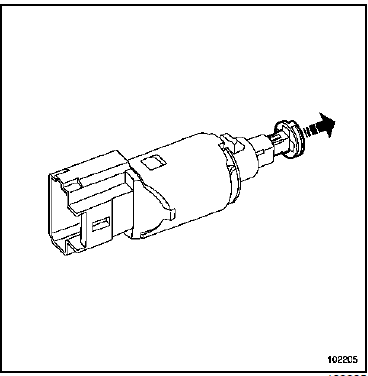
- Position the switches in their housings.
- Turn one quarter turn clockwise.
- Reconnect the two clutch pedal switches.
Connect the battery; carry out the necessary relearn procedures (see Battery chapter).
- Torque the battery cover screws (0.4 daN.m).
RIGHT-HAND DRIVE
Tightening torques |
|
| clutch pedal bracket nuts | 2.1 daN.m |
| battery cover screw | 0.4 daN.m |

REMOVAL
- Disconnect the battery, starting with the negative terminal.
- Drain the brake fluid reservoir until the level is below the master cylinder supply port.
- Remove:
- the engine covers,
- the battery,
- the battery tray.
- Disconnect the injection ECU.
- Remove the injection ECU.
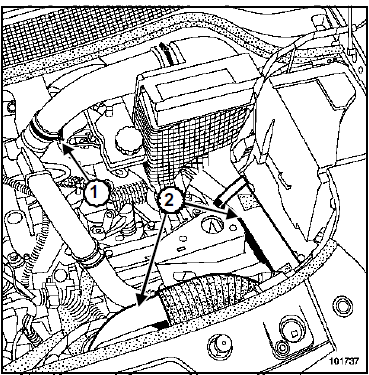
- Loosen the air hose clamp (1).
- Remove:
- the air sleeves (2),
- the air filter housing.
- Drain the brake fluid reservoir until the level is below the master cylinder supply port.
JH3 or JR5
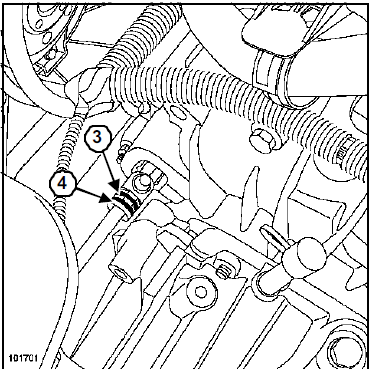
- Lift the clip (3).
- Pull the clutch control line out by one notch.
- Place a rag under the bleed port.
- Operate the pedal by hand to empty the transmitter and the line.
- Lift the clip (4).
- Disconnect the line from the receiver.
- Fit plugs to the openings.
ND0
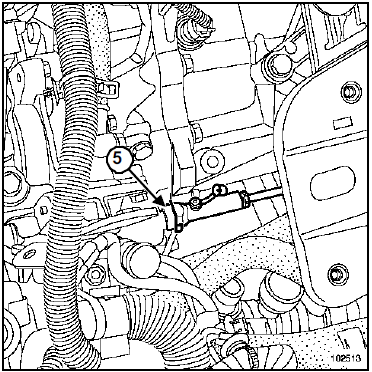
- Press the clip (5) by hand while pulling on the hose.
Do not pull on the clip. Any handling error requires replacement of the hose.
- Pull the clutch control line out by one notch.
- Place a rag under the bleed port.
- Operate the pedal by hand (to empty the transmitter and the line).
- Lift the clip (5).
- Disconnect the line from the receiver.
- Fit plugs to the openings.
In the cabin compartment
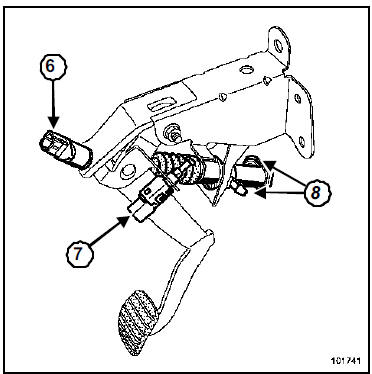
- Remove the grey switch (6) (start of travel) by turning it one quarter turn.
- Disconnect the connector from switch (6).
- Remove the green switch (7) (end of travel) by turning it one quarter turn.
- Disconnect the connector from switch (7).
- Place a rag under the master cylinder.
- Remove the clips from the fittings on the transmitter (8).
- Disconnect the pipes.
- Fit plugs to the openings.
- Remove the clutch master cylinder pushrod from the pedal.
- Remove the four nuts from the clutch pedal bracket.
- Remove the "pedal - master cylinder" assembly.
- Remove the transmitter from the pedal assembly by turning it one quarter turn clockwise (bayonet fitting).
INSTALLATION
- Check the condition of the seals.
- Refit in the reverse order of removal.
- Tighten the clutch pedal bracket nuts to torque (2.1 daN.m).
- Pull the ends of the sensors fully to position them at minimum.
The clutch pedal position sensors have automatic adjustment that adapts to the pedal position.
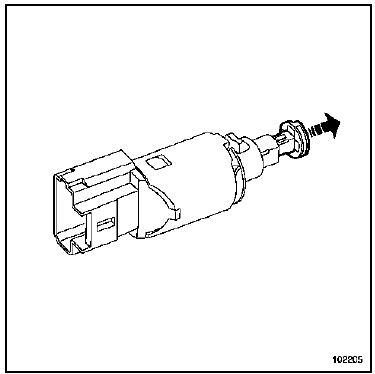
- Position the switches in their housings.
- Turn one quarter turn clockwise.
- Reconnect the two clutch pedal switches.
- Bleed the clutch control (see Chapter Mechanical Controls, Bleeding the Clutch Circuit, page 37A-39).
Connect the battery; carry out the necessary relearn procedures (see Battery chapter).
- Torque the battery cover screws (0.4 daN.m).
Test yourself
A quick Renault Megane quiz: every answer comes with an explanation and a link to the manual page.
Was this page helpful?