Display contents

In this manual: Display contents
Instrument panel — 1Switches — 1Toyota Prius Interior — 1What to do if... — 1Before driving — 1Seat belts — 1SRS airbags — 1Toyota Prius Front passenger occupant classification system — 1Exhaust gas precautions — 1Child safety — 1Riding with children — 1Child restraint systems — 1Emergency assistance — 1System components — 1Safety Connect LED light Indicators — 1Safety information for Safety Connect — 1Hybrid system — 1Hybrid system features — 1Hybrid system precautions — 1Theft deterrent system — 1Warning lights and indicators — 1Warning lights — 1Indicators — 1Gauges and meters — 1Multi-information display — 1Display contents — 1Driving information display — 1Driving support system information display — 1Settings display — 1Energy monitor / consumption screen — 1System components — 1Consumption screen — 1Key information — 1Keys — 1Digital Key — 1Opening, closing and locking the doors — 1Side doors — 1Back door — 1Smart key system — 1Adjusting the seats — 1Front seats — 1Rear seats — 1Head restraints — 1Adjusting the steering wheel and mirrors — 1Steering wheel — 1Inside rear view mirror — 1Digital Rear-view Mirror — 1Outside rear view mirrors — 1Opening, closing the windows — 1Driving position memory — 1My Settings — 1Driving the vehicle — 1Cargo and luggage — 1Vehicle load limits — 1Power (ignition) switch — 1Toyota Prius EV drive mode — 1Transmission — 1Turn signal lever — 1Parking brake — 1Brake Hold — 1Operating the lights and wipers — 1Headlight switch — 1AHB (Automatic High Beam) — 1Windshield wipers and washer — 1Refueling — 1Using the driving support systems — 1Toyota Safety Sense 3.0 software update — 1Toyota Safety Sense 3.0215 — 1PCS (Pre-Collision System) — 1LTA (Lane Tracing Assist) — 1LCA (Lane Change Assist) — 1LDA (Lane Departure Alert) — 1PDA (Proactive driving assist) — 1FCTA (Front Cross Traffic Alert) — 1RSA (Road Sign Assist) — 1Dynamic radar cruise control — 1Cruise control — 1Emergency Driving Stop System — 1BSM (Blind Spot Monitor) — 1Safe Exit Assist — 1Intuitive parking assist — 1RCTA (Rear Cross Traffic Alert) function — 1RCD (Rear Camera Detection) function — 1PKSB (Parking Support Brake) — 1Parking Support Brake function (static objects to the front and rear/static objects around the vehicle) — 1Parking Support Brake function (rear-crossing vehicles) — 1Parking Support Brake function (rear pedestrians) — 1Toyota Teammate Advanced Park — 1Driving mode select switch — 1Driving assist systems — 1Driving tips — 1Hybrid Electric Vehicle driving tips — 1Winter driving tips — 1Using the air conditioning system and defogger — 1Automatic air conditioning system — 1Heated steering wheel/seat heaters/seat ventilators — 1Using the interior lights — 1Location of the interior lights — 1Operating the personal lights — 1List of storage features — 1Luggage compartment features — 1Other interior features — 1Garage door opener — 1Cleaning and protecting the vehicle exterior — 1Cleaning and protecting the vehicle interior — 1Maintenance requirements — 1General maintenance — 1Emission inspection and maintenance (I/M) programs — 1Do-it-yourself maintenance — 1Do-it-yourself service precautions — 1Hood — 1Positioning a floor jack — 1Engine compartment Toyota Prius 2024-2025 — 112-volt battery — 1Tire pressure warning system — 1Air conditioning filter — 1Cleaning the hybrid battery (traction battery) air intake vent — 1Electronic key battery — 1Checking and replacing fuses — 1Headlight aim — 1Emergency flashers — 1If your vehicle has to be stopped in an emergency — 1If the vehicle is submerged or water on the road is rising — 1If your vehicle needs to be towed — 1If a warning light turns on or a warning buzzer sounds — 1If a warning message is displayed — 1If you have a flat tire (vehicles without spare tire) — 1If you have a flat tire (vehicles with spare tire) — 1If the hybrid system will not start — 1If the electronic key does not operate properly — 1If the 12-volt battery is discharged — 1If your vehicle overheats — 1If the vehicle becomes stuck — 1Maintenance data (fuel, oil level, etc.) — 1Fuel information — 1Customization — 1
5steps
~30min
2/5difficulty
Done 0 of 5

In the 2024 Toyota Prius, the multi-information display is a versatile tool for showcasing fuel efficiency metrics and a variety of driving-related information. Additionally, it offers convenient access to customize display settings and adjust other vehicle preferences to suit driver preferences and needs. This feature enhances driver awareness and control over essential vehicle data and settings while promoting a more informed and personalized driving experience.

The multi-information display can also be used to change the display settings and other settings.

Display contents:

Following information is displayed on the multi-information display.
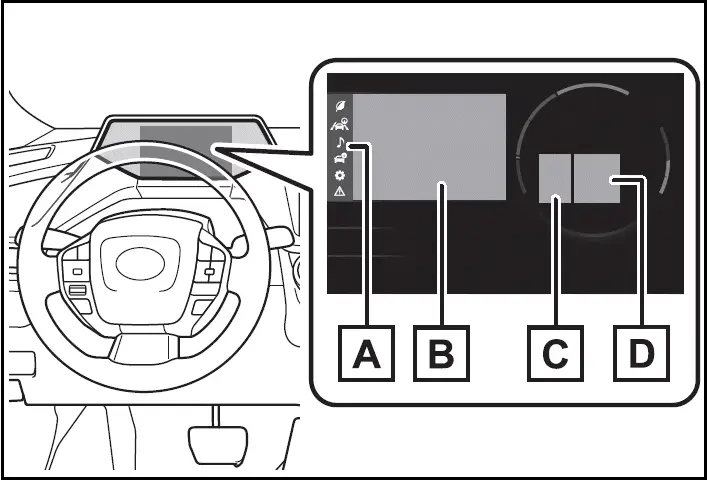
Display contents - 2024 Toyota Prius
  1. Menu icons
  2. Information display area

A variety of information can be displayed by selecting a menu icon.

Additionally, warning or suggestion/ advice pop-up displays will be displayed in some situations.

  1. RSA (Road Sign Assist) (if equipped)

Displays recognized signs while the RSA (Road Sign Assist) is operating.

  1. Driving support system information

The multi-information display is displayed when

The power switch is in ON.

Liquid crystal display

Changing the display

The multi-information display is operated using the meter control switches.
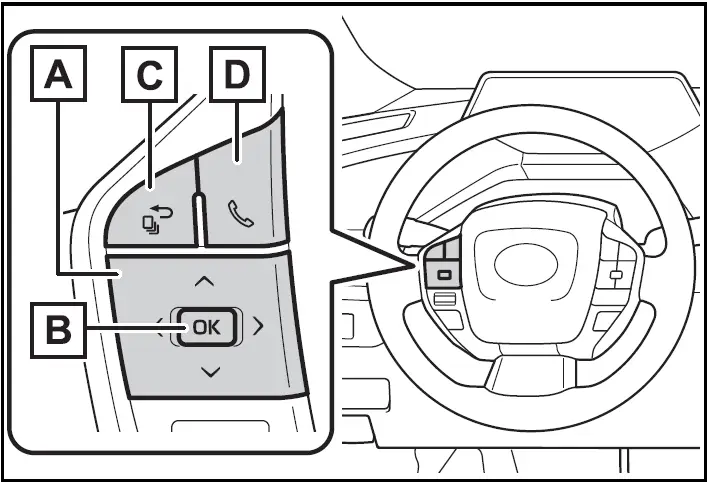
Changing the display - 2024 Toyota Prius
  1. Select menu icons, scroll the screen and move the cursor

Change displayed content, scroll the screen and move the cursor

  1. Press: Enter/Set Press and hold: Reset/Display customizable items
  2. Return to the previous screen/Move the main meter
  3. Call sending/receiving and history display

Linked with the hands-free system, sending or receiving call is displayed.

For details regarding the hands-free system, refer to "MULTIMEDIA OWNER'S MANUAL".

WARNING

Caution for use while driving

For safety, avoid operating the meter control switch while driving as much as possible, and do not look continuously at the multiinformation display while driving.

Stop the vehicle and operate the meter control switch. Failure to do so may cause a steering wheel operation error, resulting in an unexpected accident.

Menu icons

Information related to each icon can be displayed by selecting the icon with the meter control switches.

Some of the information may be displayed automatically depending on the situation.

Driving information display

Driving support system information display

Audio system-linked display

Vehicle information display

Settings display

Warning message display