Gauges and meters
Gauges and meters in the 2024 Toyota Prius provide essential information about the vehicle's performance and operating parameters. These instruments include displays for speed, fuel level, hybrid system operation, battery charge, and other critical metrics. They offer real-time feedback to drivers, helping them monitor and optimize their driving experience while ensuring the Prius operates efficiently and safely.
The meters display various drive information
Meter display
- Main meter in center position
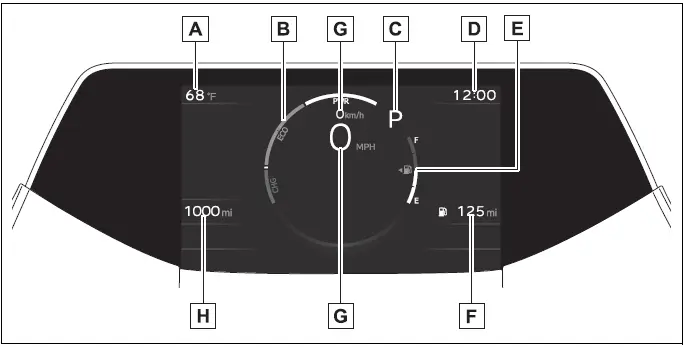
The units used on the meter and display may differ depending on the target region.
- Outside temperature
- Hybrid System Indicator
Displays hybrid system output or regeneration level
- Shift position indicator
Displays the selected shift position
- Clock
The GPS clock's time is automatically adjusted by utilizing GPS time information.
For details, refer to the "MULTIMEDIA OWNER'S MANUAL".
- Fuel gauge
Displays the quantity of fuel remaining in the tank.
- Distance to empty
Displays driving range with remaining fuel
- Speedometer
Displays the vehicle speed.
- Odometer, trip meter and oil maintenance
Odometer: Displays the total distance that the vehicle has been driven.
Trip meter: Displays the distance the vehicle has been driven since the meter was last reset. Trip meters "A" and "B" can be used to record and display different distances independently.
Oil maintenance: Displays the distance until the next engine oil change.
Main meter moved to the right
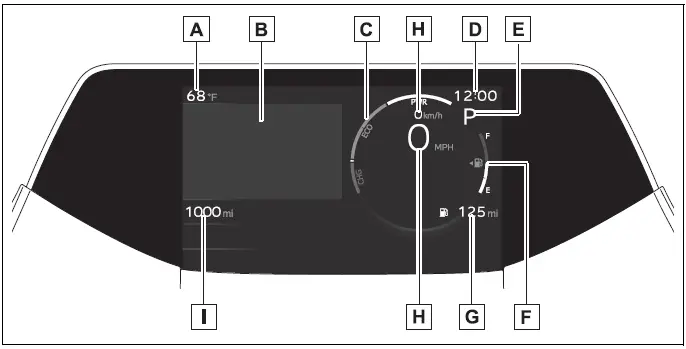
The units used on the meter and display may differ depending on the target region.
- Outside temperature
- Multi-information display
Presents the driver with a variety of driving-related data
Displays warning messages if a malfunction occurs
- Hybrid System Indicator
Displays hybrid system output or regeneration level
- Clock
The GPS clock's time is automatically adjusted by utilizing GPS time information.
For details, refer to the "MULTIMEDIA OWNER'S MANUAL".
- Shift position indicator
Displays the selected shift position
- Fuel gauge
Displays the quantity of fuel remaining in the tank.
- Distance to empty
Displays driving range with remaining fuel
- Speedometer
Displays the vehicle speed.
- Odometer, trip meter and oil maintenance
Odometer: Displays the total distance that the vehicle has been driven.
Trip meter: Displays the distance the vehicle has been driven since the meter was last reset. Trip meters "A" and "B" can be used to record and display different distances independently.
Oil maintenance: Displays the distance until the next engine oil change.
Toyota Prius Hybrid System Indicator
The meters and display illuminate when
The power switch is in ON.
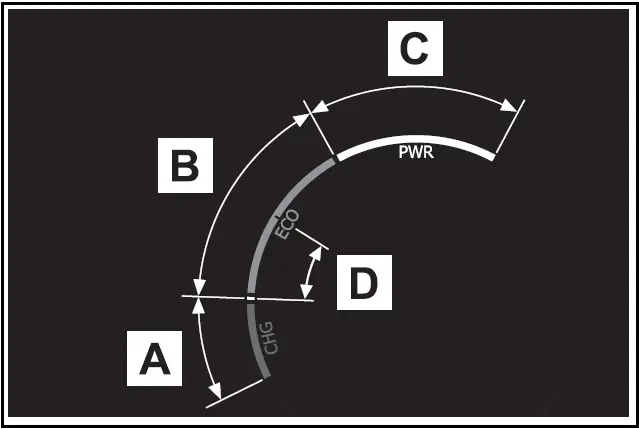
- Charge area
Shows regeneration* status. Regenerated energy will be used to charge the hybrid battery (traction battery).
- Eco area
Shows that the vehicle is being driven in an Eco-friendly manner.
By keeping the indicator needle within Eco area, more Eco-friendly driving can be achieved.
- Power area
Shows that an Eco-friendly driving range is being exceeded (during full power driving etc.)
- Hybrid Eco are
Shows that gasoline engine power is not being used very often.
The gasoline engine will automatically stop and restart under various conditions.
*: When used in this manual, "regeneration" refers to the conversion of energy created by the movement of the vehicle into electrical energy.
In the following situation, the Hybrid System Indicator does not operate.
- "READY" indicator is not illuminated.
- The shift position is in a range other than D or B.
Distance to empty
- This distance is computed based on your average fuel consumption.
As a result, the actual distance that can be driven may differ from that displayed.
- When only a small amount of fuel is added to the tank, the display may not be updated. When refueling, turn the power switch off. If the vehicle is refueled without turning the power switch off, the display may not be updated.
- When "Refuel" is displayed, the remaining fuel amount is low and the distance that can be driven with the remaining fuel cannot be calculated. Refuel immediately.
Outside temperature display
- Displays the outside temperature within the range of -40ºF (-40ºC) to 140ºF (60ºC).
- When the outside temperature is approximately 37ºF (3ºC) or lower, the indicator
 will flash for approximately 10 seconds, then stay on.
- In the following situations, the correct outside temperature may not be displayed, or the display may take long
- When stopped, or driving at low speeds (less than 12 mph [20 km/h])
- When the outside temperature has changed suddenly (at the entrance/exit of a garage, tunnel, etc.)
- When "--" or "E" is displayed, the system may be malfunctioning.
Take your vehicle to your Toyota dealer.
Liquid crystal display
Small spots or light spots may appear on the display. This phenomenon is characteristic of liquid crystal displays, and there is no problem continuing to use the display.
Open Source Software Information
Copyright (c) 2009-2018 ARM Limited.
Licensed under the Apache License, Version 2.0 (the "License"); you may not use this file except in compliance with the License.
Unless required by applicable law or agreed to in writing, software distributed under the License is distributed on an "AS IS" BASIS, WITHOUT WARRANTIES OR CONDITIONS OF ANY KIND, either express or implied. See the License for the specific language governing permissions and limitations under the License.
WARNING
The information display at low temperatures
Allow the interior of the vehicle to warm up before using the liquid crystal information display. At extremely low temperatures, the display monitor may respond slowly, and display changes may be delayed.
NOTICE
To prevent damage to the engine and its components
The engine may be overheating if "Engine Coolant Temp High Stop in a Safe Place See Owner's Manual" is shown on the multiinformation display. In this case, immediately stop the vehicle in a safe place, and check the engine after it has cooled completely
Switching the meter display
The multi-information display can be switched between display and hidden.
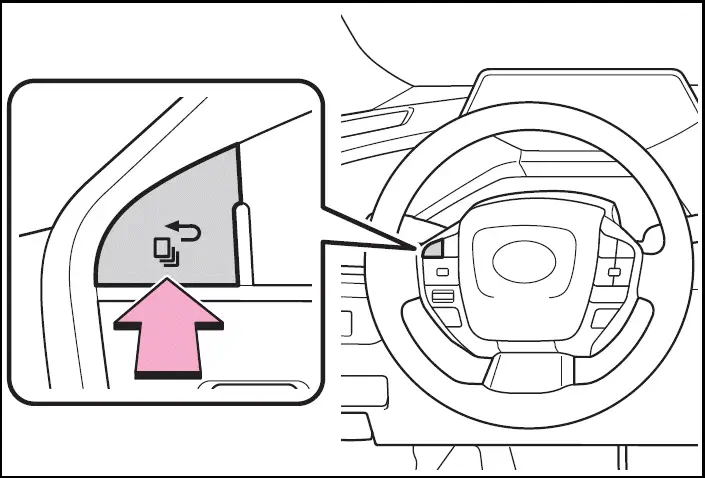
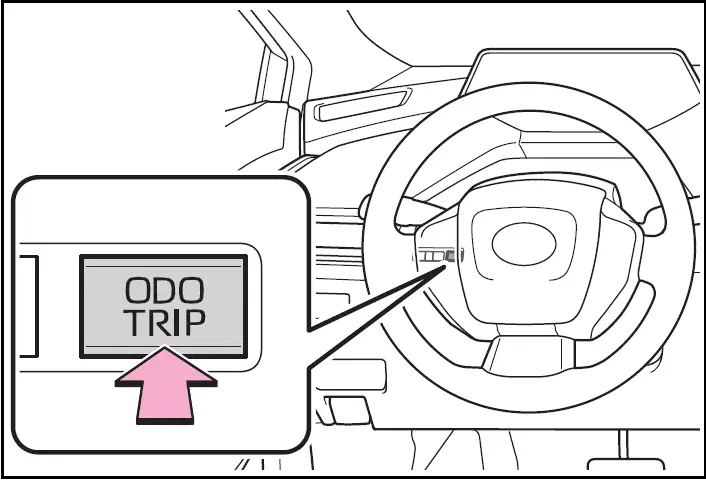
Using the "ODO TRIP" switch
Switches the items of the odometer, trip meter A, trip meter B and  (oil maintenance) by pressing the "ODO TRIP" switch.
When the trip meter is displayed, pressing and holding the switch will reset the trip meter.
Pop-up display
Distance until the next engine oil change will be displayed when a warning message indicating that oil maintenance is required or should be performed soon is displayed.
Adjusting meter brightness
The meter brightness can be adjusted.
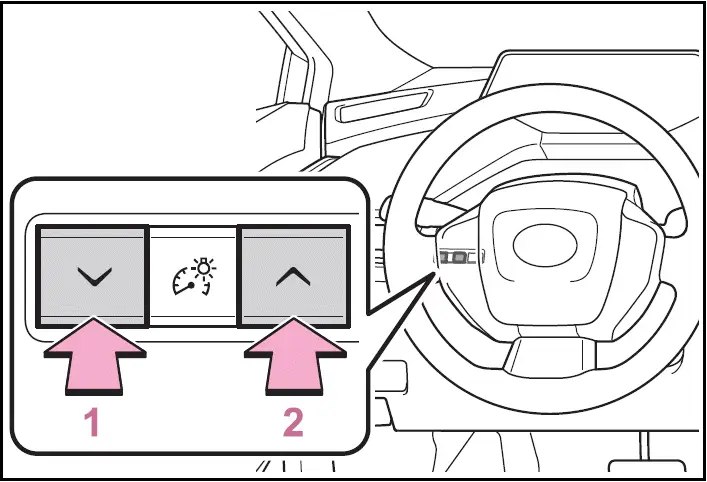
- Darker
- Brighter
Brightness of the meter lights (day mode and night mode)
The brightness of the meter lights can be adjusted individually.
In the following situations, the meters changes between day mode and night mode.
- Day mode: When the tail lights are off or when the tail lights are on but the surrounding area is bright
- Night mode: When the tail lights are on and the surrounding area is dark