Intuitive parking assist
The 2024-2025 Toyota Prius features an advanced Intuitive Parking Assist (IPA) system designed to make parking easier and safer. This system utilizes a combination of sensors and cameras to help drivers maneuver the Prius into parking spaces with confidence and precision. It enhances the overall driving experience by providing real-time assistance during parking maneuvers.
To use the Intuitive Parking Assist, drivers can activate the system by pressing the dedicated parking assist button, typically located on the dashboard or center console. Once activated, the system engages its ultrasonic sensors, which are strategically placed around the front and rear bumpers of the vehicle. Additionally, cameras provide a 360-degree view of the Prius’s surroundings, giving the driver a comprehensive perspective of nearby objects and obstacles.
As the Prius approaches an obstacle while parking, the Intuitive Parking Assist system delivers visual and auditory alerts to inform the driver of the proximity of the object. These alerts help the driver gauge the distance to obstacles and make precise adjustments to avoid potential collisions. By providing this real-time feedback, the IPA system ensures that parking is not only easier but also significantly safer, reducing the likelihood of minor parking mishaps.
The Intuitive Parking Assist in the 2024-2025 Toyota Prius is a valuable feature that enhances the vehicle’s practicality and safety. It simplifies the parking process, making it more accessible for drivers of all skill levels, and provides peace of mind by minimizing the risk of accidental bumps and scrapes.
The distance from your vehicle to objects, such as a wall, when parallel parking or maneuvering into a garage is measured by the sensors and communicated via the Multimedia Display and a buzzer. Always check the surrounding area when using this system.
System components
Types of sensors
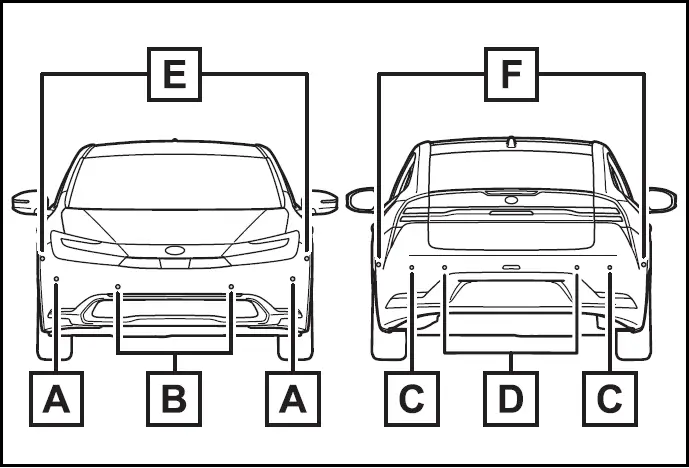
- Front corner sensors
- Front center sensors
- Rear corner sensors
- Rear center sensors
- Front side sensors*
- Rear side sensors*
*: Vehicles with Advanced Park
Display
When the sensors detect an object, such as a wall, a graphic is shown on the Multimedia Display depending on the position and distance to the object.
Display example:
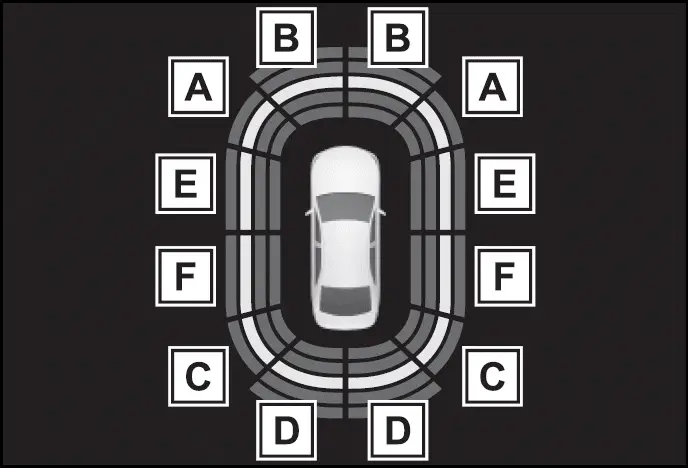
- Front corner sensor detection
- Front center sensor detection
- Rear corner sensor detection
- Rear center sensor detection
- Front side sensor detection*
- Rear side sensor detection*
*: Vehicles with Advanced Park
- Turning the intuitive parking assist on/off
- Sensor detection display, object distance
- Intuitive parking assist object warning function (vehicles with Advanced Park)
Turning the intuitive parking assist on/off
The intuitive parking assist can be enabled/disabled on  of the multi-information display.
When the intuitive parking assist function is disabled, the intuitive parking assist OFF indicator illuminates.
To re-enable the system, select  on the multi-information display, select the intuitive parking assist and turn it on. If the system is disabled, it will remain off even if the power switch is turned to ON after the power switch has been turned off.
WARNING
Cautions regarding the use of the system
There is a limit to the degree of recognition accuracy and control performance that this system can provide, do not overly rely on this system. The driver is always responsible for paying attention to the vehicle's surroundings and driving safely.
To ensure the system can operate properly
Make sure to observe the following precautions. The system may not operate properly and may lead to an unexpected accident.
When these precautions cannot be observed, turn the system off.
- Do not damage the sensors, and always keep them clean.
- Do not attach a sticker or install an electronic component, such as a backlit license plate (especially fluorescent type), fog lights, fender pole or wireless antenna near a radar sensor.
- Do not subject the surrounding area of the sensor to a strong impact. If subjected to an impact, have the vehicle inspected by your Toyota dealer. If the front or rear bumper needs to be removed/installed or replaced, contact your Toyota dealer.
- Do not modify, disassemble or paint the sensors.
- Do not attach a license plate cover.
WARNING
- Keep your tires properly inflated.
- A non-genuine Toyota suspension (lowered suspension, etc.) is installed.
Notes when washing the vehicle
Do not apply intensive bursts of water or steam to the sensor area. Doing so may result in the sensor malfunctioning.
- When using a high pressure washer to wash the vehicle, do not spray the sensors directly, as doing so may cause a sensor to malfunction.
- When using steam to clean the vehicle, do not direct steam too close to the sensors as doing so may cause a sensor to malfunction.
The system can be operated when
- The power switch is in ON.
- The intuitive parking assist function is on.
- The vehicle speed is less than about 10 km/h.
- The shift position is in a position other than P.
If "Parking Assist Unavailable Sensor Blocked" is displayed on the multi-information display
A sensor may be covered with ice, snow, dirt, etc. Remove the ice, snow, dirt, etc., from the sensor to return the system to normal.
Also, due to ice forming on a sensor at low temperatures, a warning message may be displayed or the sensor may not be able to detect an object. Once the ice melts, the system will return to normal.
If an abnormality is displayed even though there are no water droplets, ice, snow or dirt, the sensor may be operating abnormally. Have the vehicle inspected by your Toyota dealer.
If "System Stopped See Owner's Manual" is displayed on the multi-information display
Water may be continuously flowing over the sensor surface, such as in a heavy rain. When the system determines that it is normal, the system will return to normal.
If "System Malfunction Visit Your Dealer" is displayed on the multi-information display
There may be a sensor or voltage malfunction. Have the vehicle inspected by your Toyota dealer.
Sensor detection information
- The sensor's detection areas are limited to the areas around the vehicle's front and rear bumpers.
- Certain vehicle conditions and the surrounding environment may affect the ability of a sensor to correctly detect an object.
- Objects may not be detected if they are too close to the sensor.
- There will be a short delay between object detection and display.
Even at low speeds, there is a possibility that the object will come within the sensor's detection areas before the display is shown and the warning beep sounds.
- It might be difficult to hear the buzzer due to the volume of the audio system or air flow noise of the air conditioning system.
- It may be difficult to hear the buzzer if buzzers for other systems are sounding.
- If the meter malfunctions, the buzzer may not sound.
Objects which the system may not properly detect
The shape of the object may prevent the sensor from detecting it.
Pay particular attention to the following objects:
- Wires, fences, ropes, etc.
- Cotton, snow and other materials that absorb sound waves
- Sharply-angled objects
- Low objects
- Tall objects with upper sections projecting outwards in the direction of your vehicle
People may not be detected if they are wearing certain types of clothing.
Situations in which the system may not operate properly
Certain vehicle conditions and the surrounding environment may affect the ability of a sensor to correctly detect objects. Particular instances where this may occur are listed below.
- There is dirt, snow, water drops or ice on a sensor. (Cleaning the sensors will resolve this problem.)
- A sensor is frozen. (Thawing the area will resolve this problem.) In especially cold weather, if a sensor is frozen the sensor display may be displayed abnormally, or objects, such as a wall, may not be detected.
- When a sensor or the area around a sensor is extremely hot or cold.

- On an extremely bumpy road, on an incline, on gravel, or on grass.
- When vehicle horns, vehicle detectors, motorcycle engines, air brakes of large vehicles, the clearance sonar of other vehicles or other devices which produce ultrasonic waves are near the vehicle.
- A sensor is coated with a sheet of spray or heavy rain.
- If objects draw too close to the sensor.
- When a pedestrian is wearing clothing that does not reflect ultrasonic waves (ex. skirts with gathers or frills).
- When objects that are not perpendicular to the ground, not perpendicular to the vehicle traveling direction, uneven, or waving are in the detection range.
- When strong winds are blowing.
- When driving in inclement weather such as fog, snow or a sandstorm.
- When an object that cannot be detected is between the vehicle and a detected object.
- If an object such as a vehicle, motorcycle, bicycle or pedestrian cuts in front of the vehicle or runs out from the side of the vehicle.
- If the orientation of a sensor has been changed due to a collision or other impact.
- When equipment such as a towing eyelet, transport hook, bumper protector, bumper trim, bicycle carrier or snow-removal device (snow plow) is installed near the sensor.
- If the front of the vehicle is raised or lowered due to the carried load.
- If the vehicle cannot be driven in a stable manner, such as when the vehicle has been in an accident or is malfunctioning.
- When tire chains, a compact spare tire or an emergency tire puncture repair kit are used
Situations in which the system may operate even if there is no possibility of a collision
In some situations, such as the following, the system may operate even though there is no possibility of a collision.
- When driving on a narrow road.
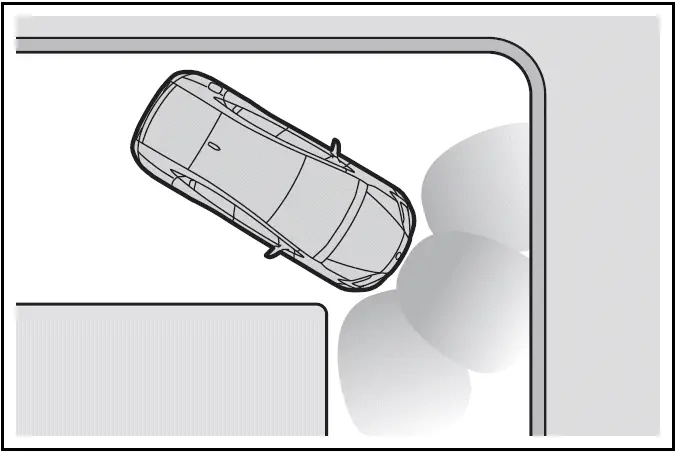
- When driving toward a banner, flag, low-hanging branch or boom barrier (such as those used at railroad crossings, toll gates and parking lots).
- When there is a rut or hole in the surface of the road.
- When driving on a metal cover (grating), such as those used for drainage ditches.
- When driving up or down a steep slope.
- If a sensor is hit by a large amount of water, such as when driving on a flooded road.
- There is dirt, snow, water drops or ice on a sensor. (Cleaning the sensors will resolve this problem.)
- A sensor is coated with a sheet of spray or heavy rain.
- When driving in inclement weather such as fog, snow or a sandstorm.
- When strong winds are blowing.

- When vehicle horns, vehicle detectors, motorcycle engines, air brakes of large vehicles, the clearance sonar of other vehicles or other devices which produce ultrasonic waves are near the vehicle.
- If the front of the vehicle is raised or lowered due to the carried load.
- If the orientation of a sensor has been changed due to a collision or other impact.
- The vehicle is approaching a tall or curved curb.
- Driving close to columns (Hshaped steel beams, etc.) in multistory parking garages, construction sites, etc.
- If the vehicle cannot be driven in a stable manner, such as when the vehicle has been in an accident or is malfunctioning.
- On an extremely bumpy road, on an incline, on gravel, or on grass.
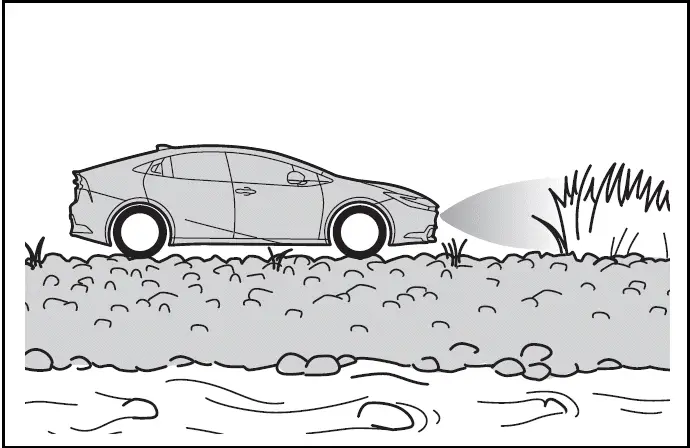
- When tire chains, a compact spare tire or an emergency tire puncture repair kit are used.
Sensor detection display, object distance
The 2024-2025 Toyota Prius is equipped with a sensor detection display that provides information about object distances around the vehicle, enhancing driver awareness and safety during maneuvers. This display utilizes a combination of sensors and cameras strategically positioned around the Prius to detect objects in its vicinity.
The sensor detection display in the Toyota Prius utilizes ultrasonic sensors located on the front and rear bumpers, as well as cameras that offer a comprehensive view of the vehicle's surroundings. These sensors work together to detect objects such as vehicles, pedestrians, or obstacles within proximity to the Prius.
The sensor detection display plays a crucial role in enhancing driver assistance by providing real-time information about object distances. It allows the driver to make informed decisions while navigating tight spaces, maneuvering in crowded areas, or reversing the Prius. By displaying object distances clearly and accurately, the system contributes to safer driving practices and minimizes the risk of collisions or accidents.
SDD is integrated with other safety systems in the Toyota Prius, such as the Intuitive Parking Assist and Rear Cross-Traffic Alert. These systems utilize the same sensors and cameras to provide comprehensive coverage and ensure thorough detection of objects in various driving scenarios.
SD display in the 2024-2025 Toyota Prius enhances driver awareness by visually representing object distances around the vehicle. It is a valuable feature that contributes to safer driving experiences by providing real-time information and alerts, thereby assisting drivers in maneuvering safely and confidently in diverse driving conditions.
Detection range of the sensors
- Vehicles without Advanced Park
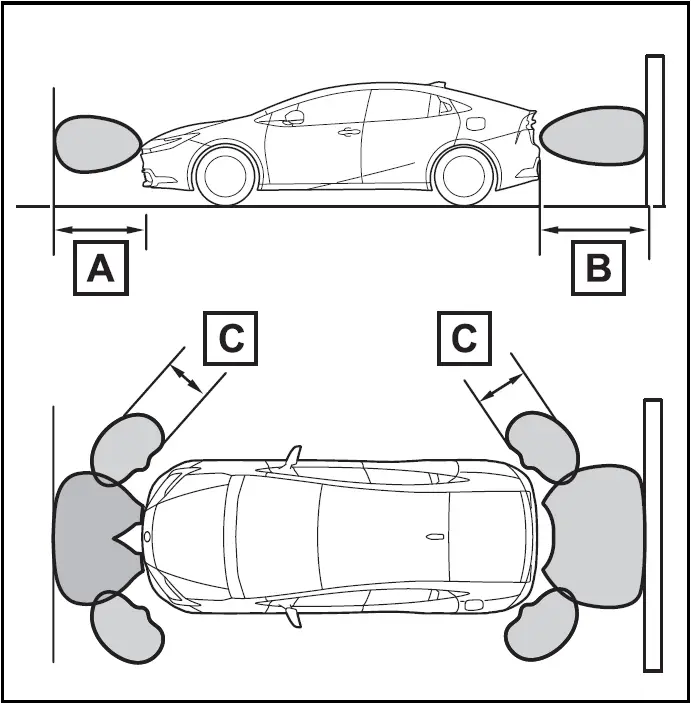
- Approximately 3.3 ft. (100 cm)
- Approximately 4.9 ft. (150 cm)
- Approximately 2.0 ft. (60 cm)
The diagram shows the detection range of the sensors. Note that the sensors cannot detect objects that are extremely close to the vehicle.
The range of the sensors may change depending on the shape of the object, etc.
- Vehicles with Advanced Park

- Approximately 6.6 ft. (200 cm)
The diagram shows the detection range of the sensors. Note that the sensors cannot detect objects that are extremely close to the vehicle.
The range of the sensors may change depending on the shape of the object etc.
The distance and buzzer
- Vehicles without Advanced Park
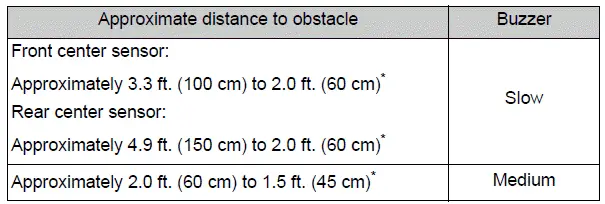
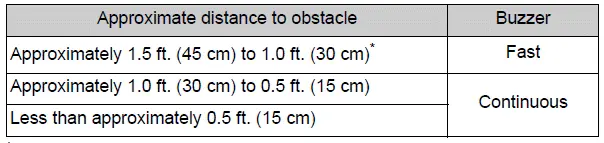
*: Automatic buzzer mute function is enabled.
Vehicles with Advanced Park
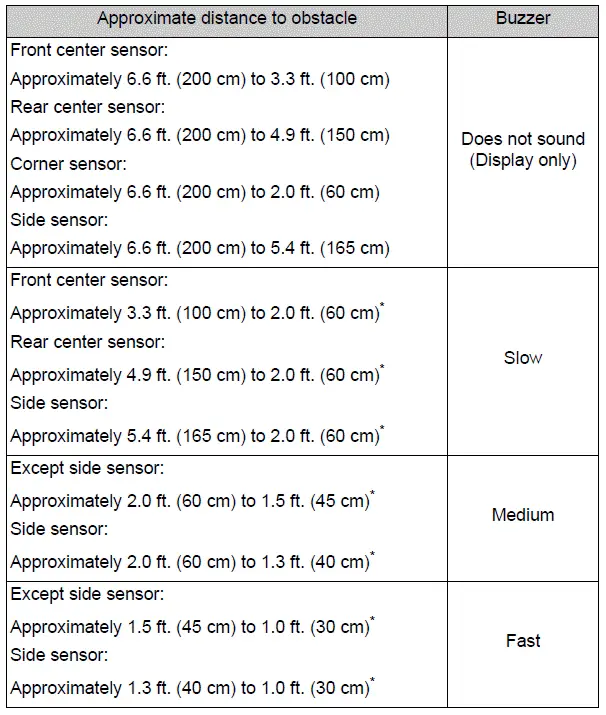

*: Automatic buzzer mute function is enabled.
Buzzer operation and distance to an object
A buzzer sounds when the sensors are operating.
- The buzzer beeps faster as the vehicle approaches a static object. When the vehicle comes within the approximately 1.0 ft. (30 cm) of the static object, the buzzer will sound continuously.
- When 2 or more sensors simultaneously detect a static object, the buzzer sounds for the nearest object.
- After a buzzer begins sounding, if the distance between the vehicle and the detected a static object does not become shorter, the buzzer will be muted automatically. (automatic buzzer mute function)
Adjusting the buzzer volume
The buzzer volume of the intuitive parking assist, RCTA (if equipped), and RCD (if equipped) can be adjusted all together on  of the multi-information display.
Muting a buzzer temporarily
- When an object is detected, the temporary mute switch is displayed on the Multimedia Display.
Select the switch to mute a buzzer of the intuitive parking assist, RCTA (if equipped), and RCD (if equipped) all together.
- Mute will be automatically canceled in the following situations.
- When the shift position is changed.
- When the vehicle speed exceeds a certain speed.
- When there is a malfunction in a sensor or the system is temporarily unavailable.
- When the operating function is disabled manually.
- When the power switch is turned off.
Intuitive parking assist object warning function (vehicles with Advanced Park)
The Toyota Prius is equipped with an object warning function designed to alert the driver to the presence of objects along the vehicle's sides. This feature utilizes a display and audible buzzer to notify the driver if objects are detected within the vehicle's estimated path. It enhances safety by providing timely warnings, helping drivers to avoid potential collisions with objects that may not be visible in their blind spots.

- Object
- Calculated vehicle route
When the vehicle is moving, the side sensors or side cameras can detect objects. While the vehicle is moving, if a detected object can no longer be detected by the side sensors or side cameras, the location of the object relative to the vehicle is estimated. If the object is determined to be in the estimated path of the vehicle, the object warning function will operate.
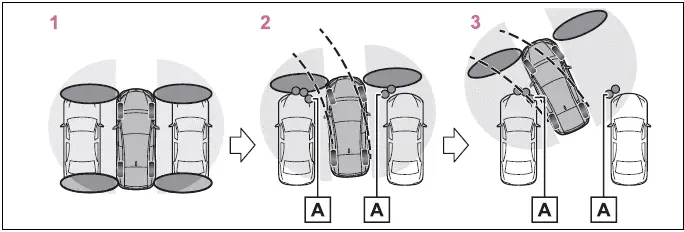
- Object detected by side sensors or side cameras
- The vehicle is stopped and objects along the sides of the vehicle are not detected.
- Objects are detected as the vehicle is moving.
- Even though the objects are outside of the detection area of the side sensors or side cameras, a warning is displayed and a buzzer sounds.
The intuitive parking assist object warning function is operational when
- The vehicle moves about 23.0 ft.(7 m) after the hybrid system is started.
- The R shift position is selected.
- After the shift position has been changed from R to D, the vehicle has moved approximately 23.0 ft.(7 m) or less
 switch has been pressed and the Multimedia Display is displayed.
- The front or rear sensor detects a stationary object.
Detection of objects along the sides of the vehicle
- Objects along the sides of the vehicle are not instantaneously detected. The location of objects in relation to the vehicle is estimated after they are first detected by the front or rear side sensors, or side cameras. Therefore, after the power switch is changed to ON, even if an object is along the side of the vehicle, it may not be detected until the vehicle has been driven a small amount and the side sensors or side cameras completely scan the areas along the sides of the vehicle.
- If a vehicle, person, animal, etc., is detected by a side sensors or side cameras, but then leaves the detection area of the side sensors or side cameras, the system will assume the object has not moved.
WARNING
Side sensors and side cameras
In situations such as the following, the function may not operate correctly, possibly leading to an accident.
Proceed carefully.
- When starting off shortly after the power switch is turned to ON and a small vehicle or other object which cannot be detected by a front side sensor is next to the vehicle.
In the situation shown in the following illustration, even if the vehicle starts off, the vehicle on the left will not be detected and the object warning function will not operate.
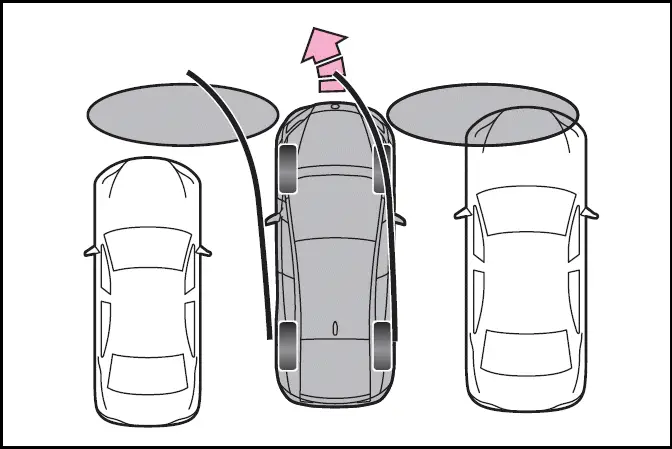
- When an object or person is in a position which cannot be detected by the side sensors or side cameras.
- When, after the side sensors have completed scanning the areas along the sides of the vehicle, a vehicle, person, or other object approaches the side of the vehicle and cannot be detected.
- When the outside rear view mirror is closed, the side sensors or side cameras cannot detect objects.
- If the 12-volt battery was discharged or has been removed and installed, fold and extend the outside rear view mirrors