Opening, closing the windows
Power windows
Opening and closing the power windows
The power windows in your 2024 Toyota Prius can be operated using the window switches located on the door panels. To open a window, press the switch in the appropriate direction: up to close and down to open. Each window typically has its own switch, allowing individual control for all passengers. This convenience feature allows for quick and effortless adjustment of window positions to regulate airflow and maintain comfort inside the vehicle. Always ensure that passengers are aware of and able to operate the window switches for their respective seats to enhance convenience and safety while driving or when parked.
Operating the switch moves the side windows as follows:
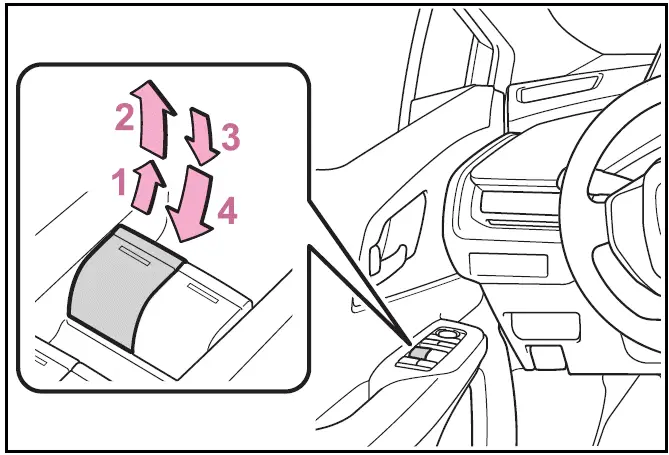
- Closing
- One-touch closing*
- Opening
- One-touch opening*
*: To stop the side window partway, operate the switch in the opposite direction.
The power windows can be operated when
The power switch is in ON.
Operating the power windows after turning the hybrid system off
The power windows can be operated for approximately 45 seconds even after the power switch is turned to ACC or OFF. They cannot, however, be operated once either front door is opened.
Jam protection function
If an object becomes jammed between the side window and the window frame while the side window is closing, side window movement is stopped and the side window is opened slightly.
Catch protection function
If an object becomes caught between the door and side window while the side window is opening, side window movement is stopped.
When the power window cannot be opened or closed
If the jam protection or catch protection functions unexpectedly prevent the side window from operating properly, follow these steps using the power window switch on that particular door.
- Stop the vehicle. With the power switch in ON, within 4 seconds of the jam protection function or catch protection function activating, continuously operate the power window switch in the onetouch closing direction or onetouch opening direction so that the side window can be opened and closed.
- If the side window cannot be opened and closed even when performing the above operations, perform the following procedure for function initialization.
- Turn the power switch to ON.
- Pull and hold the power window switch in the one-touch closing direction and completely close the side window.
- Release the power window switch for a moment, resume pulling the switch in the onetouch closing direction, and hold it there for approximately 6 seconds or more.
- Press and hold the power window switch in the one-touch opening direction. After the side window is completely opened, continue holding the switch for an additional 1 second or more.
- Release the power window switch for a moment, resume pushing the switch in the onetouch opening direction, and hold it there for approximately 4 seconds or more.
- Pull and hold the power window switch in the one-touch closing direction again. After the side window is completely closed, continue holding the switch for a further 1 second or more.
If you release the switch while the side window is moving, start again from the beginning.
If the side window reverses and cannot be fully closed or opened, have the vehicle inspected by your Toyota dealer.
Door lock linked power window operation
- The power windows can be opened and closed using the mechanical key.*
- The power windows can be opened using the wireless remote control.*
*: These settings must be customized at your Toyota dealer.
Power window open reminder function
A message is shown on the multiinformation display when the power switch is turned to OFF and the driver's door is opened with the power windows open.
Customization
Settings (e.g. linked door lock operation) can be changed. (Customizable features
WARNING
Observe the following precautions.
Failing to do so may result in death or serious injury.
Closing the power windows
- The driver is responsible for all the power window operations, including the operation for the passengers. In order to prevent accidental operation, especially by a child, do not let a child operate the power windows. It is possible for children and other passengers to have body parts caught in the power window.
Also, when riding with a child, it is recommended to use the window lock switch
- Check to make sure that all passengers do not have any part of their body in a position where it could be caught when a power window is being operated.
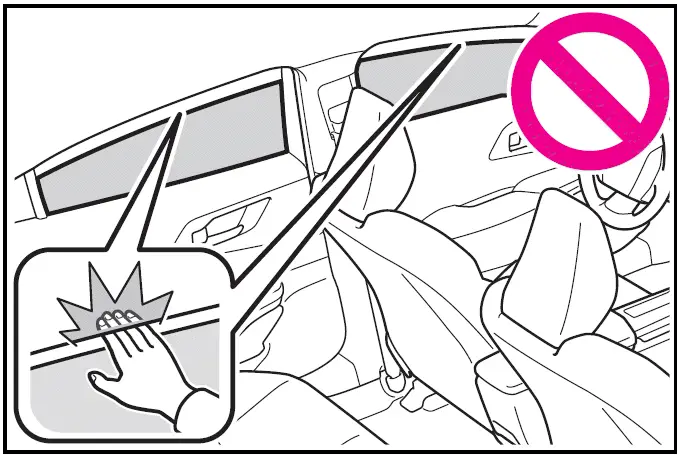
- When using the wireless remote control or mechanical key and operating the power windows, operate the power window after checking to make sure that there is no possibility of any passenger having any of their body parts caught in the side window. Also, do not let a child operate the power window by the wireless remote control or mechanical key. It is possible for children and other passengers to get caught in the power window.
- When exiting the vehicle, turn the power switch to OFF, carry the key and exit the vehicle along with the child. There may be accidental operation, due to mischief, etc., that may possibly lead to an accident.
WARNING
Jam protection function
- Never use any part of your body to intentionally activate the jam protection function.
- The jam protection function may not work if something gets jammed just before the side window is fully closed. Be careful not to get any part of your body jammed in the side window.
Catch protection function
- Never use any part of your body or clothing to intentionally activate the catch protection function.
- The catch protection function may not work if something gets caught just before the side window is fully opened. Be careful not to get any part of your body or clothing caught in the side window.
Preventing accidental operation (window lock switch)
The window lock switch in the 2024 Toyota Prius helps prevent unintended operation of passenger windows, ensuring children cannot accidentally open or close them. This safety feature is particularly useful for maintaining control over the vehicle's windows, enhancing peace of mind and safety while driving with young passengers.
Press the switch.
The indicator  will come on and the passenger windows will be locked.
The passenger windows can still be opened and closed using the driver's switch even if the lock switch is on.
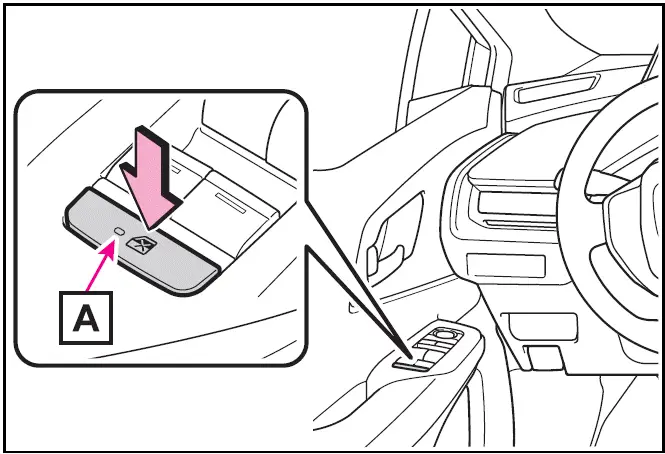
The window lock switch can be operated when
The power switch is in ON.
When the 12-volt battery is disconnected
The window lock switch is disabled.
If necessary, press the window lock switch after reconnecting the 12-volt battery.