PKSB (Parking Support Brake)
The 2024 Toyota Prius includes the Parking Support Brake (PKSB) system, an advanced safety feature designed to assist drivers during parking maneuvers. PKSB helps prevent potential collisions by detecting obstacles in front of or behind the vehicle and applying the brakes automatically if a potential collision is detected. This system uses sensors to monitor the surroundings and can intervene if it senses an impending collision with a stationary object or a vehicle approaching from the side.
The PKSB system enhances the overall safety and convenience of the Prius, making it easier to park in tight spaces and reducing the likelihood of parking-related accidents. This feature is part of Toyota's commitment to incorporating advanced safety technologies in their vehicles to protect both drivers and pedestrians.
- PKSB (Parking Support Brake) system
- Enabling/Disabling the Parking Support Brake
- System overview
PKSB (Parking Support Brake) system
The PKSB (Parking Support Brake) is a system that issues warnings and automatically performs braking to help reduce collision damage with operation targets that were detected when traveling at a low speed such as when parking.
This system consists of the following functions: a Parking Support Brake function (static objects to the front and rear) that detects static objects such as walls, a Parking Support Brake function (rear-crossing vehicles)* that detects vehicles approaching from the rear while backing up, a Parking Support Brake function (rear pedestrians)* that detects pedestrians behind the vehicle, and a Parking Support Brake function (static objects around the vehicle) (vehicles with Advanced Park) that detects static objects around the vehicle.
PKSB (Parking Support Brake) system
The system has detected the following as operation targets.
(The operation targets vary depending on the function.)
- Parking Support Brake function (static objects to the front and rear)
- Parking Support Brake function (rear-crossing vehicles) (if equipped)
- Parking Support Brake function (rear pedestrians) (if equipped)
- Parking Support Brake function (static objects around the vehicle) (vehicles with Advanced Park)
WARNING
Cautions regarding the use of the system
Do not overly rely on the system, as doing so may lead to an accident.
Always drive while checking the safety of the surroundings of the vehicle.
Depending on the vehicle and road conditions, weather, etc., the system may not operate.
The detection capabilities of sensors and radars are limited.
Always drive while checking the safety of the surroundings of the vehicle.
- The driver is solely responsible for safe driving. Always drive carefully, taking care to observe your surroundings. The Parking Support Brake system is designed to provide support to lessen the severity of collisions.
However, it may not operate in some situations.
- The Parking Support Brake system is not designed to stop the vehicle completely. Additionally, even if the system has stopped the vehicle, it is necessary to depress the brake pedal immediately as brake control will be canceled after approximately 2 seconds.
- It is extremely dangerous to check the system operations by intentionally driving the vehicle into the direction of a wall, etc.
Never attempt such actions.
When to disable the Parking Support Brake
In the following situations, disable the Parking Support Brake as the system may operate even though there is no possibility of a collision.
WARNING
- When inspecting the vehicle using a chassis roller, chassis dynamo or free roller
- When loading the vehicle onto a boat, truck or other transport vessel
- If the suspension has been modified or tires of a size other than specified are installed
- If the front of the vehicle is raised or lowered due to the carried load
- When equipment that may obstruct a sensor is installed, such as a towing eyelet, transport hook, bumper protector (an additional trim strip, etc.), bicycle carrier, or snow plow
- When using automatic car washing devices
- If the vehicle cannot be driven in a stable manner, such as when the vehicle has been in an accident or is malfunctioning
- When the vehicle is driven in a sporty manner or off-road
- When the tires are not properly inflated
- When the tires are very worn
- When tire chains, a compact spare tire or an emergency tire puncture repair kit are used.
- When towing with the vehicle
Precautions for the suspension
Do not modify the suspension of the vehicle. If the height or tilt of the vehicle is changed, the sensors may not be able to detect detectable objects and the system may not operate correctly, possibly leading to an accident.
NOTICE
If "System Stopped See Owner's Manual" is displayed on the multi-information display and the driving assist information indicator is illuminated
If this message is displayed immediately after the power switch is changed to ON, operate the vehicle carefully, paying attention to your surroundings. It may be necessary to drive the vehicle for a certain amount of time before the system returns to normal.
(If the system is not return to normal after driving for a while, clean the sensor or rear camera lens.)
Enabling/Disabling the Parking Support Brake
All of the Parking Support Brake functions (static objects to the front and rear, rear-crossing vehicles [if equipped], rear pedestrians [if equipped], and static objects around the vehicle [vehicles with Advanced Park]) are enabled/disabled simultaneously.
The Parking Support Brake function can be enabled/disabled on  of the multi-information display.
When the PKSB (Parking Support Brake) is disabled, the driving assist information indicator illuminates, and a message is displayed on the multi-information display.
If the system switches to OFF (disabled) and the PKSB (Parking Support Brake) is stopped, the PKSB (Parking Support Brake) will not be re-enabled until ON (enabled) is selected again on the multi-information display and the system operates.
If the system is disabled, it will remain off even if the power switch is turned to ON after the power switch has been turned to OFF.
Display and buzzer for hybrid system output restriction control and brake control
If the hybrid system output restriction control or brake control operates, a buzzer will sound and a message will be displayed on the Multimedia Display and multi-information display, to alert the driver.
Depending on the situation, hybrid system output restriction control will operate to either limit acceleration or restrict output as much as possible.
- Hybrid system output restriction control is operating (acceleration restriction)
Acceleration greater than a certain amount is restricted by the system.
Multimedia Display (vehicles with panoramic view monitor): No warning displayed Multi-information display: "Object Detected Acceleration Reduced" Driving assist information indicator: Not illuminated
Buzzer: Does not sound
- Hybrid system output restriction control is operating (output restricted as much as possible)
The system has determined that stronger-than-normal brake operation is necessary.
Multimedia Display (vehicles with panoramic view monitor): "BRAKE!" Multi-information display: "BRAKE!" Driving assist information indicator: Not illuminated
Buzzer: Short beep
- Brake control is operating
The system determined that emergency braking is necessary.
Multimedia Display (vehicles with panoramic view monitor): "BRAKE!" Multi-information display: "BRAKE!" Driving assist information indicator: Not illuminated
Buzzer: Short beep
- Vehicle stopped by system operation
The vehicle has been stopped by brake control operation.
Multimedia Display (vehicles with panoramic view monitor): "Press Brake Pedal"
Multi-information display: "Accelerator Pedal is Pressed Press Brake Pedal" (If the accelerator pedal is not depressed, "Press Brake Pedal" will be displayed.) Driving assist information indicator: Illuminated
Buzzer: Sounds repeatedly
System overview
If the Parking Support Brake determines that a collision with a detected object or pedestrian (if equipped) is possible, the hybrid system output will be restricted to restrain any increase in the vehicle speed. (Hybrid system output restriction control: See figure 2.) Additionally, if the accelerator pedal continues to be depressed, the brakes will be applied automatically to reduce the vehicle speed. (Brake control: See figure 3.)
- Figure 1: When the PKSB (Parking Support Brake) is not operating

- Hybrid system output
- Braking force
- Time
- Figure 2: When hybrid system output restriction control operates
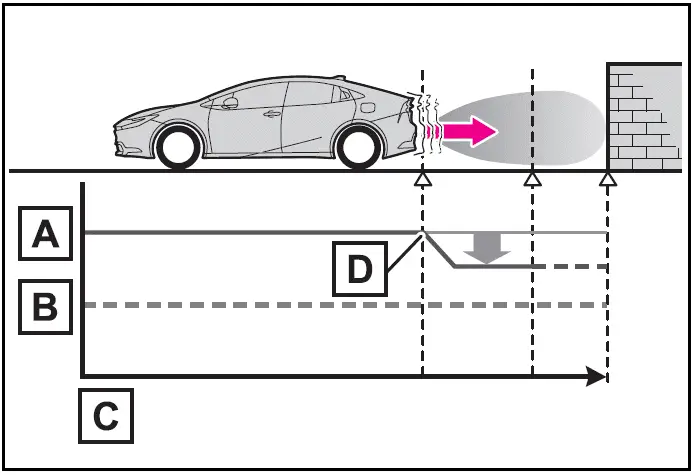
- Hybrid system output
- Braking force
- Time
- Hybrid system output restriction control begins operating (System determines that possibility of collision with detected object is high)
- Figure 3: When hybrid system output restriction control and brake control operates

- Hybrid system output
- Braking force
- Time
- Hybrid system output restriction control begins operating (System determines that possibility of collision with detected object is high)
- Brake control begins operating (System determines that possibility of collision with detected object is extremely high)
If the Parking Support Brake has operated
If the vehicle is stopped due to operation of the Parking Support Brake, the Parking Support Brake will be disabled and the driving assist information indicator will illuminate. In addition, even when the PKSB (Parking Support Brake) operates, the brake control is canceled after approximately 2 seconds to start off.
Furthermore, the brake control also can be canceled by depressing the brake pedal. Depressing the accelerator pedal again after that allows the vehicle to start off.
Re-enabling the Parking Support Brake
To re-enable the Parking Support Brake when it is disabled due to operation of the PKSB (Parking Support Brake), either enable the system again, or turn the power switch off and then back to ON.
Additionally, if any of the following conditions are met, the system will be re-enabled automatically and the driving assist information indicator will turn off
- The P shift position is selected
- Drive with no operation targets in the traveling direction of the vehicle
- Change the traveling direction of the vehicle
Buzzer
Regardless of whether the intuitive parking assist is enabled or not , if the PKSB (Parking Support Brake) system is enabled , the buzzer will sound to notify the driver of the approximate distance to the object when the brake control and the hybrid system output restriction control are operated.