Operating the personal lights
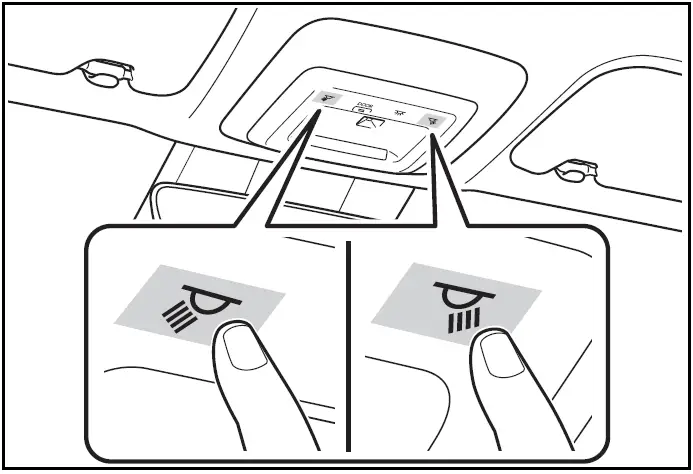
Turning the front personal lights on/off
Touch the switch.
Each time the switch is touched, the front personal light turns on/off.
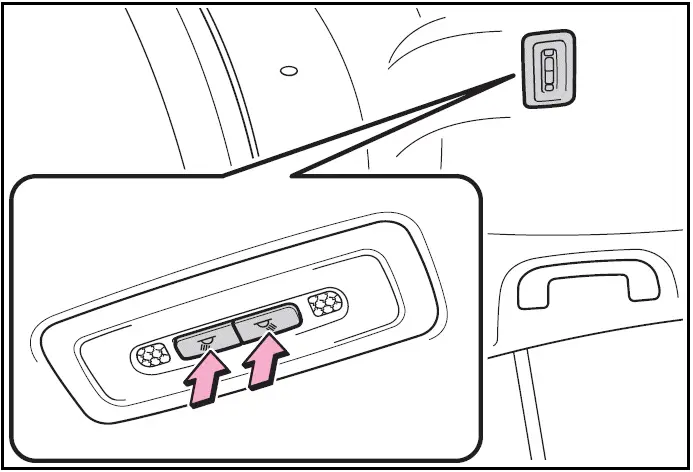
Turning the rear personal lights on/off
Press the switch.
Each time the switch is pressed, the rear personal light turns on/off.
If the light is turned on by the interior lights, the rear personal light cannot turn off by pressing the switch.
When front personal light switch does not respond as normal
- When water, dirt, etc., have adhered to the switch surface
- When operated with a wet hand
- When wearing gloves, etc.
Illumination notification (if equipped)
Under the following conditions, the instrument panel ornament lights blink 2 times to notify the driver.
Preceding vehicle start notification
Notifies when the preceding vehicle starts off or accelerates while stopped behind the preceding vehicle.
This function may also operate while driving at extremely slow speeds immediately before stopping the vehicle.
PDA (Proactive Driving Assist) Obstacle Anticipation Assist linked notifications
Notifies when PDA (Proactive Driving Assist) Obstacle Anticipation Assist has detected an operation target.
Operation description of illumination notification
- PDA (Proactive Driving Assist) Obstacle Anticipation Assist linked notifications do not operate when PDA (Proactive Driving Assist) Obstacle Anticipation Assist is disabled through a customize setting
- When the preceding vehicle is close in distance from the vehicle while stopped, the timing for notifying that the preceding vehicle has started off may be delayed.
- This function does not operate when the front camera or front radar sensor does not operate properly such as during bad weather.
Customization
Settings can be changed to enabled and disabled illumination notifications.