Power (ignition) switch
- Starting the hybrid system
- Stopping the hybrid system
- Changing power switch modes
Starting the hybrid system
Starting the hybrid system in the 2024 Toyota Prius involves a few straightforward steps. Ensure the electronic key or smart key is inside the vehicle. Press the brake pedal and then press the power switch located typically on the dashboard. This action activates the hybrid system, initializing the vehicle for driving. The system seamlessly integrates the gasoline engine and electric motor to optimize fuel efficiency and reduce emissions during operation.
Performing the following operations when carrying the electronic key on your person starts the hybrid system or changes power switch modes.
- Pull the parking brake switch to check that the parking brake is set
The parking brake indicator will come on.
- Firmly depress the brake pedal.
 and a message will be displayed on the multi-information display.
If it is not displayed, the hybrid system cannot be started.
When the shift position is N, the hybrid system cannot start. Shift the shift position to P when starting the hybrid system.
- Press the power switch shortly and firmly.
When operating the power switch, one short, firm press is enough. It is not necessary to press and hold the switch.
If the "READY" indicator turns on, the hybrid system will operate normally.
Continue depressing the brake pedal until the "READY" indicator is illuminated.
The hybrid system can be started from any power switch mode.
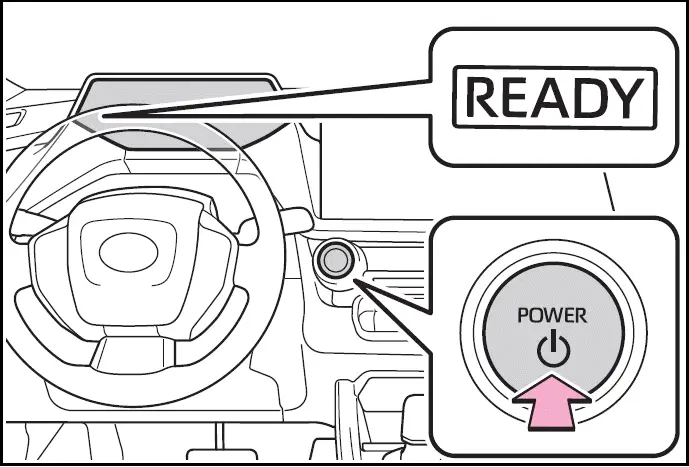
- Check that the "READY" indicator is illuminated.
The vehicle cannot be driven if the "READY" indicator is off.
Power switch illumination
According to the situation, the power switch illumination operates as follows.
- When driver's door or front passenger's door is opened, the power switch illumination illuminates.
- When the power switch is in OFF and depressing the brake pedal with carrying the electronic key on your person, the power switch illumination blinks.
- When the power switch is in ACC or ON, the power switch illumination illuminates.
- When the power switch mode is changed from ACC or ON to OFF, the power switch illumination illuminates for a certain amount of time. Afterwards, the power switch illumination turns off.
If the hybrid system does not start in Toyota Prius
If you encounter issues with starting the hybrid system in your 2024 Toyota Prius, several factors could be at play. First, ensure that the immobilizer system is properly deactivated, as this can prevent the hybrid system from starting. If the issue persists, it's recommended to contact your Toyota dealer for assistance.
If there's a specific message related to startup displayed on the multi-information display, carefully read the message and follow any provided instructions to troubleshoot further.
If you've unlocked the door using the mechanical key, you may need to start the hybrid system using the physical power switch inside the vehicle, rather than relying on the smart key system. However, if the electronic key is inside the vehicle and the doors are locked, you should be able to start the hybrid system as usual. For detailed guidance, refer to the vehicle's manual or consult your Toyota dealer for support.
When the ambient temperature is low, such as during winter driving conditions
- When starting the hybrid system, the flashing time of the "READY" indicator may be long. Leave the vehicle as it is until the "READY" indicator is steady on, as steady means the vehicle is able to move.
- When the hybrid battery (traction battery) is extremely cold (below approximately -22ºF [-30ºC]) under the influence of the outside temperature, it may not be possible to start the hybrid system. In this case, try to start the hybrid system again after the temperature of the hybrid battery increases due to the outside temperature increase etc.
Sounds and vibrations specific to a Hybrid Electric Vehicle
If the 12-volt battery is discharged
The hybrid system cannot be started using the smart key system.
Refer to P.508 to restart the hybrid system.
- Electronic key battery depletion
- Conditions affecting operation
- Note for the entry function
- If "Smart Key System Malfunction See Owner's Manual" is displayed on the multi-information display
The system may be malfunctioning.
Have the vehicle inspected by your Toyota dealer immediately.
- If the "READY" indicator does not come on
In the event that the "READY" indicator does not come on even after performing the proper procedures for starting the vehicle, contact your Toyota dealer immediately.
When "Check Fuel Cap" is displayed on the multi-information display
If the hybrid system is malfunctioning
Electronic key battery
Operation of the power switch
- If the switch is not pressed shortly and firmly, the power switch mode may not change or the hybrid system may not start.
- If attempting to restart the hybrid system immediately after turning the power switch to OFF, the hybrid system may not start in some cases. After turning the power switch to OFF, please wait a few seconds before restarting the hybrid system.
Customization
If the smart key system has been deactivated in a customized setting
WARNING
When starting the hybrid system
Always start the hybrid system while sitting in the driver's seat.
Do not depress the accelerator pedal while starting the hybrid system under any circumstances.
Doing so may cause an accident resulting in death or serious injury.
NOTICE
When starting the hybrid system
If the hybrid system becomes difficult to start, have your vehicle checked by your Toyota dealer immediately.
Symptoms indicating a malfunction with the power switch
If the power switch seems to be operating somewhat differently than usual, such as the switch sticking slightly, there may be a malfunction. Contact your Toyota dealer immediately.
Stopping the hybrid system
- Stop the vehicle completely.
- If the parking brake is in manual mode, set the parking brake.
- Press the P position switch.
Check that the shift position indicator shows P and the parking brake indicator is illuminated.
- Press the power switch.
The hybrid system will stop, and the meter display will be extinguished (the shift position indicator will be extinguished a few seconds after the meter display).
- Release the brake pedal and check that "ACCESSORY" or "POWER ON" is not shown on the meter.
When the shift control system malfunctions
If the shift control system is malfunctioning, when attempting to turn the power switch off, it may not be able to be turned off. In this situation, it may be possible to turn the power switch off by applying the parking brake and then operating the power switch.
If there is a malfunction in the system, have the vehicle inspected by your Toyota dealer immediately.
Automatic hybrid system shut off feature
- The vehicle is equipped with a feature that automatically shuts off the hybrid system when the shift position is in P with the hybrid system operating for an extended period.
- The hybrid system will automatically shut off after approximately 1 hour if it has been left operating while the shift position is in P.
- The timer for the automatic hybrid system shut off feature will reset if the brake pedal is depressed or if the shift position is in a position other than P.
- After the vehicle is parked, if the door is locked with the door lock switch from the inside or the mechanical key from the outside, the automatic hybrid system shut off feature will be disabled. The timer for the automatic hybrid system shut off feature will be re-enabled if the driver's door is opened.
WARNING
Stopping the hybrid system in an emergency
- If you want to stop the hybrid system in an emergency while driving the vehicle, press and hold the power switch for more than 2 seconds, or press it briefly 3 times or more in succession.
However, do not touch the power switch while driving except in an emergency. Turning the hybrid system off while driving will not cause loss of steering or braking control.
However, power assist for the steering wheel may be lost making it difficult to steer smoothly before stopping the vehicle depending on the remaining charge in the 12-volt battery or usage conditions. In this situation, you should pull over and stop the vehicle as soon as it is safe to do so.
- If the power switch is operated while the vehicle is running, a warning message will be shown on the multi-information display and a buzzer sounds.
- When restarting the hybrid system after an emergency shutdown, shift the shift position to N and press the power switch shortly and firmly
When parking
Exhaust gases include harmful carbon monoxide (CO), which is colorless and odorless. Observe the following precautions.
Failure to do so may cause exhaust gases to enter the vehicle and may lead to an accident caused by light-headedness, or may lead to death or a serious health hazard.
- If the vehicle is in a poorly ventilated area or a closed area, such as a garage, stop the hybrid system.
- Do not leave the vehicle with the hybrid system operating for a long time. If such a situation cannot be avoided, park the vehicle in an open space and ensure that exhaust fumes do not enter the vehicle interior.
- Do not leave the hybrid system operating in an area with snow build-up, or where it is snowing.
If snowbanks build up around the vehicle while the hybrid system is operating, exhaust gases may collect and enter the vehicle.
Changing power switch modes
Changing the power switch modes in the 2024 Toyota Prius is straightforward. With the brake pedal released, you can switch between different modes by pressing the power switch. Each press of the switch toggles through the available modes, allowing you to select the desired mode for driving or parking. This feature provides flexibility depending on your driving needs, whether it's starting the vehicle, engaging different power settings, or shutting down the system after use. Always ensure the vehicle is stationary and in a safe location before adjusting the power switch modes.
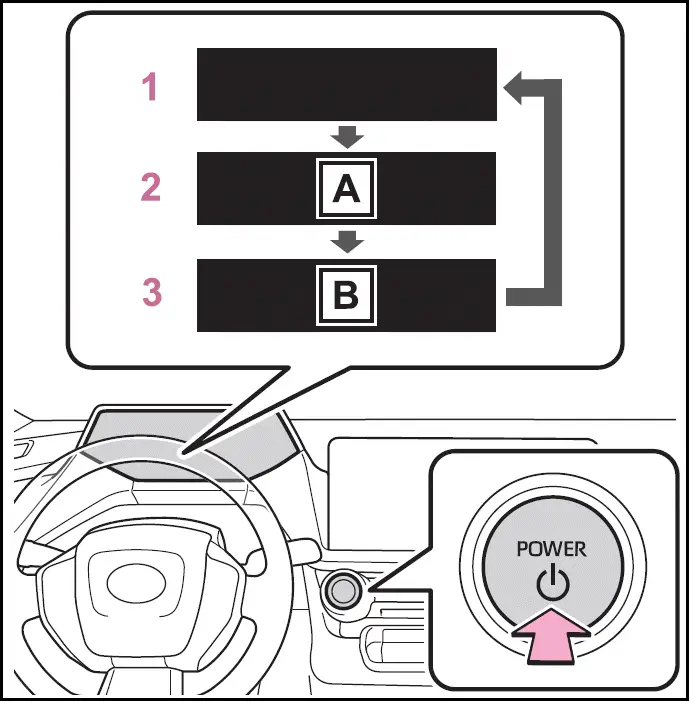
- "ACCESSORY"
- "POWER ON"
- OFF
The emergency flashers can be used.
- ACC*
Some electrical components such as the audio system can be used.
"ACCESSORY" will be displayed on the meter.
- ON
All electrical components can be used.
"POWER ON" will be displayed on the meter.
*: ACC mode can be enabled/disabled on the customize menu
When ACC customization is in off
- With the power switch is turned off, the multimedia system can still be used for a certain time until the battery saving function starts operating.
- When the safe exit assist is operating, a buzzer will sound and a voice guidance will be given. (vehicles with safe exit assist)
Auto power off function
- If the vehicle is left in ACC or ON (the hybrid system is not operating) for more than 20 minutes with the shift position in P, the power switch will automatically turn to OFF.
- If the 12-volt battery is low with the shift position is in P and the power switch is in ACC or ON (the hybrid system is not operating), a buzzer sounds and a message will be displayed on the multi-information display. If this continues, the power switch is automatically turn to OFF.
However, this function cannot entirely prevent the 12-volt battery discharge. Do not leave the vehicle with the power switch in ACC or ON for long periods of time when the hybrid system is not operating.
NOTICE
To prevent 12-volt battery discharge
- Do not leave the power switch in ACC or ON for long periods of time without the hybrid system on.
- If "ACCESSORY" or "POWER ON" is displayed on the meter, the power switch is not in OFF.
Exit the vehicle after turning the power switch to OFF.