Keys
In the articls, you will find comprehensive information about keys, including details on replacing a dead battery and other useful instructions related to key maintenance and operation. This section provides valuable guidance on how to ensure the proper functioning of your electronic key, addressing key-related issues and offering tips for optimal usage. It serves as a resourceful guide to help Prius owners effectively manage their vehicle's key system and maintain convenience and security in everyday use.
- Key types
- Wireless remote control
Key types
The following keys are provided with the vehicle.
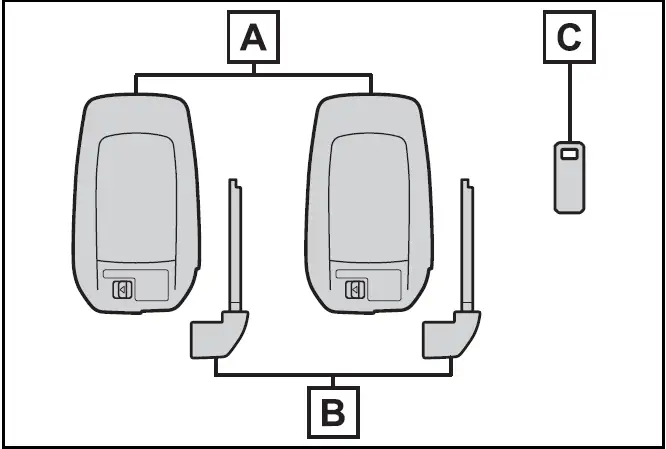
- Electronic keys
- Operating the smart key system
- Operating the wireless remote control function
- Mechanical keys
- Key number plate
When riding in an aircraft
When bringing a Toyota Prius electronic key onto an aircraft, ensure no buttons are pressed while in the cabin. Store the key securely to prevent accidental button activation, as pressing a button could emit radio waves that may interfere with aircraft operation. Taking these precautions helps maintain safety and prevents potential disruptions during the flight.
Toyota Prius Electronic key battery depletion
When the electronic key battery in the Toyota Prius becomes depleted, it can affect key functions such as remote locking, unlocking, and starting the vehicle. To address this, Toyota recommends replacing the battery with a new one as soon as possible. This ensures continued reliability of the electronic key's operations, preventing potential inconvenience or disruption in accessing and using the Prius. Regularly checking and replacing the electronic key battery when necessary helps maintain seamless functionality and driver convenience.
- The standard battery life is 1 to 2 years.
- If the battery becomes low, an alarm will sound in the cabin and a message will be displayed on the multi-information display when the hybrid system stops.
- To reduce key battery depletion when the electronic key is to not be used for long periods of time, set the electronic key to the battery- saving mode
- As the electronic key always receives radio waves, the battery will become depleted even if the electronic key is not used. The following symptoms indicate that the electronic key battery may be depleted. Replace the battery when necessary.
- The smart key system or the wireless remote control does not operate.
- The detection area becomes smaller.
- The LED indicator on the key surface does not turn on.
While it is possible to replace the battery yourself in the Toyota Prius electronic key, Toyota recommends having it done by a Toyota dealer to avoid the risk of damaging the key. Dealers are equipped with the proper tools and expertise to safely replace the battery without compromising the electronic key's functionality or integrity. This approach ensures that the replacement is performed correctly, maintaining the key's reliability and avoiding potential issues that could arise from improper handling.
- To avoid serious deterioration, do not leave the electronic key within 3 ft. (1 m) of the following electrical appliances that produce a magnetic field:
- TVs
- Personal computers
- Cellular phones, cordless phones and battery chargers
- Table lamps
- Induction cookers
- If the electronic key is near the vehicle for longer than necessary, even if the smart key system is not operated, the key battery may become depleted faster than normal.
When not operating the smart key system, it is recommended to not stay with the electronic key near the vehicle longer than necessary.
If a message regarding the state of the electronic key or power switch mode, etc. is shown
To prevent situations where the electronic key may be inadvertently trapped inside the vehicle or removed unintentionally by other passengers, the Toyota Prius displays a message on the multi-information display. This message prompts the user to confirm the status of the electronic key and the power switch mode before exiting the vehicle. This proactive alert helps drivers ensure that the key is in their possession and that the vehicle is securely locked or powered off, preventing potential issues with key retrieval or vehicle security.
In those cases, follow the instructions on the display immediately.
If "Key Battery Low Replace Key Battery" is displayed on the multi-information display
The electronic key has a low battery.
Replace the electronic key battery.
Replacing the battery
Confirmation of the registered key number
The number of keys already registered to the vehicle can be confirmed.
Ask your Toyota dealer for details.
If "A New Key has been Registered Contact Your Dealer for Details" is displayed on the multi-information display
This message will be displayed each time the driver's door is opened when the doors are unlocked from the outside for approximately 10 days after a new electronic key has been registered.
If this message is displayed but you have not had a new electronic key registered, ask your Toyota dealer to check if an unknown electronic key (other than those in your possession) has been registered.
NOTICE
To prevent key damage
- Do not drop the keys, subject them to strong shocks or bend them.
- Do not expose the keys to high temperatures for long periods of time.
- Do not get the keys wet or wash them in an ultrasonic washer, etc.
- Do not attach metallic or magnetic materials to the keys or place the keys close to such materials.
- Do not disassemble the keys.
- Do not attach a sticker or anything else to the surface of the electronic key.
- Do not place the keys near objects that produce magnetic fields, such as TVs, audio systems and induction cookers.
- Do not place the keys near medical electrical equipment such as low-frequency therapy equipment or microwave therapy equipment, and do not receive medical attention with the keys on your person.
Carrying the electronic key on your person
Carry the electronic key 3.9 in.
(10 cm) or more away from electric appliances that are turned on.
Radio waves emitted from electric appliances within 3.9 in. (10 cm) of the electronic key may interfere with the key, causing the key to not function properly.
In case of a smart key system malfunction or other keyrelated problems
When an electronic key is lost
Wireless remote control
In the 2024 Toyota Prius, the wireless remote control refers to the electronic key fob used for keyless entry and vehicle operation. This device allows drivers to remotely lock and unlock the Prius, activate the panic alarm, and sometimes control other vehicle functions such as remote start. The wireless remote control enhances convenience and security by providing easy access to the vehicle without the need for physical keys. It is an integral part of the Prius' modern keyless entry system, offering drivers seamless interaction with their vehicle from a distance.
The electronic keys are equipped with the following wireless remote control:
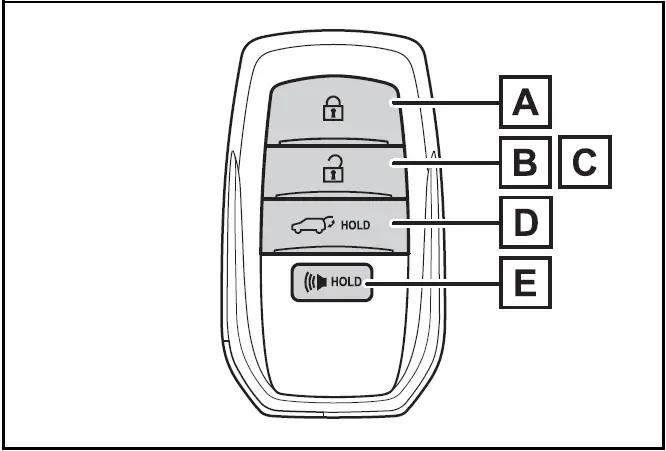
- Locks all the doors
- Unlocks all the doors
- Opens the side windows*
- Opens and closes the power back door (if equipped)
- Sounds the alarm
*: This setting must be customized at your Toyota dealer.
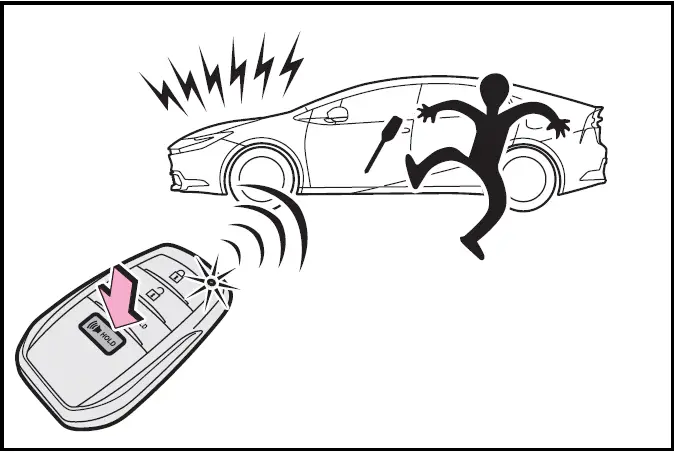
Theft deterrent panic mode
When  is pressed for longer than about 1 second, an alarm will sound intermittently and the vehicle lights will flash to deter any person from trying to break into or damage your vehicle.
To stop the alarm, press any button on the electronic key.
Using the mechanical key
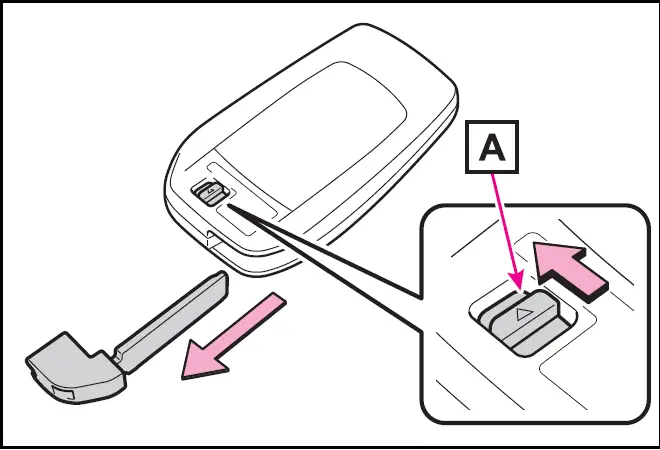
To take out the mechanical key, slide the release lever  and take the key out.
The mechanical key can only be inserted in one direction, as the key only has grooves on one side. If the key cannot be inserted in a lock cylinder, turn it over and re-attempt to insert it.
After using the mechanical key, store it in the electronic key. Carry the mechanical key together with the electronic key. If the electronic key battery is depleted or the entry function does not operate properly, you will need the mechanical key.
If you lose your mechanical keys
If a wrong key is used
The key cylinder rotates freely to isolate inside mechanism.