Display e comandi vocali
Gestione dei messaggi salvati dal display centrale
In questo manuale: Display e comandi vocali
2passaggi
~12min
1/5difficoltà
Completati 0 di 2
Messages saved from the instrument panel and center displays are handled in the center display.
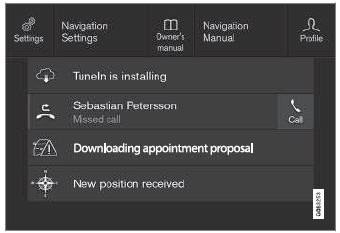
Esempi di messaggi salvati e possibili scelte in alto.
Messages that have been shown in the center display and that need to be saved are stored in the center display's Top view.
Lettura dei messaggi salvati
- Open Top view in the center display.
- Viene visualizzato l'elenco dei messaggi salvati. I messaggi con una freccia a destra possono essere espansi.
- Tap a message to expand/minimize it.
- More information about the message will appear in the list and the image to the left of the app will display information about the message in graphic form.
Gestione dei messaggi salvati
Alcuni messaggi hanno un pulsante, ad esempio per attivare/disattivare una funzione relativa al messaggio.
- Premere il pulsante per eseguire l'azione.
Saved messages in Top view are automatically deleted when the ignition is switched off.
Mettiti alla prova
Un breve quiz sulla Volvo XC90: ogni risposta ha una spiegazione e un link alla pagina del manuale.
Questa pagina ti è stata utile?